
Category: Website Management

  • Why Structure Uses WordPress CMS for Website Development

    Why Structure Uses WordPress CMS for Website Development

    One of the first questions we get during a Consult Call is, “Which website platform should we use, WordPress?”

    Our clients often suggest using WordPress alongside other platforms like Shopify, Squarespace, or HubSpot. But they almost always suggest WordPress because it’s the most popular Content Management System (CMS).

    There’s a reason The New York Times, Forbes, eBay, The Walt Disney Company, and Best Buy (among others) are powered by WordPress.

    However, when planning a website revamp, many decisions can feel crushing. An abundance of free resources is available to assist you with optimizing your site’s design and copywriting. However, choosing a suitable CMS can still be a tough decision.

    At Structure, we specialize in designing and developing custom WordPress websites. That’s the bulk of what we do. We also help our clients with web strategy, website management, and digital marketing. But most projects start with a custom WordPress website.

    Why a Custom WordPress Website is Valuable

    Most marketing starts with a custom WordPress website or landing page. This is because your website is at the heart of all your marketing efforts—digital and traditional.

    In our free webinar How to Build an Attractive, High-Converting Website That Makes You Proud, we discuss your website as a flywheel. Let me explain.
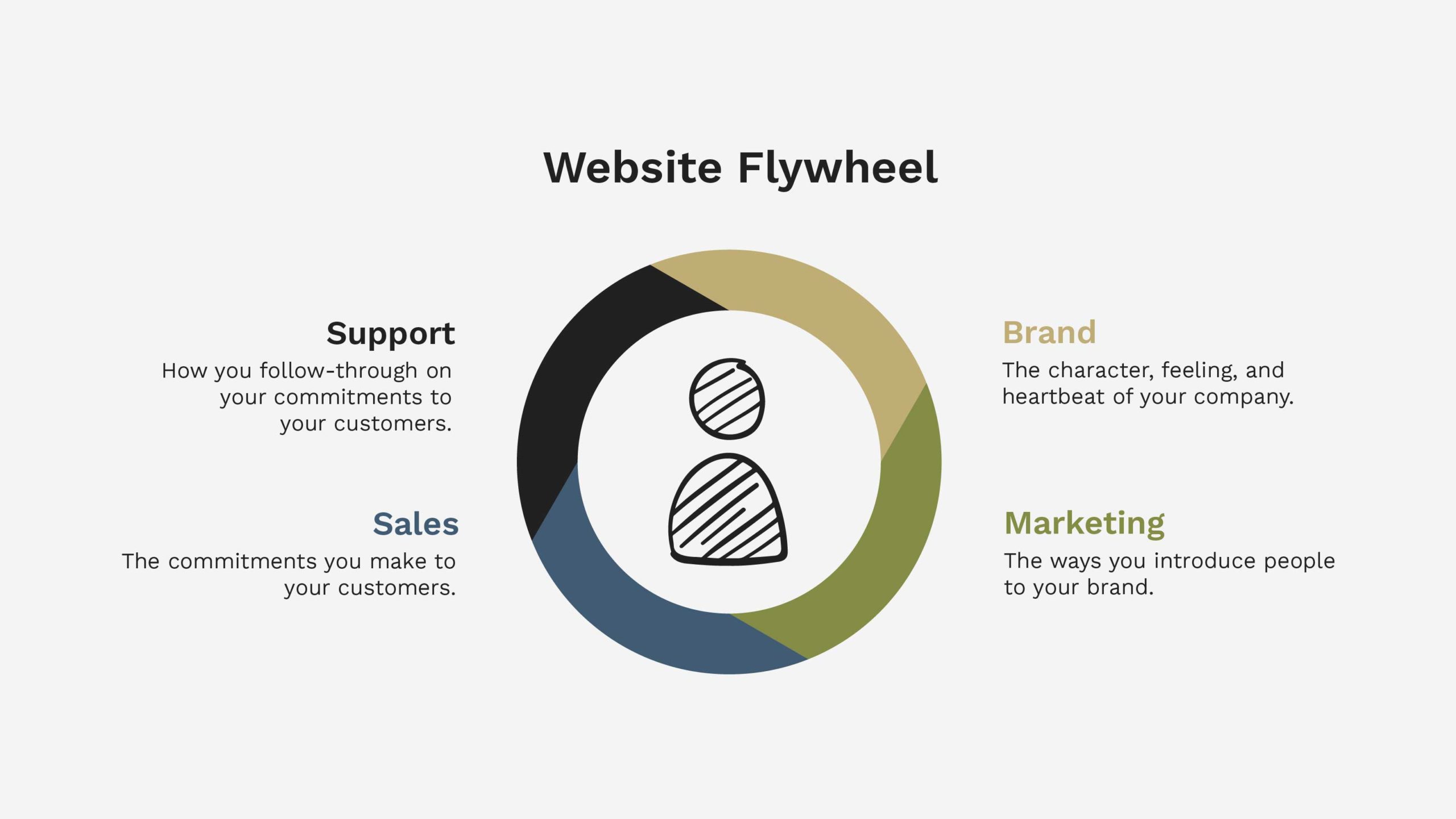
    Website Flywheel

    A flywheel is a mechanical device that conserves angular momentum to store rotational energy. That may sound not very easy, but it’s straightforward.

    A flywheel is a circular device used on trains, tractors, trucks, and any large machine with a big job to increase horsepower and create explosive momentum.

    Your website is like a flywheel. It’s intended to create momentum and be a force multiplier for your marketing and business efforts. And when it’s designed and built to accomplish that objective, more often than not, it succeeds!

    The Glaring Problem with Website Builders, Templates, and Themes

    Need help with a Squarespace or Wix website? We can’t help you (other than help you move your website away from them).

    Those website builders (like Wix, Squarespace, Duda, GoDaddy, Weebly, etc.) don’t help you create a flywheel that multiplies force for your business.

    Instead, they help you create a clusterfuck (pardon my French) of a website. It makes you want to throw your laptop out of your office window.

    Those are not my words, by the way. They came from a recent client who desperately needed help migrating his website from Squarespace to WordPress because Squarespace drove him mad!

    Website builders do this by requiring you to start the entire process by picking a template. Then, jumping right into the building without giving the nod to your goals or unique needs as a business. They skip the entire planning process, assuming you did or will never do it.

    Skipping website planning is a fatal mistake.

    WordPress templates or themes readily available have many of the same issues. It can work if you buy a template or theme that fits your plan. It will fail if you pick a template or theme as your plan.

    WordPress Website Facts

    Here are a handful of encouraging facts.

    • WordPress is used by 42.8% of the top 10 million websites
    • There are over 455 Million WordPress websites, accounting for more than 39% of all websites
    • 62% of Inc. 5,000 websites run on WordPress
    • The New York Times, Forbes, eBay, The Walt Disney Company, and Best Buy are powered by WordPress
    • WordPress has been around since May 27, 2003
    • There are over 58,000 plugins (integrations) available for WordPress
    • WordPress is the web’s most widely used CMS (content management system)

    We all know that facts tell and stories sell. So why does Structure use WordPress, and why do we recommend you use it for your project? Here are the reasons.

    Why Structure Uses WordPress (and You Should Use Too)

    1. WordPress is widely adopted

    As you can see from the facts above, WordPress dominates the website market. This means somebody will always be available to help you with troubleshooting or customization needs.

    I frequently mention this assurance to my clients. If an unfortunate event renders Structure unable to continue working with them, they would have no difficulty locating a developer replacement who could work on their WordPress websites.

    For the record, Structure isn’t going anywhere. However, knowing you’re not choosing an obscure platform only specialists can use is peace of mind.

    We recently migrated a client’s website from a platform called Higher Logic to WordPress. The client is so much happier after the transition. I share this story because Higher Logic is one of those obscure platforms. While some use it, it’s highly specialized and requires paying a high-rate developer to make almost any update.

    2. It is easy-to-use

    There’s a myth that WordPress offers a user-friendly interface that does not require coding knowledge or experience. It does provide a user-friendly interface. But we have to be realistic with setting expectations to ensure that we know not everyone understands it.

    “WordPress does not require coding knowledge or experience” is also misleading. It may not require knowing a coding language like CSS or Javascript. But a basic understanding of HTML and development principles will take a long way.

    If you do not have a basic understanding, you will struggle. That’s precisely why folks hire Structure to help. You value the system WordPress offers, but you don’t know how to manage the technical details of the platform yourself.

    You can easily add pages and posts to your site, customize layouts, create menus and links, upload images and videos, and more. This still makes WordPress an excellent choice for small businesses and large teams.

    WordPress has the potential to provide you with a simple-to-navigate backend CMS. Alas, that doesn’t always seem to be the case. I have conversations with numerous customers apprehensive about using WordPress due to their prior negative experiences while trying cumbersome interfaces.

    WordPress Training & Support

    Our website development packages at Structure include an optional 1-hour recorded training and support video call. In this call, we train you to use your website and navigate WordPress. Furthermore, we include two additional support hours within 30 days of launch. That way, you have no reservations about contacting us for questions, big or small.

    Last but not least, our WordPress websites are designed especially for user convenience. Content can easily and quickly be edited or updated with little technical expertise. We accomplish this by using Custom Fields. You can edit copy or media in the back end without breaking your website on the front end.

    3. It is excellent with SEO

    WordPress’s most powerful benefit is its impact on your SEO (Search Engine Optimization). Some powerful plugins like YoastSEO for WordPress and LinkWhisper can significantly enhance how your website is tagged to rank for Google. It also makes it brain-dead simple to optimize your content for search.

    It’s worth noting that SEO is not automatic, and WordPress doesn’t do all the work for you. However, the data structure allows you to input and optimize data without jerry-rigging anything.

    In short, think of WordPress SEO like T-ball. The baseball is just sitting on the tee—you need to hit it. Same thing with SEO on WordPress. It tees you up, and you have a swing if you know how to hit a ball.

    4. WordPress is owned

    This might be one of the most significant selling points of WordPress. It’s what’s called an ‘open source’ platform. It is accessible worldwide, and you don’t have to pay for a license.

    With a WordPress site, you own the code base and don’t have to pay a license fee to anyone to keep your website. You also can modify and change the code as needed.

    That said, you still have to pay for infrastructure costs like domain and website hosting, which often come all-inclusive with other platforms like Squarespace, Shopify, and Wix.

    5. WordPress is secure

    Website security has always been a concern but is becoming increasingly so as time goes on. As the internet becomes more widely adopted, cybercriminals and hackers (that’s what they’re called!) are getting more innovative and savvier, while website managers are getting more relaxed and trusting.

    If you’re worried about the safety and security of your website, you should be at ease because it’s a secure platform as long as you keep it up to date.

    WordPress security vulnerabilities commonly come from outdated plugins and themes, weak passwords, and other preventable issues. So you’ll need to ensure your WordPress Core, Themes, and Plugins are current. We recommend doing this monthly at a minimum. If you’re particularly concerned, weekly updates are sufficient.

    Managing Security Vulnerabilities

    Most of Structure’s clients don’t want to manage their security, let alone update their website monthly and ensure it is still in perfect working condition. We offer WordPress Website Management packages after completing a website project. We find that most of our clients beg for help in this area!

    All Structure WordPress Website Management packages include these features:

    • Plugin and WordPress Core Updates (monthly)
    • Dedicated Account Manager
    • 24-hour Response Time (during the workweek)
    • Detailed Website Report (monthly)
    • Cloud Backups (daily)
    • Advanced Security (Malware Scans, Firewall, Bot & Login Protection)
    • Activity Log
    • Uptime Monitoring

    The benefit of hiring Structure for WordPress Website Management is ensuring your site is safe, secure, always running 24/7, and working as expected to grow your business.

    6. WordPress is scalable

    WordPress is renowned for its scalability, as it can create a single-page website or an enterprise solution with tens of thousands of pages. The scope of your imagination and budget only limits you. Structure has built websites ranging from one page to hundreds of pages.

    WordPress is incredibly versatile, and you can use it to create any website:

    • eCommerce website
    • Business website
    • Blog website
    • Portfolio website
    • Event website
    • Personal website
    • Membership website
    • Nonprofit website
    • Informational website
    • Online forum

    WordPress is widely used for eCommerce, as well as blogs, news sites, membership sites, auction sites, and more. You can also choose from thousands of plugins and themes, so you’re never limited in design or functionality. 

    Integrations

    As we mentioned in the facts above, there are over 58,000 plugins available. That means there are 58,000+ ways you can integrate your business systems—no matter what they may be—with your WordPress website.

    A few popular plugin integrations we’ve configured are:

    • LearnDash
    • Salesforce
    • HubSpot
    • MailChimp
    • Intercom
    • Zapier
    • Convert Kit
    • Slack
    • Square
    • Authorize.net
    • Stripe
    • ShipStation
    • Airtable

    WordPress is not limited by space or bandwidth. Your website can grow as large as needed without any performance issues. Particularly those that might occur if you used a platform like Squarespace or Wix.

    Website Hosting

    For example, website Hosting is highly flexible and scalable. You’re not trapped by the quality of hosting that Squarespace or Shopify has chosen.

    If you’re a small business start, you can buy cheaper hosting. It will integrate with WordPress.

    Or maybe you’re a growing business with tens or hundreds of thousands of monthly visitors. You can plug in a quality host like WP Engine (our recommendation), which will integrate well.

    The scalable nature of WordPress makes it the ideal CMS for startups and growing businesses.

    7. WordPress is stable

    There’s a big problem with content management systems. Can you tie your business to something new if it won’t be around next year?

    If you’re evaluating some of the website builders out there, you should. be concerned—mainly those created and managed in other countries.

    However, WordPress has been around since May 27, 2003. It is so widely adopted you have the comfort of knowing that, in all likelihood, it’s not going anywhere.

    The platform is continually updated and improved, keeping current with the ever-changing technology landscape. And because it’s open source, developers are constantly working on significant updates, new features, and security patches. This means your website will stay up-to-date and secure.

  • 3 Steps to Eliminate Contact Form Spam from Your WordPress Website 

    3 Steps to Eliminate Contact Form Spam from Your WordPress Website 

    There’s nothing more annoying than contact form spam bots burying your inbox in mountains of fake submissions. Here’s how to stop it—for good.

    Spam bots are automated computer programs that submit incorrect information onto your contact or email signup form. They’re always looking for ways to assume control of your site, server, or email address so they can use it to send out spam emails. Even worse, they might pilfer your email list, so they have a new set of people to bug with their spammy messages.

    Spamming is often an uphill battle because spammers and bots constantly change their methods. However, there are some steps you can take to reduce the amount of spam that gets through successfully.

    Get a FREE Customized Digital Growth Plan

    Take our 10-minute Digital Maturity Assessment and receive a FREE, personalized digital growth score that uncovers gaps and drives your business forward.

    Take the Free Assessment →

    How to Directly Prevent Contact Form Spam

    1. Enable a Honeypot

    Honeypots are hidden contact fields that spammers will likely fill in, but users never see. Spam bots will see these fields and try to submit them, revealing themselves as a bot. Best of all, when the bot fills out your form, that form submission will go straight to the trash instead of your inbox.

    The best way to enable a honeypot is to use a contact form plugin with built-in honeypot functionality. For example, plugins like Contact Form 7 and Gravity Forms have honeypots.

    2. Add reCAPTCHA

    Another great way to protect your contact form from spam is to add a reCAPTCHA field. This is a simple checkbox that users must tick off for their contact form submission. If it’s not checked, the contact form submission will automatically be thrown out, and nothing happens – no new client, user, or extra mail in your inbox.

    There are two different types of reCAPTCHA available: visible and invisible.

    Visible reCAPTCHA

    The little boxes you see on websites to confirm that you’re not a robot are called reCAPTCHA. They could be better, but they’re much better than previous options and do an excellent job filtering spam.

    They work by comparing the contact form submission against a database of known spam email addresses. The contact form submission is considered spam and discarded if there’s a match.

    Invisible reCAPTCHA

    Invisible reCAPTCHA works precisely the same way but replaces those visible contact forms with a tiny element that users never see. Like its visible counterpart, this invisible field successfully filters out all contact form submissions from bots.

    3. Add a Conditional Submit Button

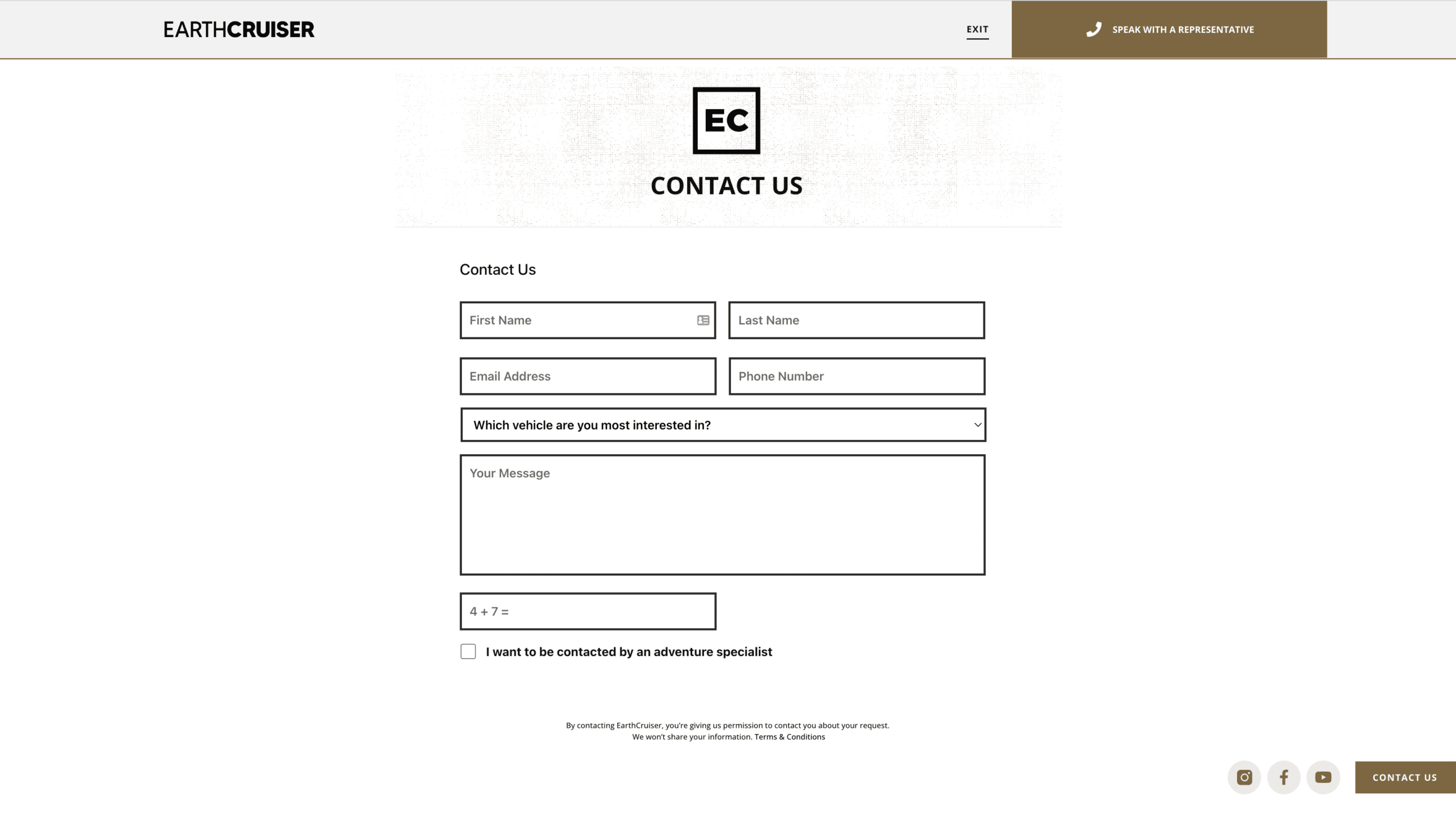
    If the above two methods aren’t cutting, adding a single-line text field to your form, which asks a simple question that only humans can answer, will bypass any bot. A natural person should be able to answer the question correctly, whereas most bots won’t. If someone gets through your form at this point, you’ll know it’s a human.

    Earthcruiser contact form submit button
    Earthcruiser conditional form submit button

    Enable button conditional logic based on this question field in your form plugin settings. If the submitter doesn’t input the correct answer, the form can’t submit. The trick is to simplify the question so anyone can answer and then only let through forms with the correct answer. 

    Here are some examples: 

    • 4+7=?
    • A dog has how many legs?
    • Everyone who lives, _________
    • USA is the acronym for __________

    No single anti-spam method in the world can catch 100% of spam. Because of that, you can find hundreds of anti-spam techniques and services across the internet, some that work and others that don’t. For complete elimination, we recommend using all three methods simultaneously.

    Get a FREE Customized Digital Growth Plan

    Take our 10-minute Digital Maturity Assessment and receive a FREE, personalized digital growth score that uncovers gaps and drives your business forward.

    Take the Free Assessment →

    How to Indirectly Prevent Contact Form Spam

    Choose a reputable WordPress website host

    Choosing a reputable WordPress website host is an essential step in preventing contact form spam.

    Many hosting providers are notorious for being plagued by contact form spam, so you must look into your potential host’s reputation and track record before committing. Some things to look for include: 

    • A history of contact from spam issues and how the hosting provider has dealt with them
    • Robust security features, including firewalls, malware protection, and data backups
    • Fast loading speeds and reliable uptime guarantee to minimize the likelihood of contact form submissions getting lost or stuck in a queue for too long

    The way to find out is by placing a simple Google search like, “Does GoDaddy have spam issues?” You might run into a community article posted in October 2021 titled, “Why does Godaddy have such a major problem with inbound/outbound spam?” It’s worth looking into.

    By choosing a reputable host with solid security measures, you can rest assured that your contact forms will stay as spam-free as possible and that you’ll be able to collect all of the valuable contact information you need from your website visitors.

    When you purchase a WordPress Website Management Package from Structure, we’ll evaluate your hosting and recommend switching to our preferred hosting partner with a good history. We’ll even help you make the switch!

    Use a quality WordPress form plugin

    Another critical component to preventing spam is using a high-quality WordPress contact form plugin. Because contact forms are so vulnerable to bot attacks, choosing a plugin with solid security measures and anti-spam features is essential. 

    Look for plugins that include: 

    • Email verification capabilities – these can prevent bots from submitting contact forms by requiring users to verify their email addresses before sending messages
    • IP filtering or restriction options – these will help keep your contact form submissions from being intercepted by spammers who might be spoofing legitimate IP addresses to bypass security filters
    • A built-in captcha feature – this will stop bots from accidentally submitting contact forms, either due to typing errors or simply not understanding the instructions on the form

    With a quality contact form plugin and reliable hosting, you can rest assured that your contact forms will be protected from contact form spam. At Structure, we recommend using the Gravity Forms plugin to create and manage contact forms on your WordPress site. 

    Install a WordPress anti-spam plugin

    Installing a WordPress anti-spam plugin is the final step in preventing contact form spam. There are many different plugins available, each with different features and capabilities. Some popular plugins to consider include: 

    • Akismet – this plugin uses an intelligent system to filter out contact form spam based on keywords and patterns that indicate bot behavior
    • WPForms AntiSpam – this plugin incorporates honeypot technology to fool bots into thinking contact forms are filled out by humans, thereby stopping the bots from submitting forms in the first place
    • Anti-Bot Contact Form – this plugin uses various security measures, such as CAPTCHAs and javascript logic tests, to prevent contact form submissions by spambots

    With the right WordPress anti-spam plugin, you can keep contact form spam to a minimum and ensure that only legitimate contact form submissions are received. All our WordPress Management Packages include a free anti-spam plugin.

    How to change the security preferences on your Google reCAPTCHA

    1. Log into your Google reCAPTCHA admin console to access your settings

    If reCAPTCHA is already set up:

    • Log into the Google reCAPTCHA Admin Console: Google reCAPTCHA
    • Click on the Gear Icon (top-right corner).
    • Adjust the Security Preferences Slider:
    • Increase security sensitivity if spam persists.
    • Click Save Changes.

    If reCAPTCHA is NOT set up:

    • Register a new site at Google reCAPTCHA Admin.
    • Fill in the necessary details:
      • Label: Client Name – Website reCAPTCHA
      • reCAPTCHA Type: Choose v3 (for seamless background security) or v2 (if client prefers the “I am not a robot” checkbox).
      • Domain: Enter the website URL(s).
      • Owners: Keep Structure Access as the primary owner.
      • Accept terms and submit the form.
    • Copy the Site Key and Secret Key and store them securely in Structure’s internal documentation.
    • Add the new reCAPTCHA keys to the WordPress contact form plugin settings.
    • Test the form to confirm functionality.

    Common Questions About Contact Form Spam

    What is contact form spam, and how can it affect my website?

    Contact form spam refers to sending automated messages through contact forms on websites, often in an attempt to promote unrelated products or services. This can negatively impact your website by clogging up contact forms with unwanted submissions and potentially disrupting workflows, business processes, and other essential activities that rely on contact information from contact forms.

    How does contact form spam affect my website and user experience?

    Contact form spam can negatively affect user experience. However, the effects are primarily behind the scenes.

    This behind-the-scenes contact form spam wastes resources and potentially harms your website’s credibility, security, and performance.

    1. Inundation of Irrelevant Content: Spam submissions flood your contact forms with irrelevant and often inappropriate content, making it challenging to manage genuine inquiries.
    2. Misuse of Resources: Dealing with spam consumes valuable time and resources that could be better spent on legitimate tasks.
    3. Loss of Legitimate Leads: Legitimate inquiries might get lost amidst spam submissions, causing you to miss potential business opportunities.
    4. Security Concerns: Some spam may contain malicious links or content, posing security risks to your website and its users.
    5. Performance Impact: Large volumes of spam can slow down your website’s performance, affecting loading times and user satisfaction.
    6. Data Integrity: If your contact form database is cluttered with spam, it becomes challenging to maintain accurate and valuable user data.
    7. SEO Implications: If spam content is published on your site, it could impact your SEO efforts and search engine rankings.

    Implementing effective spam prevention measures is essential to maintaining a positive online presence and providing a smooth user experience.

    Are there any common techniques spammers use to bypass contact form security?

    Spammers are quite crafty when it comes to bypassing contact form security.

    They often use sneaky tactics like automated bots that can flood forms super fast. Sometimes, they toss random characters in hidden or normal fields to confuse the system. They might even switch up their IP addresses to stay hidden.

    Some of them have software that’s pretty smart and can solve CAPTCHAs, making those puzzles less effective. And get this; they might even hire people to manually submit spam content, making it trickier to spot.

    They’re also known to disguise themselves as regular browsers by faking their user agent info. Plus, they can hide links, keywords, or stuff within the form fields to make it look real. Sneaky, right?

    It’s smart to use various security measures, like CAPTCHAs, honeypots, and IP blocking, to tackle all this trickery. Mixing it up helps keep those pesky spammers at bay.

    How can I prevent contact form spam from affecting my website?

    You can use key strategies to prevent contact form spam from affecting your website. These include choosing a reputable hosting provider with robust security features, using a high-quality WordPress plugin for contact forms, and installing an anti-spam plugin to protect contact form submissions from bots. Additionally, you can stay up-to-date on contact form spam trends and best practices by consulting resources like online forums and blogs dedicated to website management.

    What are some key considerations when choosing a contact form plugin that will help me prevent spam?

    Some key considerations when choosing a contact form plugin include its ability to integrate with your existing website, whether or not it includes security features like anti-spam capabilities, and its level of usability and accessibility for both you and your users. 

    Other important factors include the availability of support from the plugin’s developer and any built-in reporting tools that can help you monitor contact form activity over time. Overall, it’s essential to do thorough research to find a contact form plugin that meets all your needs and successfully protects your website from contact form spam.’

    With these strategies, you can eliminate contact form spam from your WordPress website and maintain high security and productivity. 

    Can spam entries still get through all three spam-eliminating steps?

    Unfortunately, yes. However, if you’re using all three spam-eliminating steps indicated in this article, you can be sure the contact form spam entries are from real humans.

    Unless you want to eliminate humans from filling out your form, you’ll have to put up with a few annoying folks here and there.

    Is there a way to eliminate humans from submitting spam entries?

    Yes, there is! One way to protect your contact forms from human spam is to disable right-click functionality on your WordPress site. 

    Here’s how this works. Disabling right-click functionality can help hinder human spammers from copying and pasting their information into your forms. This will require them to manually enter the information or use keyboard shortcuts (not everyone knows them).

    Several plugins can help you implement this functionality, namely WP Content Copy Protection & No Right Click and Disable Right Click For WP.

    I’ve heard you can Block Traffic by IP Address. Is that possible?

    Yes, it is possible to block contact from spam by IP address. However, it’s important to note that some IP blocking methods may inadvertently block legitimate traffic, so using this approach cautiously is essential. 

    If you want to block specific IPs, you can add them to the Comment Blacklist field on the Discussion settings page of your WordPress admin panel. Advanced site owners can do this through their web host, cPanel, or a security plugin like Wordfence or Sucuri.

    Cloudflare also offers several services that protect your site (and forms), such as IP Access Rules, allowing you to block entire countries easily. This is particularly helpful if you’re in the United States and notice a flurry of spam entries from Russia or China, for example. They also provide solutions to mitigate DDoS attacks or stop malicious bot abuse.

    Overall, many different approaches are available for effectively blocking contact from spam, one approach is by IP address, and each website owner must determine which strategy works best for their individual needs.

    See Structure’s WordPress Website Management Packages for help blocking IP or another method.

    What WordPress plugins are available to prevent form spam entries?

    Many WordPress plugins can help you prevent spam contact form entries. Some popular options include Akismet, Anti-Spam by CleanTalk, Really Simple Captcha, and Simple Cloudflare Turnstile. Additionally, numerous premium options are available if you’re looking for more robust features or support. 

    However, regardless of which plugins you choose, it’s important to regularly audit your contact forms, remove invalid entries, and respond quickly to any contact form submissions that look suspicious or potentially malicious. This will help keep your contact form spam-free and ensure the smooth operation of your website. 

    If you need additional support or guidance managing your contact forms, Schedule a Free Consult Call to review your website, suggest solutions based on your unique needs, and help you implement them quickly.

    Can CAPTCHA or reCAPTCHA solutions effectively stop contact form spam?

    You bet! CAPTCHA and reCAPTCHA solutions are like those tricky puzzles you solve to prove you’re not a robot. They’re pretty good at stopping most spam because they’re simple for humans but tough for automated bot spammers.

    CAPTCHA challenges might have you typing in twisted characters or solving basic puzzles. They’re decent at stopping some bots, but the smarter ones can sometimes get past them.

    Now, reCAPTCHA is like the superhero version. It’s from Google and uses fancier challenges, like identifying stuff in images or solving puzzles. Plus, it’s smart – if it smells something fishy, it makes the puzzles tougher on the spot.

    But remember, no solution is perfect. So, to ensure your forms are spam-free, think about using CAPTCHA or reCAPTCHA along with other tricks like honeypots, IP blocking, and checking the info people submit. It’s like building a fortress against those pesky spam bots!

    How do I balance spam prevention and user convenience for legitimate submissions?

    You’re walking a tightrope here… you want to keep the spam out while making it easy for real users to connect with you.

    Remember, the goal is a smooth user ride and a no-entry sign for spammers. It might take trial and error, but you’ll find that perfect balance quickly.

  • 5 Stages of a Successful Website Redesign Process That Works Every Time

    5 Stages of a Successful Website Redesign Process That Works Every Time

    Redesigning a company website can feel intimidating, especially if you’ve never done it before or you’re already overwhelmed by the projects on your plate. It’s so much easier when you have a proven website redesign process to follow.

    In this article, we will walk you through the Structure Website Redesign Process that we’ve used for hundreds of clients over the last five years (September 20, 2023, at the time of this writing).

    To cut to the chase, we have a 5 Step Website Redesign Process that works every time (if you follow it!).

    1. Define
    2. Design
    3. Develop
    4. Manage
    5. Grow

    You can do these steps on your own or with your internal team. You could probably get a solid head start with this article and our Free Website Redesign Planning Guide.

    However, if you’re considering hiring an expert to help with your website redesign project, it’s much easier to trust someone who has a plan and has worked on it repeatedly.

    Unfortunately, you don’t get that with most local web design agencies or freelancers.

    This 5-Step Website Plan is the same process we’ve used for clients in executive coaching, manufacturing, private equity, e-commerce, cannabis, consumer packaged goods, and many more.

    If you’re in one of those industries, that’s great! But even if you’re not, this website redesign process will still work for you.

    And even if you’ve got a small website or spinning off a new one, you can use this process. While it’s perfect for a website redesign, it works great for a new website.

    Let’s build a website that keeps your customers hooked.

    Step 1: Define – Website Planning

    A website redesign isn’t art.

    It’s science.

    Unfortunately, in the many website redesign projects we’ve worked on, the primary problem with any web project that doesn’t meet goals or expectations is a failure to plan.

    Of course, at Structure, we start with planning. So that’s not an issue when you work with us.

    But in my experience as a digital marketing veteran at software companies and agencies, the same website issues have come up over the years.

    And they all come back to one thing: failure to plan.

    It’s not just my experience, either!

    Research suggests that 68% of marketers did a site redesign in the last 12 months – but 1/3 were unhappy with the results.

    Furthermore, failed website redesigns cost an average of $55,000 plus an additional $115,000 over the next 12 months to fix.

    Ralf Speth, CEO of Jaguar Land Rover, said it best:

    If you think good design is expensive, you should look at the cost of bad design.

    Likewise, if you think a good website is expensive, you should see the cost of a bad website.

    That is why we start every website redesign process with a website plan. And you should, too.

    Get Our Free Website Redesign Planning Guide

    Download the Structure Website Design Planner to plan a website launch that makes your project successful!

    How does the “define” stage of the Structure website redesign process work?

    All website projects start with a free 30-minute Consult Call where we’ll gain an understanding of what you’re hoping to create.

    We’ll ask questions like…

    • Why do you need a new website?
    • What do you need your website to do for your business?
    • How did your last website perform? What worked/didn’t work?
    • Which platforms are you using, and do you like them?

    During this call, we’ll also be able to recommend a website design package that fits your goals. Once you decide on a package, we’ll start with a virtual or in-person Website Workshop.

    During this workshop, we’ll help you define and document the following information:

    1. Basic company information
    2. Who is on your team
    3. The vision for your website
    4. A competitive analysis
    5. Brand documentation
    6. Your buyer’s journey
    7. A sitemap of your pages
    8. Content plans for each page
    9. Technology requirements
    10. Website build budget

    The final answers comprise your Website Plan.

    Step 2: Design – Website Layout

    Website design is more than mocking up a pretty version of your brand for a webpage; it’s designing a home for your customers to visit to engage with your business and buy from you!

    Whether you’re starting by looking for a fresh look for your website or you already know you want to add new functionality, the website redesign process hinges on understanding what makes an outstanding strategic design.

    Website Redesign Process: Define

    What is a strategic design, you might ask?

    A strategic design is these things:

    • Visually appealing and on-brand
    • Well-organized and easy to navigate
    • Engaging with compelling content
    • Designed for your target audience
    • Optimized for search engines
    • Responsive, so it looks good on all devices

    Creating a strategic website design that meets all these criteria can seem daunting, but it’s important to remember that your website is a vital part of your business and should reflect your brand and meet your business goals.

    In short, your website design should focus on how it works, not just how it looks.

    How does the “design” stage of the Structure website redesign process work?

    The Structure Website Design Package you choose will determine what you receive from the process. However, here are some of the deliverables you can expect:

    • Wireframes
    • Desktop Designs
    • Mobile Designs
    • Tablet Designs
    • Content & Media
    • Functional Specification

    If you’re unsure what this means, that’s okay! Our team of website design experts can help. We’ll coach and consult with you to clearly understand the goals and needs of your website, and then we’ll create a custom website design that’s right for you.

    Step 3: Develop – Build

    During the website development process, the aim is to create a site that aligns with the design concepts established in the prior phase.

    Moreover, this is the stage where you guarantee that your website operates smoothly, catering to the objectives, technology, and user requirements outlined in the Website Plan.

    This is another reason the website plan is so critical. It is a guiding source of truth throughout the website redesign process.

    Achieving these objectives will create a website that accomplishes your plan and sets you up to crush your business goals.

    Website Redesign Process: Development

    How does the “development” stage of the Structure website redesign process work?

    Upon your approval of the Functional Specification (the final design deliverable), our development team will begin building your website on a separate development site so your live website isn’t affected. 

    We’ll optimize your website for all devices and browsers and essential SEO, accessibility, and load speed as standard practice.

    Then, we’ll break your website. But don’t worry, it won’t stay broken!

    We’ll fix any issues and put checks in place to ensure it’s bulletproof for your team and users.

    Testing is completed with a Training Call so you know exactly how everything works. Then, you’ll get to review and approve your website.

    When you approve, we’ll launch your website and push it live onto your domain for customers to use and love. 

    If you’re lost by now, here’s a quick recap:

    1. Structure Builds Your Website
    2. Structure Completes Quality Assurance (testing)
    3. Structure Provides Website Training
    4. Your Review
    5. Structure Launches Your Website

    Ultimately, by the end of this step, you’ll have a new website to delight every visitor.

    Your website will be easy to manage and set up to work for your business.

    And we have a Work For Free Warranty to cover you in case of any unexpected flaws.

    Step 4: Manage – Updates & Monitoring

    All websites must be updated and optimized, especially after being redesigned.

    It’s a common practice for local agencies to “lock” you into a management plan with them. Often, this subscription is part of the deal. Or, they might hold the key to your hosting.

    Either way, we’re not fans of locking you into anywhere you don’t want to be.

    That includes a management or hosting plan you don’t know why you’re paying for. That’s not our style.

    Website Redesign Process: Support

    We want to hand off your website to your team with training and support to ensure it’s working and meeting your business goals.

    You’ll have every tool and resource if you want to manage it yourself.

    However, managing your website takes time. It can easily take a few hours a week.

    Most clients don’t have a team to hand their website to, so we continue working with an active WordPress Website Management package.

    We love managing websites we’ve built, and it’s honestly one of our favorite partnerships for long-term growth.

    The reason is that we’re “in your corner” to support any ongoing initiatives, optimizations, and projects.

    We’re here for whatever you need, as long as you need it.

    How does the “manage” stage of the Structure website redesign process work?

    Website management with Structure is more hands-off for you than most other steps in the website redesign process.

    This means you may not see much of what’s happening in the background.

    But as soon as you hand off your website for management, we immediately do the following:

    • Setup daily site backups
    • Test forms and conversion funnels
    • Make monthly plugin and software updates
    • Report on website performance monthly
    • Audit website performance & SEO annually
    • Make ourselves readily available to answer any questions you have

    That’s it! If you want to learn more, you can download our free PDF Overview (no email required).

    Step 5: Grow – Increase Results

    In the end, the effectiveness of your website launch hinges on its capacity to generate traffic, capture leads, and drive sales.

    However, achieving these objectives becomes impossible if your website isn’t functioning correctly. In this final phase, you will execute marketing campaigns tailored to your target audience.

    Subsequently, you will consistently fine-tune your strategies in response to the distinctive challenges and opportunities you encounter. The growth phase is where your website truly reaches its full potential.

    How does the “grow” stage of the Structure website redesign process work?

    Often, we work with our clients to develop a sales funnel to drive sign-ups and sales.

    For most clients, this means focusing on three initiatives, in order:

    1. Acquire Traffic
    2. Generate Leads
    3. Increase Sales

    Website Redesign Process Common Questions

    [gs_faq id=”2091″]

    [gs_faq id=”2093″]

    [gs_faq id=”903″]

    [gs_faq id=”892″]

    [gs_faq id=”895″]

    [gs_faq id=”897″]

    [gs_faq id=”2095″]

    [gs_faq id=”2097″]

    [gs_faq id=”2099″]

    [gs_faq id=”2102″]