In the world we live in today, having a powerful online presence is super important for businesses. This article will guide you through the steps you need to follow to make sure your website grows and succeeds. These steps will be explained with a focus on real-world challenges like limited resources and the ever-changing digital landscape. By the end of this guide, you’ll have a clear idea of how to excel in online marketing with a newfound understanding of website growth strategies.
Step 1: Setting Clear Objectives
Building a strong online presence starts with having clear goals. These goals should match your company’s bigger plans and be tailored to the people you want to reach. Your main goals should include making your company more visible online, getting more potential customers, improving how people use your website, creating great content, and using data to make smart decisions.
Tackling Pain Points: Resource Constraints
One common challenge is not having enough resources. This will be a common problem you might run into if you are working with a small team or don’t have much money to spend on marketing. To deal with this, you need to pick the most important goals and use your resources wisely to achieve them.
Step 2: Website Optimization for Enhanced Visibility
To be more visible online, you have to make your website better. This means making it show up higher on search engines, getting more people to visit it from search results, and being active on social media.
Tackling Pain Points: Technical Expertise
As someone in marketing, you may not know everything on the technical side. That’s why you should work with a website expert who can make your site fast, efficient, good for search engines, and easy to use.
Step 3: Lead Generation Strategies
To get more customers, you need to find new ways to get their contact information, like their email. This means you have to use forms and other tricks to get their info.\
Tackling Pain Points: Adapting to Algorithm Changes
The way search engines and social media work can change a lot. You have to keep up with the changes and adjust your tricks to stay successful in getting leads.
Step 4: Enhancing Website Engagement
To keep people on your site, you need to make it interesting. This means they should want to stay and come back for more.
Tackling Pain Points: Content Production
Creating good content can be hard and takes a lot of time. To deal with this, make a plan for the kind of content you need, like blogs, videos, and pictures. Then, use this plan to make sure you’re making the right stuff.
Step 5: Data-Driven Decision Making
To make sure your plans work, you need to use data. This means you look at the numbers to see what’s going well and what’s not.
Tackling Pain Points: Content Production
Using data can also help you deal with making content. Look at what people like and what they don’t like, and make changes to your content based on that.
Step 6: Hiring a Strategic Website Manager
To help with all of this, it’s a good idea to get someone good at working on websites. They can help you a lot.
Where to Find a Website Manager
Talk to People You Know: Ask your friends and people you know if they can recommend someone.
Use Job Websites: Look for people on websites where you can find job openings. You want to find someone who’s done this kind of work before.
Get Help from Job Agencies: You can also get help from companies that help you find the right person for the job. They know a lot about this kind of work and can make the hiring process easier.
Picking the Right Person
When you’re looking for a website expert, you need to be sure they’re the right person for the job. This means checking their skills, experience, and how well they work with a small team and limited resources.
Requesting References and a Portfolio
Get in touch with people who’ve worked with them before and look at the work they’ve done. This will show you if they’re good at helping websites grow.
Keyword Research: Identifying the keywords and phrases that your target audience is searching for. You need to know what words people use to look for your products or services. These are the keywords you should use in your content.
Making a Schedule: Decide when you’ll put out your content. A regular schedule helps people know when to expect new stuff.
Different Content Types: Don’t just stick to one type of content. Use blogs, videos, pictures, and more. People like different things.
Speaking to Different People: Not everyone is the same. Make sure your content talks to the different groups of people you want to reach.
Quality Assurance: Check your content to make sure it’s interesting, clear, and useful.
Performance Metrics: Defining key performance indicators to measure the success of your content. This might include metrics like page views, time on page, conversion rates, and more.
Step 7: Use SEO to Get Seen
SEO stands for Search Engine Optimization, and it’s about making your website show up better in search engines. This is a big part of building a strong online presence.
What Is SEO?
SEO involves:
Keyword Research: Keyword research helps you identify the words and phrases that your audience uses to search for your products or services. It’s the foundation of your content strategy.
On-Page Optimization: This includes optimizing your content for your target keywords. This involves ensuring that your keyword appears in the content naturally, in headers, and meta tags. It also involves making sure your website’s technical elements are optimized for search engines.
Off-Page Optimization: This involves building high-quality backlinks to your website from reputable sources. Backlinks are like endorsements from other websites, indicating to search engines that your content is valuable and credible.
Content Quality: High-quality, informative, and engaging content is a cornerstone of SEO. It keeps visitors on your site longer and encourages other websites to link to your content.
Mobile Friendliness: As more people use smartphones and tablets to browse the web, a mobile-friendly website is crucial for SEO. Google and other search engines prioritize mobile-friendly websites in their rankings.
Site Speed: A fast-loading website is not only crucial for SEO but also for user experience. Slow websites tend to have higher bounce rates and lower search engine rankings.
User Experience: A well-designed, user-friendly website keeps visitors engaged and encourages them to explore more pages. Search engines consider user experience when ranking websites.
SEO involves a lot of skilled technical work. That’s why a website expert is important. They can help make sure your site is SEO-friendly.
Step 8: Use Content Marketing
Content marketing is all about sharing your content with people. It helps you reach a wider audience, keep your current audience engaged, and encourage people to take action like signing up for a newsletter.
Ways to Share Your Content
You can share your content through:
Social Media: Share your content on platforms like Facebook, Instagram, and Twitter. Each platform has its own rules, so make sure your content fits the platform.
Email Marketing: Build an email list and send your content directly to people’s inboxes. This is a great way to build relationships and encourage people to do things like buying your products.
Influencer Marketing: Partner with influencers in your field to get access to their audiences and gain credibility.
Guest Blogging: Write articles for other well-known websites in your field. This helps you reach a bigger audience and get links to your site.
Content Syndication: Share your content on platforms like Medium, LinkedIn, or websites that are popular in your industry. This helps you reach new audiences.
Tackling Website Growth Strategies Pain Points: Adapting to Algorithm Changes
Content marketing is always changing. The way search engines and social media work can change a lot. You need to stay up to date with these changes and adjust your strategies to stay successful.
Step 9: Measure and Analyze Data
To make sure your plans work, you need to use data. Data means numbers that tell you what’s going well and what’s not.
Tackling Pain Points: Adapting to Algorithm Changes
Adapting to changes in the digital world means looking at data. It helps you understand what’s going well and what’s not, and it guides you in making the right choices.
Website Growth Strategies Key Data to Look At
When analyzing data, keep an eye on:
How Many People Visit Your Website: Website traffic tells you how many people are coming to your site and where they come from.
Bounce Rate: A high bounce rate means people leave your site quickly. This might mean they can’t find what they want.
Conversion Rate: Look at how often people do what you want them to do on your site, like signing up for a newsletter or buying something.
Time on Page: This shows how long people stay on your site. Longer times mean your content is keeping people’s attention.
Click-Through Rate (CTR): In email marketing and paid advertising, this shows how often people click on your content.
Social Media Engagement: Keep an eye on likes, shares, comments, and other engagement on your social media posts.
Backlinks: Count how many other websites link to your content. This shows your content is good.
Conversion Funnel Analysis: Understand where people drop out of your conversion funnel. Make changes to stop people from leaving before they take action.
Dealing with limited resources can also affect your data analysis. You might not have a lot of money for fancy tools. But, there are free and affordable tools that can help you understand your data better.
Step 10: Adapting and Evolving
The digital world is always changing, and you have to change with it. What works today might not work tomorrow. Adapting and evolving your online presence is vital to remain competitive and effective in your marketing efforts.
Adapting to changes in the digital landscape requires a holistic approach. It involves staying informed about industry trends, monitoring algorithm changes, and learning from data analysis. Collaborating with a skilled website manager can provide you with the technical expertise needed to stay ahead of digital marketing challenges.
Conclusion: Successful Website Growth Strategies
Building a successful online presence is an ongoing process. The journey of cultivating your online presence can involve overcoming limited resources, adapting to changes in digital trends, creating high-quality content, and using data to make informed decisions for my company’s online success.
Hiring a skilled website manager is a significant boost to achieving your goals and handling the common challenges that arise in the digital marketing landscape. By following these steps and finding the right team member, you can strategically grow your website and establish a thriving online presence in today’s competitive digital world.
As you embark on your journey to build a successful online presence, remember that it requires patience and adaptability. The digital world is constantly changing but with the right strategies and the right team in place, your business can thrive online.
In today’s fast-changing digital world, family-owned businesses face an important choice: they must honor their traditions while also keeping up with the rapidly changing demands of the modern market. One big challenge in this journey is making sure people can find their website online. It’s as important as ever to fine the right professional website management.
In this article, we’ll take a closer look at what marketing managers in these businesses aim for, the problems they encounter, and how they decide to hire the right person to help them with their website. We’ll also see how getting the right person to manage their website can make a big difference in their success.
Why Being Visible Online Is So Important
In a world where the internet can determine if a business is successful or not, having an online presence isn’t just a bonus – it’s a must. Think of it as a digital shopfront, the first thing people see when they look for your business online. It is also a powerful tool for making people recognize your brand. For family-owned businesses, entering the digital world is a crucial step for growing and staying a strong competitor.
What You’ll Need to Do to Get Noticed
Marketing managers in family-owned businesses have some big goals that guide what they do:
Get Noticed Online
You will want more people to know about your business. Your job is to attract new customers while keeping the ones you have already worked so hard to get.
Sell More and Make More Money
Aim to increase your online sales. This means using digital marketing tricks to attract more customers who will value your company’s products and traditions.
Build a Strong Brand
Creating a solid online identity is a top priority. You will want your business to be known for what it stands for. You should aim for people to recognize and trust your brand online.
Share the Workload
This might all sound very overwhelming to you, but it doesn’t have to be that way. It is smart to consider hiring an expert in website management. This person can take care of digital marketing, handle social media, and make sure the website works well. This way, you will be able to focus on what you’re best at.
Challenges and Hurdles
Reaching these goals isn’t always easy:
Not Knowing the Digital Stuff
Traditional marketing may be something you are good at when it comes to your business, but you might not know much about digital marketing and website management. Learning these new skills can be tough.
Limited Money
You might work with a budget. Hiring a website manager costs money, and they need to make sure it’s worth the investment.
Facing Big Competition
Other businesses are also trying to get attention online. This can make it hard for family-owned businesses to stand out.
Holding onto Traditions
Family-owned businesses have deep traditions and a strong commitment to quality. They’ll need a website manager who understands and respects these values while bringing them into the digital world.
What They Look for When Hiring Professional Website Management
To pick the right person for the job, marketing managers have specific criteria in mind:
Digital Marketing Skills
They want a website manager who knows a lot about digital marketing. This means they need to be experts in things like SEO, content marketing, email marketing, and social media advertising.
Web Development Skills
The chosen person should also know about web development or work well with a web development team. This is important to make sure the website looks great and is easy to use.
Creativity and Innovation
Being creative and thinking outside the box is a big plus. They want a website manager who can come up with new and exciting ideas that set their business apart from the competition.
Cost-Effective Solutions
The website manager needs to be good at what they do without overspending. They have to show that the money spent on them is a smart investment.
Understanding of Brand Values
The person they hire should get what the family-owned business stands for. It’s not just about selling products but also showing the business’s values and commitment to quality.
Proven Success
They want someone with a track record of making businesses more visible online and increasing their income. This shows they know what they’re doing.
Good at Communicating
The website manager must be able to explain their plans and results in a way that everyone can understand. This is how they make sure everyone is on the same page.
How Professional Website Management Makes a Difference
Now, let’s see why hiring the right website manager can change everything for a family-owned business:
Getting Noticed Online
A skilled website manager knows the ins and outs of digital marketing. This helps the business become more visible online. They use strategies like SEO, content marketing, and social media advertising to make sure the business shows up in search results and social media. It’s like turning on a bright spotlight on the business, making it more noticeable to everyone.
Selling More and Earning More
Smart digital marketing and website management can lead to an increase in online sales. The website manager plans campaigns that attract a wider audience who appreciate the quality and traditions of the business. This means more money flowing in and a more successful business.
Building a Strong Brand
Professional website management ensures that the business’s online brand identity is strong and clear. The website manager makes sure the design, content, and user experience of the website match the business’s core values. This helps the brand stick in the minds of customers. It’s like making a mark that’s hard to forget.
Sharing the Workload
By having a professional website manager, the marketing manager can focus on what they do best. They can trust the expert to handle digital marketing and website optimization. This makes their work more efficient and leads to better results.
Using Money Wisely
A skilled website manager isn’t just about spending money; they are good at managing it too. They make sure the strategies they use are both effective and budget-friendly. The website manager makes sure the money invested in them brings in more money in return.
Preserving Traditions
In a family-owned business, tradition is vital. The website manager needs to understand and respect these traditions while bringing them into the digital world. This means keeping the commitment to quality and craftsmanship strong, even online.
Proven Success
A website manager with a proven track record is someone you can trust. Their past successes show that they know how to navigate the digital world. They bring assurance to the marketing manager and the family, showing they are in good hands.
Clear Communication
Good communication is key. The website manager needs to explain their strategies and results clearly. This makes sure everyone understands the impact of their work and can support the business’s goals.
The Journey to Success: Tradition and Innovation
In today’s digital age, having a strong online presence is not just a bonus for family-owned businesses – it’s a necessity. It’s about keeping traditions alive while embracing new ways of doing things. The marketing manager in our story represents many professionals in similar situations, all with specific goals and challenges.
By using the right criteria to choose a professional website manager, these businesses can see a big change in their online presence. With a well-optimized website and a digital marketing plan that’s tailored to them, they can reach more people, sell more, and stay true to their unique brand. The road isn’t easy, but with a commitment to their traditions and a smart approach to digital marketing, family-owned businesses can thrive in the digital world, making sure their legacy continues to shine.
Conclusion: Professional Website Management
Professional website management services isn’t just a tool – it’s a doorway to a brighter future for these special businesses. It’s a way to honor the past and embrace the future, all while staying connected with the modern world. The impact is huge, breathing new life into old traditions while pushing them forward into the digital era with strength and energy. It’s a journey that empowers family-owned businesses, letting them enjoy the best of both worlds. It’s a story of tradition and entrepreneurship facing the digital future with confidence and success.
Unsure if your WordPress website management services are up to par? Don’t worry . . . you’ve come to the right spot! This blog post outlines five things to include in quality website management. Read on and gain insight into whether or not your current provider delivers what they promise. Let’s jump in!
Structure’s mission is to deliver the most efficient yet human WordPress website management services. We ultimately improve our client’s businesses by helping them get better business results from their websites.
1. Backups: If something goes wrong, your website management services should include regular backups of your site data
Having an up-to-date backup of your website data is like a life jacket when you’re boating in the open seas (except less…lifesaving). You can rest easy knowing that if something goes wrong with your WordPress site—and it will—you won’t be stuck paddling upstream with a spoon. You’ll quickly be back on dry land with regular backups as part of your WordPress management service package.
A backup is only as good as its restore. That means if your WordPress site has decided to pull an unexpected disappearing act, having backups will result in a surefire way to restore order quicker than you can say, ‘Where are my posts’?
Managed hosting services like WP Engine Managed WordPress Hosting typically include daily backups as a part of your plan. However, suppose you’re hosting your website through another provider like GoDaddy, HostGator, or Bluehost. In that case, you’ll want to ensure you set up a daily WordPress backup system or hire a WordPress management service provider like Structure to put a plan in place for those backups in case you need them.
A WordPress management service like Structure builds a safety net for your website with reliable, timely backups. You can rest assured that no matter what happens with your website, you can have a perfect restoration before you miss any opportunities.
2. Updates: Your website management services should include regular updates to the WordPress core, plugins, and themes
Unfortunately, it isn’t as simple as pushing a button, so folks like you hire a professional WordPress website management service.
Websites require ongoing maintenance and regular updates to the WordPress core, plugins, and themes. Any WordPress management services worth their salt will ensure that these updates remain current so you don’t have to worry about broken links, security risks, or compatibility errors on your website.
It’s common for a startup founder, marketing director, or website manager to think they can take care of the monthly website updates. However, it was not long before they experienced an issue, and they had to pay a developer $1,000 to fix a dumb little thing that could’ve been avoided with regular updates.
At Structure, WordPress software updates are a core part of our WordPress management services. We work with you to understand your website’s setup and ensure that WordPress is up-to-date quickly and efficiently. After we update your website, we also complete a thorough Testing and Quality Assurance process to verify your website works as well, if not better, than it did before the update.
Last but not least, we have a team of WordPress developers on hand to handle any issues that may arise from the update process.
So if you haven’t already, Schedule a Free Consult Call with Structure ASAP to get the ball rolling and your website up-to-date.
3. Security: Website management services should also include security measures to protect your site from hackers
Your WordPress management service must include security measures to protect your WordPress site and ensure you don’t compromise your business or customer data.
You can guard against malicious activity with the right security solutions while providing a great user experience. Investing in WordPress security is a smart move that will pay off long term!
What kind of security measures, you might ask? Beyond keeping your website backed up and up-to-date, three security measures come to mind.
Integrated Firewall
Automatic Malware Scanner
Instant Malware Cleaner
Many DIY website managers and freelancers use WordPress security plugins like iThemes Security, WordFence, & Sucuri on their sites. They’re helpful plugins, but they all have the same problem—their websites get hacked!
If your security plugin is out-of-date, it’s like walking into a shooting range with a target on your back. There’s a better way!
Security measures like a third-party firewall, malware scanner, and malware cleaner help protect your WordPress website from malicious activity and hacks and keep it clean.
Integrated Firewall
Our integrated web application firewall (WAF) provides complete security for your website from malicious hackers and bots. Furthermore, our Threat Intelligence Network is constantly updated with new rules and IPs to ensure no attacks go unnoticed or uncaught in real time.
Automatic Malware Scanner
Our precise malware scanner will thoroughly scan your entire site, including databases and files, to detect even the most complex types of malware.
Instant Malware Cleaner
Once a malware scanner has identified malicious files, a malware cleaner can quickly and effectively remove them.
Don’t let security fears and flaws concern you any longer. Consider Structure as your WordPress management service provider and ensure you’re in the most defensible position against security attacks.
4. Reports: Website management services should keep you in the loop and regularly communicate how your website is doing
I encourage all WordPress owners to use a website management service that does regular reporting. Monthly reporting is plenty; if you’re on top of it, there’s nothing wrong with weekly website reports.
Our personalized Website Report presents a detailed overview of the health of your website. The report is generated based on the insights drawn through our systems and analysis by our team to help you keep track of all the changes and improvements on your website.
Specifically, our report includes the following:
Overview of your website health
Core, Plugins, and Themes updates
Number and frequency of backups
Security scan status and frequency
Firewall status and traffic or login requests
Uptime state and current rate
Performance score and current page size
Traffic sessions, page views, and bounce rate
You may not require an update on all those items. That’s okay! The key is to ensure your WordPress management provider isn’t just secretly working behind the scenes—they must show you the value they’re adding to your business.
5. Support: If you have any questions or need help with anything, your website management services should offer support when you need it
Why worry about website management when your website support has got you covered? Websites are complex money-making machines, and it helps when you have an expert on hand to answer any question so you can ensure your website is always working.
A WordPress management service knows how vital website support is to ensure everything runs smoothly. And ooh baby, they better deliver! When they do their job, it saves you from spending your time frenetically searching for answers, cross-referencing the web, and watching YouTube videos trying to figure out what is happening.
Structure WordPress Management packages provide a Dedicated, U.S.-based Account Manager and a 24-hour Response Time during the workweek. Typically, you can expect to hear back same-day if it’s not “one of those days,” . . . if you catch the drift.
Finding a good website management service that can handle all the behind-the-scenes work is essential to keep your website running smoothly and looking great.
A good website manager will handle updates, security, backups, monitoring, and support, so you don’t have to worry about it. This will give you more time to focus on creating great content for your site.
Do you have a website management service that you’re happy with? Let us know in the comments below.
Common Questions About WordPress Management Services
What are WordPress maintenance services?
WordPress maintenance is a fancy word to describe many activities you must do to ensure your website runs well.
You can’t just do it sometimes; you must always do it to keep your website healthy. Depending on your website’s complexity, you might need maintenance every day or week.
How much does it cost to service a WordPress website?
You can expect the cost to be anywhere between $250 to $1,500 per month, depending on how much support you need.
For example, a custom-built, large e-commerce website is costly to maintain. The website maintenance company needs more manual work to manage your site.
On the other hand, a simple informational website is cheap to maintain. The website management provider needs less manual work to manage your site.
What are the benefits of hiring professional WordPress Management Services?
Having a WordPress management service like Structure comes with many benefits. You can focus on other business areas and trust WordPress will be handled.
A website that works
No more inexperienced freelancers
Say goodbye to website downtime
More time to focus on what’s essential for your business
Increased website performance, efficiency, and reliability
Peace of mind knowing that an expert is handling your website’s technical aspects
I mean, you can try to manage your website by yourself. But why would you want to when it only costs $250/mo, and you never have to worry about whether your website is working? WordPress management services are a stupid smart way to ensure you get the best results out of your website.
Why do you need WordPress maintenance services?
WordPress gets new updates every month. This makes WordPress more secure and better at work. If you have a WordPress website, you need to do some things to keep it secure. You need to keep the core code updated and any plugins you might use. If you don’t hire a WordPress maintenance service, you’ll be on the hook for doing these things yourself.
Furthermore, having a dedicated WordPress professional on hand and only an email away is priceless. Eventually, your website will give you trouble, and you’ll need someone to help. Having a WordPress management service provider available and familiar with your website is a surefire way of setting yourself up for success.
In this article, we share how (and why) a professional WordPress management service is worth the cost and will make you much more productive.
WordPress Management Service Explained
Your WordPress website should be a time-saver and a money-maker, but it needs to be well-managed to run like a well-oiled machine. This will take time and energy unless you’re a seasoned website developer. That’s when it’s time to turn to a WordPress Management Service.
WordPress management services do various things, such as providing technical support, installing security patches, maintaining the WordPress database, optimizing WordPress performance, and more.
If you have no idea what I just said, you’re in the right place.
When you choose to use a WordPress management service, they’ll take care of all these tasks for you, freeing up your time so that you can focus on other aspects of running your website or growing your business.
That said, it’s essential to choose a suitable WordPress management service provider who is experienced and has a proven process for managing your website. This will ensure that your website remains secure and functioning correctly.
However, we know that’s not always the case. Many WordPress management services take your money and don’t save you any time. If you’ve ever hired a WordPress management service, you may have experienced one of these things.
The thing is, anyone can sound like they know what they’re talking about. But when the end of the billing period rolls around, and you don’t see any improvements or reports, you start to wonder if they’re doing anything.
2. Your website gets ignored and forgotten about
WordPress websites require plugins to make specific functionality work. And plugin developers update their plugins regularly, which means your WordPress plugins may become increasingly outdated as the days go on during any given month.
If your service provider doesn’t have a proven process for regularly updating your website and sharing the information with you, your website is getting forgotten, and you’re paying for nothing.
3. They don’t know the ins and outs of your website
Your website is complex, and it’s unique to your business. Unfortunately, many WordPress management services focus on one-size-fits-all solutions and often fail to address the specific needs of your website, thus leading to subpar performance or limited functionality in certain areas.
What happens is that they don’t save you any time or money. Instead, they took your money and gave you a headache—not to mention an outdated site burning oil.
How to Find a WordPress Management Service Worth Hiring
You must find WordPress management services that offer transparency in their WordPress management processes, provide tailored solutions, and understand WordPress trends well. Doing so will ensure that your WordPress website is up-to-date, secure, and optimized for maximum results.
Finally, it is essential to remember that WordPress management services vary widely, so it is vital to research WordPress management services thoroughly before making a decision. Doing so will ensure that WordPress websites receive the highest quality WordPress management service possible.
1. Managing a website requires technical knowledge or expertise
If you or your team are still getting familiar with website development and maintenance, you need to hire a service to handle these tasks. Not only will website management drive you crazy, but it will also bog you down.
A WordPress management service will give you back hours each week and allow you to focus on high-value activities that will move your work forward.
2. WordPress management takes a lot of time
Managing a website can take significant time; some people may need more time or resources to do it themselves. A good WordPress management service will take the burden off your shoulders and free up time to focus on other aspects of your business.
3. Regular updates and maintenance are required
A WordPress management service can update your website with the latest core and plugin updates. This ensures you don’t experience any downtime or security breaches that would drive customers away.
4. You want to improve optimization for search engines
A management service can help optimize a website for search engines to improve its visibility and search rankings. This can result in more website traffic and, ultimately, more sales.
5. You need help with customization and content updates
A management service can help you add or update content on your website so it stays up-to-date and customers see the most relevant information. There’s nothing more effective at turning away customers than an outdated site. Don’t let that be yours!
6. Website backups and security is a priority
A management service can help ensure a website is backed up regularly and protected against hacking and other security threats. Not only will security issues create downtime on your site, but they can also mean someone has stolen your customer’s private information. Nobody wants to write that email.
7. You want your website to perform well
A management service can help optimize website performance by implementing caching, minifying resources, and other techniques to improve load times and overall user experience. You are losing customers if your website doesn’t load within 5 seconds. Ensuring your customers aren’t walking out the door the moment they walk in is invaluable.
WordPress Management Service Common Questions
What is a WordPress management or maintenance service?
What should I consider when looking for a WordPress Management Service?
When choosing WordPress management services, consider the provider’s reputation, experience, and customer support. It would be best to look at the types of services included in the package and how much it costs.
What is the difference between WordPress and a managed WordPress service?
WordPress is the software used to create websites, while WordPress management services focus more on upkeep and maintenance than creating the website.
What is the difference between managed WordPress and regular hosting?
Managed WordPress hosting is a service that provides WordPress users with specialized WordPress-focused features for their websites, such as automatic WordPress updates, WordPress-specific security measures, daily backups, and more.
On the other hand, regular hosting services provide the same features without WordPress-specific functionality, automatic updates, or premium support. The main difference is that managed WordPress hosting has been optimized for WordPress to ensure the best performance and security for WordPress websites.
If I hire a WordPress management service, do I own my content on WordPress?
Yes, you should! But it depends on the WordPress management service. If you hire a WordPress management service, they should give you complete ownership of your content and website. Before engaging their services, it’s essential to clarify this point with the WordPress management provider.
How much do website management and maintenance services cost?
The cost of WordPress maintenance services depends on the WordPress management service provider and their benefits. Some WordPress maintenance providers charge a one-time fee or an ongoing monthly subscription, while others offer packages tailored to your needs.
It’s also worth noting that WordPress maintenance costs can vary depending on the size and complexity of the website.
We have a few WordPress management packages at Structure, ranging from $249/mo for our Essential WordPress Management Package to $1,299/mo., for our Premium WordPress Management Package.
Can WordPress manage multiple sites?
Yes, WordPress can manage multiple sites. The WordPress Multisite Network is a feature that allows users to manage multiple sites from a single dashboard. This makes updating and maintaining a multi-site environment more accessible with minimal effort.
However, note that WordPress management services are more complex when you have a WordPress network of sites. Structure provides additional support in our second-tier Professional WordPress Management Package for WordPress multisite clients because of the additional work and risk required to manage a network.
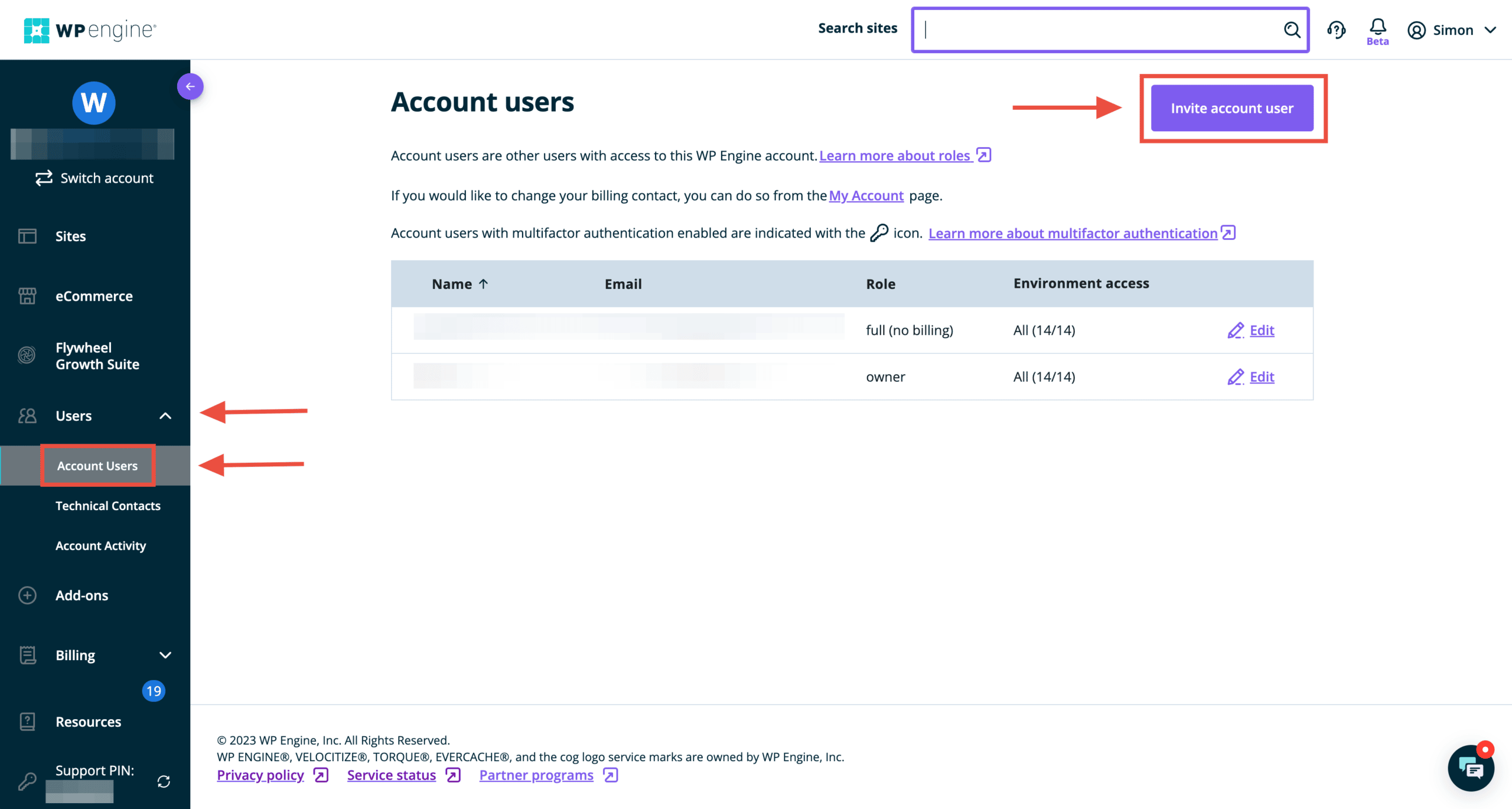
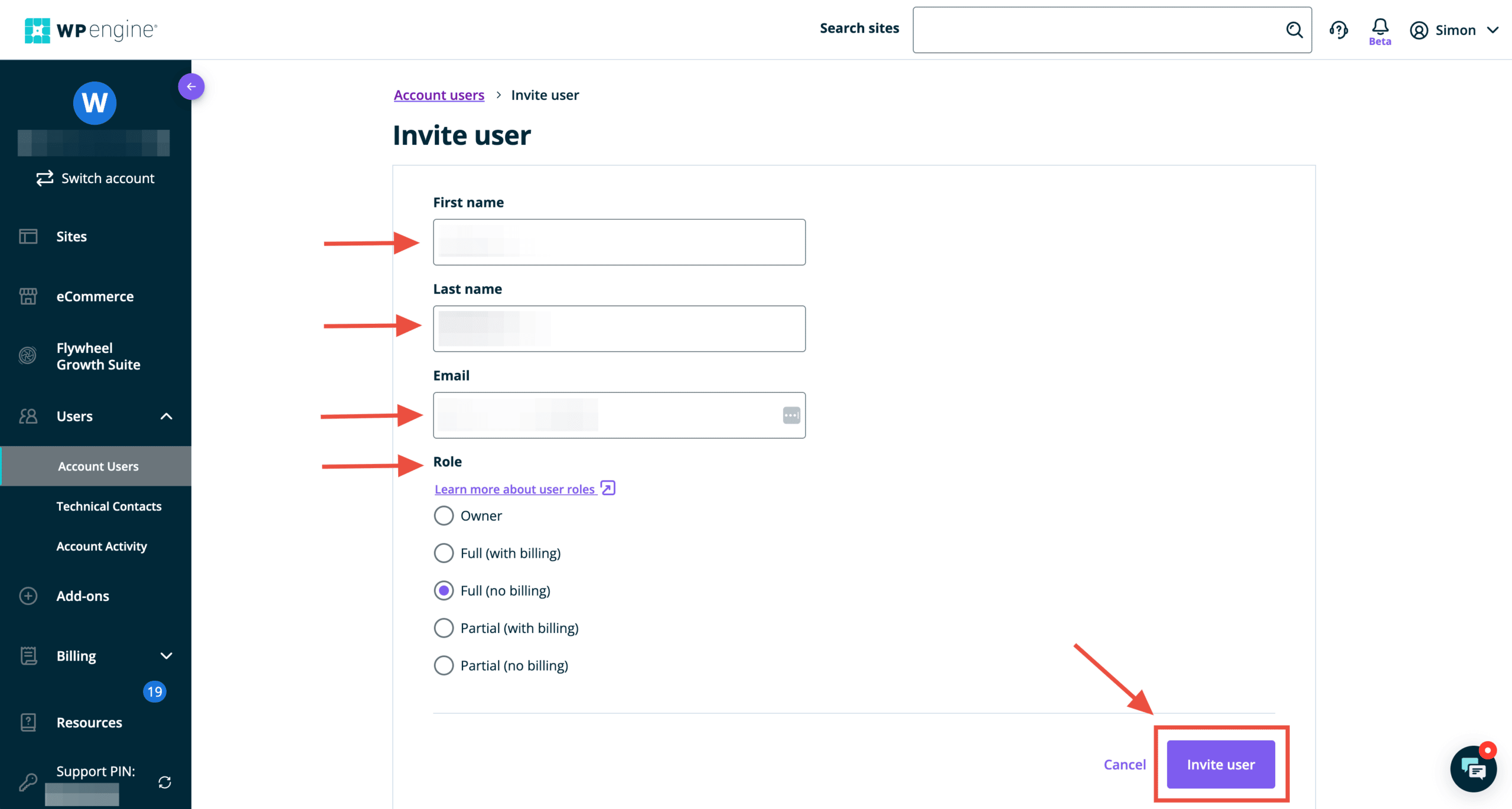
Structure is proudly a WP Engine preferred partner. We believe WP Engine provides the best managed WordPress hosting service and recommend it to all our Website Design and WordPress Management clients. This guide will provide you with WP Engine delegate access instructions so we can have the proper permissions to provide assistance with your website.
WP Engine demonstrates its commitment to usability and developers in everything they do, including when it comes to granting access to a WP Engine WordPress installation.
Get a FREE Customized Digital Growth Plan
Take our 10-minute Digital Maturity Assessment and receive a FREE, personalized digital growth score that uncovers gaps and drives your business forward.
WP Engine Delegate Access: Why should you share user access?
WP Engine account holders often add extra users to their accounts to receive more specialized assistance.
For instance, you might want a developer who can manage your website’s SFTP credentials or database or an agency like Structure to help with WordPress Management. With this approach, it is much easier and more efficient to get help when needed!
Here’s how to share access to your WP Engine website:
Running a website is hard. There are many areas to focus on, from content creation and admin to updates and security. Here’s how to untangle your WordPress management mess—and get a system in place so your website works.
Structure’s mission is to deliver the best website design, build, and management experience available and ultimately improve our client’s business by helping them turn their website into an asset instead of a liability.
In this article, we’ll help you do that by explaining what WordPress management is, what you should know, and how to find help.
If you have a small house, a simple family, and low foot traffic, your home will endure less wear and tear and require less maintenance.
However, your home will endure more wear and tear if you have a larger house, a more complex family, and entertain often. It will, therefore, require more maintenance.
When you’ve got a busy house, it’s a party! But the walls get scuffed up, the dishwasher goes out, and a window gets broken now and then—the same thing with your business.
If you’ve got a small website with only a few things going on, it will require much less maintenance. You might be able to go months without making an update.
However, suppose you have a more extensive website that integrates with complex business systems and workflows, stores customer account data, and supports high traffic through a blog. In that case, your website will require more maintenance.
1. You think you don’t need to manage your WordPress website
I recently had a conversation with one of our clients who was considering signing up for the Essential WordPress Management Package. During our conversation, he mentioned his reservations about buying the package.
“My only reservation is that we had the prior website up for several years without website management. It seemed to always run fine without any extra fees or work.”
An outdated WordPress website like this opened them up to massive security vulnerabilities, and it’s a wonder their site didn’t get hacked. I’ve seen it happen before!
It was so outdated that elements on the website’s front end were broken (like its header navigation), keeping customers from finding certain pages. The logo wasn’t even showing. That’s why you need to manage your WordPress website.
What happens if you do actively manage your website
Here are a few wins when you keep up on updates and general management:
Fix security vulnerabilities
Repair functionality bugs
Add updated security features
Replace and update functionality
Improve the performance of the whole ecosystem
Another of our WordPress website management clients likens the management and maintenance tasks to getting an oil change in their car. To keep the engine running like a well-oiled machine, you’ve got to change the oil frequently.
What happens if you don’t actively manage your website
By not managing your site correctly and performing routine updates, you risk:
Your site is broken or down
Customers can’t checkout or contact you
Content formatting is missing or broken
All of your information gets stolen
Your site is transformed into another site
Your site is used to spread viruses and malware
You may not notice any issues immediately if you don’t manage your website. Updates don’t fix what will happen. They fix what may occur, and what may happen is far worse.
Keep your WordPress website up to date. It fixes potential issues that could ruin your site, reputation, data, etc. Hopefully, you don’t find yourself a target. But if you are, it will be a massive problem.
2. You think you can do it yourself
Yes, you can manage your WordPress website yourself. However, I’ve never seen anyone do it!
At a minimum, WordPress Management involves regular (ideally monthly) WordPress Core, Theme, and Plugin updates.
At a maximum, management involves:
Adding Security and Firewall Protection (and monitoring it), so you don’t get hacked,
Activity Reporting so you can look back and see who did what on the backend of your website… and when,
Uptime Monitoring so we get alerted the moment your site goes down (if it ever does), and we can resolve it (no joke, this happened to a client this morning, and we were fixing the issue 30 minutes before they even realized the site was down), and
Daily Backup Storage so your site can be restored to a functioning machine if there’s an issue.
Our Website Management packages include all of these items. We also test all updates on a Staging site before updating our client’s Production site. That way, we catch bugs or broken items before they affect website visitors. This requires thorough knowledge of the website and Quality Assurance testing to ensure that everything works as intended after updates are made.
Lastly, we ensure you get a Dedicated Account Manager, 24-hour Response Time (During the Workweek), and a Monthly Detailed Website Report. Hence, you have full access and visibility into our work.
You might be website savvy and have time to do all this yourself. In that case, you don’t need our help!
Focus on growing your business
But most of the time, our clients don’t want to be bogged down managing their websites. They’d rather have us keep watch and make the necessary updates.
I seem to have many analogies for website management, but one of them is that I like to think of it as property management. If you own one or more properties, you could manage them yourself.
However, then you’re the one who’s on the hook managing them and responding to issues when they arise. That’s precisely the reason many opt to hire a property management company. They don’t want to do it themselves.
We’ve found that those who say they want to manage their website themselves don’t want to manage their website themselves. They don’t want to pay for website management at all. You don’t let your business books go outdated without adverse downstream effects. Neither should you ignore your WordPress website.
Don’t fool yourself by thinking you’ll keep your website updated if you won’t. Hire a professional to help.
3. You think you can hire a freelance WordPress developer for less
Unprofessional, overpriced WordPress website developers are the reality for so many businesses. This is a severe problem in our industry—and one Structure doesn’t take lightly.
Because of these “bad experiences,” a handful of myths floating around about WordPress Website Management, making it hard to see the value in hiring professional help. One of them is that WordPress website management is expensive.
If you’ve heard it said that “WordPress” management is expensive. That usually means paying high upfront costs, long-term commitments, or surprising fees that can feel like nickel and diming.
On the other hand, some WordPress website management is cheap. It is so cheap that it can only be offered at such a low price because it’s either outsourced overseas or low-quality.
At Structure, we’ve set a small monthly fee with no upfront or long-term commitment. Furthermore, you can lower your monthly fee by consenting to an annual commitment. You save quite a bit of money if you commit to a year!
For example, our Essential WordPress Management Package costs no more than outsourcing bookkeeping with Bench. If you can pay a minimum of $249/mo (when paid upfront) to ensure your books are in order, you should be able to pay a minimum of $249/mo (when paid upfront) to ensure your website is in order.
WordPress management and maintenance options
You’re convinced that you need to manage your WordPress website actively. You have a few options for keeping it up to date.
1. Manage your own WordPress website
This is an excellent option if you’re website savvy and have the time. You can download plugins, configure settings, and update your site yourself. This is a good choice if you don’t plan to update your WordPress website frequently.
In this case, you’re either completely savvy, or you have a simple website and little to no traffic that would be interrupted if there was an issue.
2. Create an in-house WordPress website management team
This is an excellent option if you have the budget and resources available. You can hire a team of experts to manage your WordPress website. This allows you to control every aspect of website management and maintenance.
One of the most significant benefits of having an in-house team is that your response time to any issue will be almost immediate—and you’ll have the resources to tackle the problem. However, to build a full-stack in-house WordPress website management team, you’ll need the following specialized roles:
Two primary ways people outsource WordPress maintenance and management are managed hosting or Hiring an Agency.
Managed Hosting
The first option is to pay for a managed WordPress hosting plan, which means the provider takes over much of the technical legwork that goes into running your WordPress site. They also provide premium customer support that goes above and beyond what you usually get with web hosting.
Companies like WP Engine (our recommendation), Bluehost, SiteGround, and others offer managed WordPress hosting plans. These can be a great way to offload some of your site management responsibilities, though you must pay more than you do for “unmanaged” hosting.
Specifically, managed hosting services can significantly help you with infrastructure issues, particularly when you have downtime or an SSL expiration. However, they’re not so great for maintenance issues, as they’re constrained on what they’ll touch on your website. And while they’re typically accessible via chat, you usually talk to a technical support agent. Most of what they’ll say will likely go right over your head!
That’s why we recommend using a managed hosting plan for infrastructure management alongside an agency partner who can help maintain your site while overseeing the managed hosting.
Agency Management Services
Structure offers WordPress website management service packages that fit almost every website and business. We provide everything you need to ensure your WordPress website stays up-to-date, secure, and optimized.
We offer plans for both small and large businesses. Our Essential plan is perfect for companies with a smaller budget—it starts at just $249/mo when paid upfront. And for larger companies needing more attention and features, our Professional plan is ideal—starting at $499/mo (when paid upfront).
No matter the size of your business or budget, we can help manage and maintain your website. We have years of experience with WordPress websites and will work with you to ensure that your website is always up-to-date, secure, and optimized for performance.
If you’re looking for an experienced team to manage your WordPress website, Structure is here to help.
The primary areas that WordPress Management services cover
1. Administration
If you’re like most companies, multiple people have logins and could be updating content or data at any given time.
Backups are essential for restoration. Without them, a healthy and fully functional version of your website would be impossible to return to if it is the victim of malicious online activity.
Backups are the saving grace in any situation, even when mistakes occur, or data is accidentally lost without malicious intent.
Having a reliable maintenance service to install your site backup if anything goes awry swiftly is immensely priceless. It eliminates the anxiety of potentially losing it all. Although small companies will find this feature incredibly useful, well-informed solopreneurs can back up their sites independently and may not need this specific service.
All of our Structure WordPress management packages include backups and backup restoration. If you’re on the Professional WordPress Website Management package or higher, you also get 2+ additional hours of bug fixes if any functionality needs to be repaired or restored.
3. Theme, Plugin, and WP Core Updates
WordPress sites are constantly updated. Plugins, themes, and WP Core must be regularly updated (at least once monthly) to keep your website functioning as expected, secure from potential threats, and running efficiently.
The problem is that updates can sometimes conflict with other elements of your website or cause other problems—if done incorrectly or without proper attention. That’s why making all updates on a staging environment is crucial before updating your life site.
This Theme, Plugin, and WP Core Update Quality Assurance process is one we employ at Structure, and we would recommend it no matter the status of your website.
4. Security Monitoring
Malware Scans & Removal
Unfortunately, malicious actors are out there waiting to take advantage of any vulnerabilities they find on your website. They can cause irreparable damage, steal user data, or even completely erase your site if you’re not careful. That’s why it’s essential to have security monitoring in place—to alert you when anything suspicious is detected quickly and to help you remove any malicious code or activity.
Fortunately, that’s precisely what our Structure WordPress management services provide. Our packages include daily malware scans and removal if anything is discovered.
Firewall
A firewall is essential for any website. It’s the first line of defense against malicious actors and can help protect your site from potential threats.
Structure’s management services include a responsive web application firewall (WAF). This will stop suspicious traffic before reaching your server and protect against malicious attacks, including DDoS, SQL injections, and more. They also offer a secure login interface with two-factor authentication to help protect your site from unauthorized access.
Bot Protection
One of the most common cyber-attacks is bots. Cyber thieves use bots to steal data, spread malware, etc.
Our Structure WordPress management packages include robust bot protection that will help keep your site secure from malicious activity. It monitors suspicious activity and blocks any requests before they reach your server.
Login Protection
Often, your WordPress website will be the target of brute-force attacks. This is when someone attempts to guess your login credentials repeatedly until they can gain access to your site.
At Structure, each package includes intelligent login protection and two-factor authentication for maximum security. This helps protect against potential cyber threats by making it harder for unauthorized users to gain access to your site.
Activity Log
Activity logging is another essential security measure that helps keep your website safe and secure. It gives you a clear view of what’s happening on your site, including user activity, successful logins or failed attempts, etc.
With our Structure WordPress management packages, you get access to an easy-to-read activity log that lets you monitor all the activity on your site in real-time. This helps you stay on top of any suspicious activity and take action if necessary.
Uptime Monitoring
It’s also important to keep an eye on the uptime of your website. You need to ensure it’s functioning correctly and that no issues affect its performance.
Our Structure WordPress management packages include regular uptime monitoring, so you can be sure your site is always running at peak efficiency. We’ll alert you if your website ever goes down and help you get it back up and running as quickly as possible.
5. Reporting
Lastly, good website Management would include tracking metrics and reporting on them. You want to keep a record week-over-week and month-over-month to know the trends and spot any off-the-wall activity.
Our Structure WordPress management packages deliver a detailed weekly or monthly PDF report that gives you an in-depth look at your site’s performance. If you want real-time visibility, you can view your WordPress management dashboard.
We’ll also track and report on critical metrics such as page visits, time spent on each page, bounce rates, conversions, etc., so you can see how your website is doing.
WordPress Management FAQs
What happens if you don’t update WordPress?
Nothing will happen immediately if you don’t update your WordPress installation, plugins, and themes. However, you open yourself to possible attacks and functionality issues by not updating your installation, plugins, or themes over time.
What are the best WordPress Maintenance and Management Services?
There are many WordPress maintenance and management services available. Some of the best available are:
Note that each service producer has their specialty and will serve your business differently. Evaluate each service individually and talk to their teams.
What are the best ways to secure your WordPress site?
The best way to secure your WordPress site is to use a combination of security measures such as:
Strong passwords
Two-factor authentication
SSL / TLS encryption
Backups
Monitoring activity logs
Uptime monitoring
Regular updates and patches
Additionally, using a quality-managed WordPress hosting provider can help keep your site secure, as they will provide additional layers of protection and make sure your site is always running optimally.
What is the importance of WordPress management?
The importance of WordPress website management lies in its ability to keep your site secure, up-to-date, and running smoothly. It can also help you track web performance metrics so you can identify any issues and take action to improve them.
You don’t have to do anything with a managed service for your WordPress site, from security patches and updates to backups and performance optimization. This allows you to focus on what matters most – growing your business.
What type of reporting do Structure WordPress management packages offer?
Our Structure WordPress management packages provide you with a detailed weekly or monthly PDF report so that you can track your website’s progress. If you’re searching for an even more in-depth overview, log into our exclusive dashboard and get real-time visibility to monitor your site’s performance!
What’s the difference between WordPress management and maintenance?
Website management and website maintenance have very similar meanings. Generally, website management refers to monitoring and optimizing your site’s performance, while website maintenance involves updating plugins, themes, core files, and other components that keep your site running smoothly.
In other words, website maintenance is something you do when you manage a website. When you manage your website, you oversee all aspects of its functioning. When you maintain your website, you take specific action to improve its performance.
The Structure Professional and Premium WordPress Website Management packages include WordPress maintenance, which includes:
Performance Checks
2 or 3 hours of additional Content Updates & Bug Fixes
Retainer Rollover
1-Point or 5-Point Website Audit
What do WordPress maintenance services do?
WordPress maintenance services take direct action to keep your website up-to-date and secure. These services ensure that your site remains functional and safe. Some WordPress maintenance services also optimize performance to ensure your site runs at peak performance.
Like Structure, they may offer services like content updates, bug fixes, retainer rollover, website audits, etc. All these services help you maintain a well-running website that is secure and reliable for your visitors.
What do WordPress management services cost?
The cost of WordPress website management services varies depending on the type and level of service you’re looking for. Structure offers three tiers of plans (Essential, Professional, and Premium) to suit various budgets. Our Basic plan starts at $249/month (when paid annually), while our Premium plan is $1,099/month (when paid annually).
If you’d like professional help putting WordPress into maintenance mode while you make updates on your website, schedule a free Consult Call with Structure.
Do you manage WooCommerce websites?
Websites with advanced functionality like WooCommerce require our Professional Plan, as do membership sites, multi-language sites, any sites with on-site payments, etc.
They take more resources for us to manage. We’ll dedicate the resources we need to keep your website secure, fast, and running smoothly.
Are there any WordPress maintenance services that are free?
Yes, there are some free WordPress services available. Some of the most popular ones include Jetpack and WP-Optimize.
Jetpack is a plugin with many features, including security, performance optimization, automated backups, malware scanning, and more.
WP-Optimize optimizes your WordPress database, efficiently removing post revisions, trashed items, and other unnecessary data. Both are great tools to help you keep your WordPress site running as efficiently as possible.
For more advanced needs, paid maintenance services are available from companies such as Structure that can provide more in-depth support for a fee.