Tag: wordpress

  • What Does a Custom WordPress Website Cost in 2025?

    What Does a Custom WordPress Website Cost in 2025?

    You need a new website, and you’re considering the cost of a custom WordPress website. Let’s talk about that a bit more.

    If you own a business, you know the drill: you look over your website and sweat because it is less than great. Not only that, but you can tell without a doubt that it is hard for customers to use—it’s even hard for you to use! What can you possibly do about it?

    Hiring a web designer or web design agency is a significant step and typically one that makes you gulp at the expense of the investment. However, if your website is a significant factor in bringing in leads and sales, it is something you don’t want to mess up and should consider investing in.

    Pricing your custom WordPress website shouldn’t be a mystery

    Cost is the most significant fear factor for most of us in investing in a custom WordPress website. It can sometimes be unclear what factors play into the website cost and if it is worth the investment—or if you should do it yourself.

    Two of the biggest mistakes people make when building a website are paying too much or not nearly enough—either overpaying or underpaying.

    Over the years, we’ve seen many great companies get taken in by a less-than-professional agency that promises the world but doesn’t deliver. Or sometimes, a company doesn’t want to spend much money, so they hire a freelancer or obscure web developer who stops replying to emails halfway through the process. The company is out of the amount of its deposit, and the site never gets launched.

    So, how do you avoid the two traps of either overpaying or underpaying? How much is the right amount? What’s the right price?

    What factors affect the cost of a custom WordPress website?

    Three main factors will affect the cost of your custom WordPress website.

    1. What are your specific needs?

    Every business and individual is different and will look for different things on their company’s website. Are you looking for an extensive website with pages of products and lots of team bios? That will factor into how much the final cost will be: more web pages means more design time, which means more cost.

    2. What platform do you want to use?

    Some platforms are more second nature to Structure than others. We work primarily with WordPress and WooCommerce.

    Some platforms cost more than others, so consider the cost differences as you plan your website.

    If you use a hosted solution like Shopify or Squarespace, you won’t pay an initial cost, but you will have monthly fees between $30 and $300/month. That fee includes upgrades and security updates, which you would need to pay someone else to do on a self-hosted solution.

    WordPress is open-source, so it is free to download and install. However, it would be best if you hosted it, which costs between $5 and $500/month.

    Magento has open-source and enterprise versions with a license fee of around $15k/year. You would need to host this platform, as well.

    3. What expert help is available for you?

    Make sure you research the best website designers in your field. There is a difference between a freelancer, an in-house web designer, and a web agency.

    They will incur small to high costs, respectively. Be aware of what you are looking for and who will do the most professional job for your needs.

    Additional factors that affect custom WordPress website cost

    These questions are all things to remember as you plan a conversation with your designer and what questions they will ask. All of these factors will affect the final price of a custom WordPress website.

    Is your website new or a redesign?

    A website redesign is like a house remodel—you have an existing website that’s outdated or doesn’t function properly. A new website is like a new house build—you’ve identified some land and want to build a house.

    When building a new house, you must establish the infrastructure (water, sewer, power, etc.) The same thing to a website; you need web hosting, a website domain, and possibly even a CDN. These are upfront costs that only need to be done once.

    With a website redesign, you’ll use the existing infrastructure to remodel, revamp, or rebrand the templates. In this case, you’ll save on some infrastructure costs.

    How many page templates do you need?

    Templates are the building blocks of standard web pages; sometimes, the same template will be used as the basis for a few different web pages. For example, on an ecommerce website, a product display page (PDP) is a standard template to communicate everything about the product being sold. This template is one design but can be used for multiple products.

    Other standard page templates are Home, About, Contact, and Blog. For an ecommerce website, you have additional page templates such as Cart, Checkout, and Order Confirmation. That’s one of the main reasons ecommerce websites are more expensive.

    The number of page templates you will need will vary according to your website and could affect the cost if many templates are required.

    How many pages does your website have?

    The number of pages needed for your website will depend on what information needs to be available to your customers. Extensive information on your website may require additional pages and could increase the total cost.

    Note that more pages don’t necessarily mean more page templates. However, since each page has unique content, you’ll need to consider the creation and population of that content on your website. Think copywriting, images, icons, illustrations, etc.

    Does your website have a blog?

    Blogs are beneficial for getting information to your potential clients or customers. Not to mention the foundation for SEO (Search Engine Optimization)! However, they will slightly increase the amount you should budget for the website project as you’ll need at least two templates for a standard blog: Category Archive and Post templates.

    The Category Archive template is the main blog feed to filter and see the most recent posts. The Post template is the actual blog post itself. You see it when you click on a blog post in the main blog feed.

    Advanced blogs or media sites will have additional page templates, such as Tag and Taxonomy templates. However, these aren’t common for most businesses.

    Do you already have media content?

    If you already have a supply of stock photos, sourcing or creating new images may not be something you need to factor into the cost. However, if you need your web designer to come up with illustrations, photographs, or video content, it will increase the overall price tag of your site.

    Does your website need e-commerce and payment processing?

    Using Stripe or other payment processors in conjunction with your site will bump up the detail that goes into the design and ultimately cost a bit more.

    Additionally, as mentioned above in the templates selection, an ecommerce site has additional page templates that will increase the cost.

    Will your website require any specialized features?

    Including unique features such as a quoting system, maps, payment processing, user accounts, integration with a CRM, etc., will inevitably increase the budget you should set aside to ensure your entire site can do exactly what you want to do.

    Ballpark custom WordPress website costs

    Small business website

    An informational or small business website with 8-16 pages will probably run between $10,000 and $15,000.

    Medium-to-large business website

    A large corporate website with 25-75 pages will be between $15,000 and $35,000.

    Ecommerce website

    An e-commerce website featuring 10 to 1000 products will cost $20,000 to $55,000.

    Complex website or application

    A database-driven website or application with 20-2000 pages will run between $25,000 and $75,000.

    As you can see, the size and complexity of the site are the primary factors in the final cost.

    Main costs of a custom WordPress website

    So, what elements of the web design process are the main factors in the cost?

    A website is not just composed of pretty pages. It takes intention to ensure that each piece of the website is crafted most effectively to get the business results you’re looking for. It’s an investment, and your custom WordPress website investment should have a direct return.

    Strategy

    A website needs to be carefully thought through. You must plan and define the pages you need and map out how they will work together for a smooth transition into a sale—or at the very least, an excellent impression.

    Content

    Your website logo, copywriting, images, video, illustrations, and more need to communicate to your potential customers how you will transform their lives.

    Design

    Your website blueprint is one of the critical parts of the process. Each page’s layout must be carefully created and its usability detailed.

    Development

    The bones of your website will need to be built so that your custom website will function and work in the way you and your customers or clients expect. This is called website development.

    Additional custom WordPress website costs to consider

    Hosting

    Web hosting is simply the service that allows you to post a unique website online. Server space for your custom WordPress website will be an additional cost. Expect $150–500 per year. And remember: you get what you pay for when it comes to hosting. We recommend WP Engine for all our client sites, which runs about $300/yr for fast, reliable hosting.

    SEO

    Search engine optimization is optimizing the content of your website, so it’s easy for search engines and customers to find. Doing okay takes research, planning, and implementation—and thus typically incurs extra fees.

    Data or content migration

    If you’re moving from one host to another (e.g., HostGator to WP Engine), or one platform to another (e.g., Squarespace to WordPress), part of the process will need to include moving data or content from your old site to your new website—and ensuring you don’t lose anything in the process. Depending on your website’s size and technical setup, this can be simple or complex.

    Integrations

    Your new website will possibly also need to be connected with other data sources, such as your CRM (Customer Relationship Management System) like Salesforce or Hubspot, ERP (Enterprise Resource Planner), and ESP (Email Service Provider) like MailChimp or ActiveCampaign.

    Internal costs of a custom WordPress website

    Strategy and planning

    Your web designer will need to have several conversations to capture your vision for the website design and run ideas or details past you.

    Content creation

    There will most certainly be photo and video creation necessary in your website design and copywriting. Sometimes, companies have these assets ready to use or want their in-house team to capture them. Either way, your web designer will have to review the material and decide what and how to use it on your custom website.

    Review and feedback

    Your website designer wants you to be happy with the result! This will include video calls, screen sharing, phone calls, and emails back and forth. We believe that the best work comes out of the best relationships. Therefore, clear, thorough communication is essential to a successful project.

    Opportunity costs of a custom WordPress website

    How many leads or sales would you generate in a year if your website worked?

    A website can create a significant increase in sales. You should be willing to spend a portion of that amount, as long as it is reasonable, to have a website that works and drives sales.

    If your website is old, broken, or confusing, it costs you money every day that it stays up. But it doesn’t have to! Your website could be your company’s best sales tool. It could produce leads and increase income at all hours of the day and night. However, when your website is sloppy and hard to understand and navigate, potential customers will tune you out and take their money elsewhere.

    Should you DIY or hire a freelancer or web design agency?

    So, what is the best way to build a website? Should you try to tackle it yourself? Hire a freelancer who does independent work. Or should we go with a more professional design agency? Each of these is an option with differing advantages, disadvantages, and prices. In most cases, businesses will partner with either a freelance web designer or a web design agency to create a professional website.

    DIY website cost

    A DIY site is the cheapest option upfront—but in the long run, it might cost you more than even what you would pay to hire a freelancer ($500–$5000 for a custom site) or a web design agency ($3,000–$100,000 for a custom site.).

    Freelancer website cost

    A freelancer is generally an experienced web designer who is not entirely as low-cost upfront as a DIY site but is not wholly as professional as a web design agency. A freelancer is excellent if you want a more budget-friendly option but lack the experience to build it yourself. Freelancers operate independently of larger agencies and may have more flexibility than established web design agencies.

    Web design agency custom WordPress website cost

    A web design agency will also have the necessary experience to create a website with a third-party builder. An agency is different from a freelancer, however, in that agencies have an entire team working on your site’s various components.

    The main reason to go with a freelancer or agency is the experience necessary when using a third-party website builder (such as Wix or Squarespace). Even though these website builders are made to be easy to learn and could help you create an attractive website, they don’t ensure that the result is user-friendly along with being good-looking. A user-friendly site is critical—if none of your site visitors understand where to learn more or purchase, they will close it as fast as they can, and you will lose the sale and the potential of a good impression.

    How to pay for a custom WordPress website

    The upfront cost of hiring an experienced designer to build a custom website can look daunting—and understandably so. You could take out a loan, of course, but that can be a lot of headaches and is not always necessary.

    Payment arrangements

    Arrangements can be made for you to make the payment process more feasible. Two or three payments are the most common method for a custom design. Some agencies are also open to dividing the cost of the website out over several months and having you pay a flat monthly fee.

    Pay upfront

    A final option could be to pay the total amount upfront and ask for a discount. Many agencies are glad to knock a bit off the price if they know they can receive the entire payment simultaneously.

    What does a custom WordPress website cost from Structure?

    Here at Structure, we aren’t the do-it-cheap or the do-it-yourself option; we are the do-it-right-option. We work hard to ensure that your final design reflects your business’ style and values.

    Base fees

    The standard fee per page template here at Structure is $1,500.

    Additional fees

    On top of the base fees, you can also expect the following:

    • $750+ per page for Copywriting
    • $1,500+ for Foundational SEO
    • $250+ per integration with CRM, ERP, ESP
    • $1,500+ for data migration or re-platforming

    Payment options

    We offer two main options for ways you can pay. One option is at milestones—you pay part of the amount when the strategy is complete, another part when the first draft is done, and so forth.

    You also could opt for the monthly flat fee option: we spread the work out over a certain amount of months, and you pay the same price every month until the website is complete.

    It’s time for a custom WordPress website that works

    Your website could be making money for your business. Watch our free website training 5 Reasons Your Website Doesn’t Create Sales, and you’ll know how to increase sales, create fans for your business, and stop losing to the competition.


  • How To Launch A New Website Successfully: 5 Steps For Guaranteed Success

    How To Launch A New Website Successfully: 5 Steps For Guaranteed Success

    You’re here because you want to launch a new website successfully, without a hitch. Good news, you’ve come to the right place! We have the perfect website launch plan for you. 

    Launching a website is a big deal. I’m sure you know that already.

    You also understand that it’s your company’s most visible asset and is where most customers will connect with you.

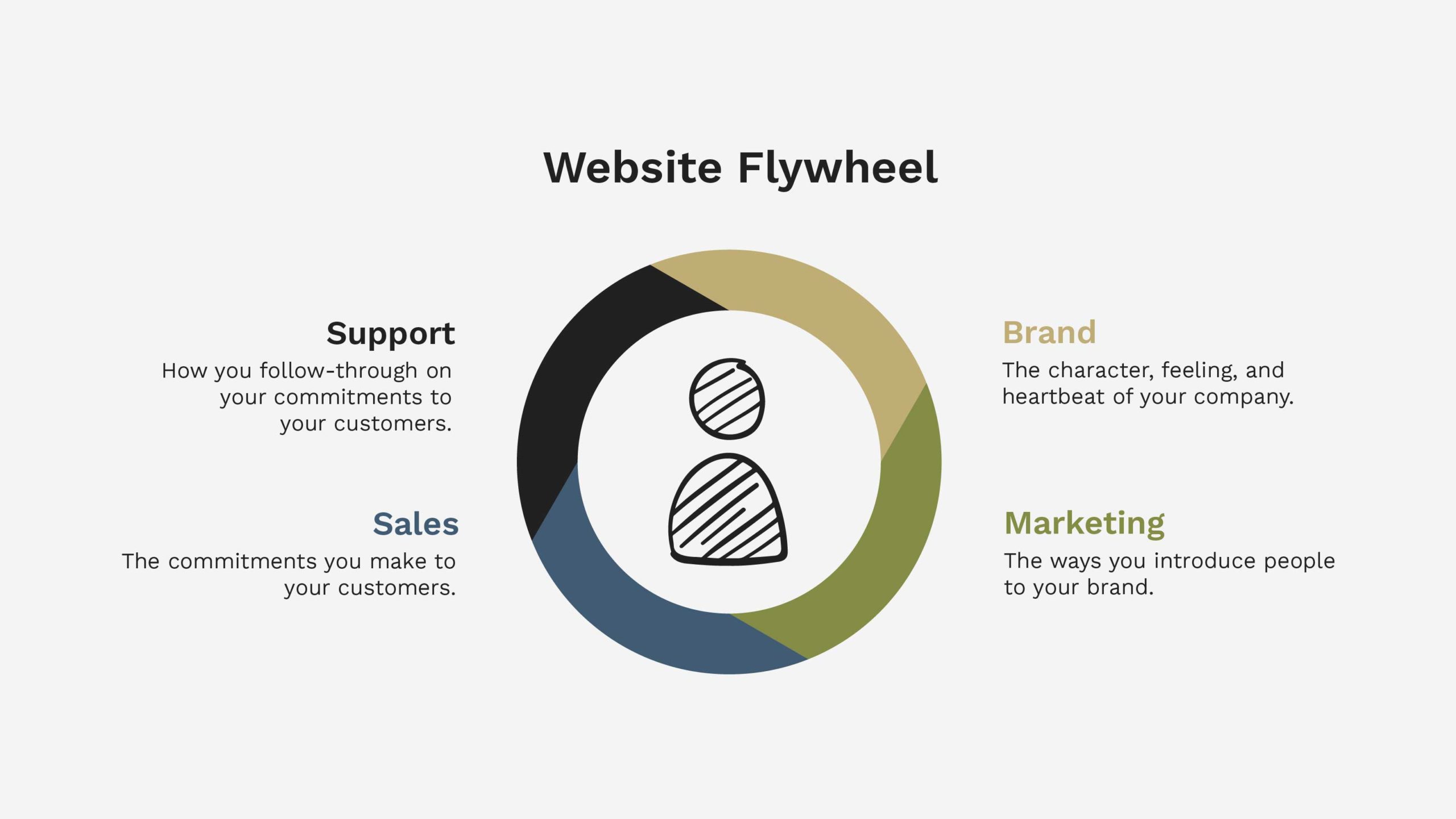
    Your website is more than a brochure, a billboard, or a logo. It’s what we call the “flywheel” that digitally connects the company and moves it forward. 

    Unfortunately, the problem you’re likely facing is that websites are complex. And yours is no exception.

    If you’re building a new website, you must ensure you’ve covered your bases. If you’re redesigning a website, you probably have a few additional things you’re already concerned about, like traffic, SEO rankings, brand reputation, conversion rates, and more.

    You know that during your website project, many things could go wrong. It’s true, and research backs it up. 80% of website launches fail, and these failed launches cost an average of $55,000 plus an additional $115,000 over the next 12 months to fix.

    If you follow this website launch plan, that won’t happen to you.

    Get a FREE Customized Digital Growth Plan

    Take our 10-minute Digital Maturity Assessment and receive a FREE, personalized digital growth score that uncovers gaps and drives your business forward.

    Take the Free Assessment →

    Why you’ll love this website launch plan 

    Most website launch plan how-to’s, guides, and checklists are written for designers or developers.

    They’re not actionable enough, and they get too deep into the weeds regarding technical items that you, as the marketing manager or business leader, aren’t thinking about… nor want to think about.

    Marketing Manager Popping Champagne Cork After Website Launch

    This guide was written with leaders in mind so that you could plan and manage a successful website launch, ensuring that you don’t miss any vital pieces along the way.

    Keep reading to learn how to launch smoothly and accomplish your team’s goals. 

    It’s worth noting that this guide is non-technical, and everything is explained in plain English. So don’t worry if you are unfamiliar with domains, hosting, CMS, etc. I’ve included clear, strategic guidance for every step along the way.

    7 website launch best practices for marketing and business leaders

    Launching a website is a pivotal moment for your business. As a marketing or business leader, you understand its unique challenges.

    To help you navigate this crucial process, let’s delve into seven best practices tailored to your needs.

    By implementing these best practices, you’re well on your way to a successful website launch. Every step you take, from meticulous planning to post-launch management, plays a pivotal role in shaping your online presence and achieving your business objectives.

    1. Slow down and take time to make a plan

    Before you rush into the website launch, it’s essential to pause and create a comprehensive plan.

    As a leader, you understand the significance of setting clear objectives and strategies. A well-structured plan, like the one you’re about to create, sets the stage for a successful launch.

    2. Focus on how it works, not just how it looks

    If you haven’t already, you must recognize that aesthetics alone won’t guarantee the success of your website.

    Ensure that the website’s functionality is seamless. Prioritize the user experience (UX) by considering how visitors will interact with your site. User-centric design goes beyond vision into function, leading to higher satisfaction and conversion rates.

    3. Build a team of technical experts

    You can’t build your website alone.

    Building a website requires technical expertise, which is why, as a leader, assembling the right team is crucial. Consider hiring skilled developers, designers, and digital marketing specialists to ensure your website is robust, secure, and high-performing. 

    4. Invite your target audience to test your website

    Engaging your target audience in testing is a strategic move to get honest user feedback.

    Before the official launch, involve a select group from your audience to uncover hidden or overlooked issues, ensuring that your website meets their expectations.

    5. Keep an easy-to-access backup of your current site

    When your new website goes live, you’ll realize that your customers aren’t the only ones who have to learn a new layout.

    That’s why you’ll love having a readily accessible backup of your current website to reference.

    This precautionary step ensures you can find the information or regularly reference—and quickly revert to the previous version if unforeseen issues arise during the launch.

    6. Line up post-launch support

    In the same way, a marriage is much more than a wedding; it’s essential to plan beyond launch.

    Retain your team long enough, or bring in some extra support for the week or two after launch to monitor website performance and address unforeseen problems (God forbid there are any!).

    Have a dedicated support plan in place to handle these post-launch responsibilities effectively. Your proactive approach ensures a smoother transition and ongoing success.

    7. Outsource website management

    Recognizing your time is valuable, consider outsourcing website management after the launch.

    Delegate security updates, content updates, and performance optimization tasks to experts who can handle these technical aspects efficiently.

    This decision will save you 2-3 hours per week and allow you to focus on your core business objectives while experts manage the intricacies of website maintenance.

    Get a FREE Customized Digital Growth Plan

    Take our 10-minute Digital Maturity Assessment and receive a FREE, personalized digital growth score that uncovers gaps and drives your business forward.

    Take the Free Assessment →

    5 stages of a successful website launch plan

    As a marketing or business leader, you’re acutely aware that the success of a website launch hinges on addressing specific challenges. Let’s dive into the five stages of a successful website launch plan to assist you in this endeavor.

    Each stage builds on the previous stage to accomplish your plan.

    Marketing Leader Planning Website Launch with Team

    1. Define – Plan a website strategy

    The first step to creating a successful website launch plan is defining a website strategy that aligns with your unique business goals and objectives.

    Consider your target audience, market trends, and the competitive landscape. Doing so will create a roadmap tailored to your needs, setting the stage for a successful launch.

    At the core, your website strategy should include the following information:

    1. Basic company information
    2. Who is on your team
    3. The vision for your website
    4. A competitive analysis
    5. Brand documentation
    6. Your buyer’s journey
    7. A sitemap of your pages
    8. Content plans for each page
    9. Technology requirements
    10. Website build budget

    At Structure, all website projects start with a strategy. Our clients can bring an existing strategy to the table for us to implement or work together on a strategy in our Website Workshops.

    In the Website Workshops, we walk our clients through a detailed worksheet for each of the 10 pieces of information listed above so they hit the ground running. It’s incredible how much confidence a documented Website Plan can give your team.

    2. Design – Mockup your website for all devices

    Putting yourself in your audience’s shoes is crucial in the design stage.

    Craft mockups of your website that cater to all devices, ensuring a seamless user experience for your visitors. Consider the challenges and preferences of your target market and design with them in mind: this user-centric approach, which you’re adopting, results in a visually appealing and functional website.

    Depending on your budget, you’ll want to hire a freelance designer or a web design agency like Structure to help with this step. The goal is to lay out a design that follows your Website Strategy.

    3. Develop – Build your website pages and functionality

    When developing your website, you’ll build the site to match the designs completed in the previous step.

    Furthermore, this is where you ensure your website functions seamlessly to meet your goals, technology, and users’ needs documented in the Website Plan. You’ll have a website that works harmoniously with your business goals if you can accomplish these things.

    Like Step 2: Design, you’ll also want to hire a freelance designer or a web design agency here. Depending on your website plan, website development can get pretty complicated, no matter what industry you serve or your business type.

    4. Manage – Ensure your website runs smoothly

    The post-launch phase requires vigilant management.

    As a leader, you understand the importance of a smoothly running website. Devote resources to ongoing maintenance, security updates, and performance optimization.

    Establish processes that address the issues you’re concerned about, ensuring your website meets your high standards consistently.

    Specifically, you’ll want to have a system to cover your bases:

    • Daily site backups
    • Weekly testing of forms and conversion funnels
    • Monthly plugin and software updates
    • Performance reporting and monitoring
    • Quarterly review of website content for accuracy
    • Test device and browser compatibility
    • Review and optimize the UX
    • Annual performance optimization
    • Annual technical SEO optimization

    5. Grow – Drive traffic, leads, and sales

    Ultimately, the success of your website launch is measured by its ability to drive traffic, leads, and sales.

    But you can’t do that if your website doesn’t work. In this last stage, you’ll implement marketing campaigns that resonate with your target audience.

    Then, you’ll continuously refine your approach based on your unique challenges and opportunities. The growth phase is where your website fulfills its potential.

    Get a FREE Customized Digital Growth Plan

    Take our 10-minute Digital Maturity Assessment and receive a FREE, personalized digital growth score that uncovers gaps and drives your business forward.

    Take the Free Assessment →

    Follow this checklist when you launch your website

    When it comes to the actual launch of your website, pressure can build.

    The worst thing to do is get there and need help figuring out what to do with yourself. That’s why we put together this no-nonsense website launch checklist—so you know exactly what actions you need to take to direct and manage your team.

    Marketing Team Smiling with Website Launch Plan

    It’s not exhaustive; we did that intentionally so you could focus on the essentials. The checklist comprises two launch phases: pre-launch and post-launch. It starts when you’re ready to launch your new website and ends after you’ve verified the site works as intended.

    Pre-launch website checklist

    • Make sure the text is accurate and error-free
    • Replace all placeholder images with final images and designs
    • Check that all styling preferences have been implemented
    • Ensure that rights to images, fonts, and other content have been appropriately licensed or cited
    • Test the site on desktop, mobile, and tablet devices
    • Test the site on Chrome, Safari, and Firefox browsers
    • Test all forms, entries, checkout processes, and integrations thoroughly
    • Create an easy-to-access backup of your website
    • Ensure regular backups are scheduled
    • Pause marketing communications and digital ads

    Post-launch website checklist

    • Visit your URL
    • Ensure your website Privacy Settings allow search engine indexing
    • Search and Replace DEV or STG URLs with new PRD URLs
    • Run a Technical SEO site audit to quickly identify any significant issues preventing customers from accessing your site
    • Make sure the text is accurate and error-free
    • Check that all styling preferences have migrated correctly
    • Test the site on desktop, mobile, and tablet devices
    • Test the site on Chrome, Safari, and Firefox browsers
    • Test all forms, entries, checkout processes, and integrations thoroughly
    • Make sure all links work correctly
    • Resume marketing communications and digital ads

    Successful website launch examples from Structure

    The proof is in the pudding. This website launch plan has worked for hundreds of Structure web design clients and will work for you, too. While every website is different, the process is the same.

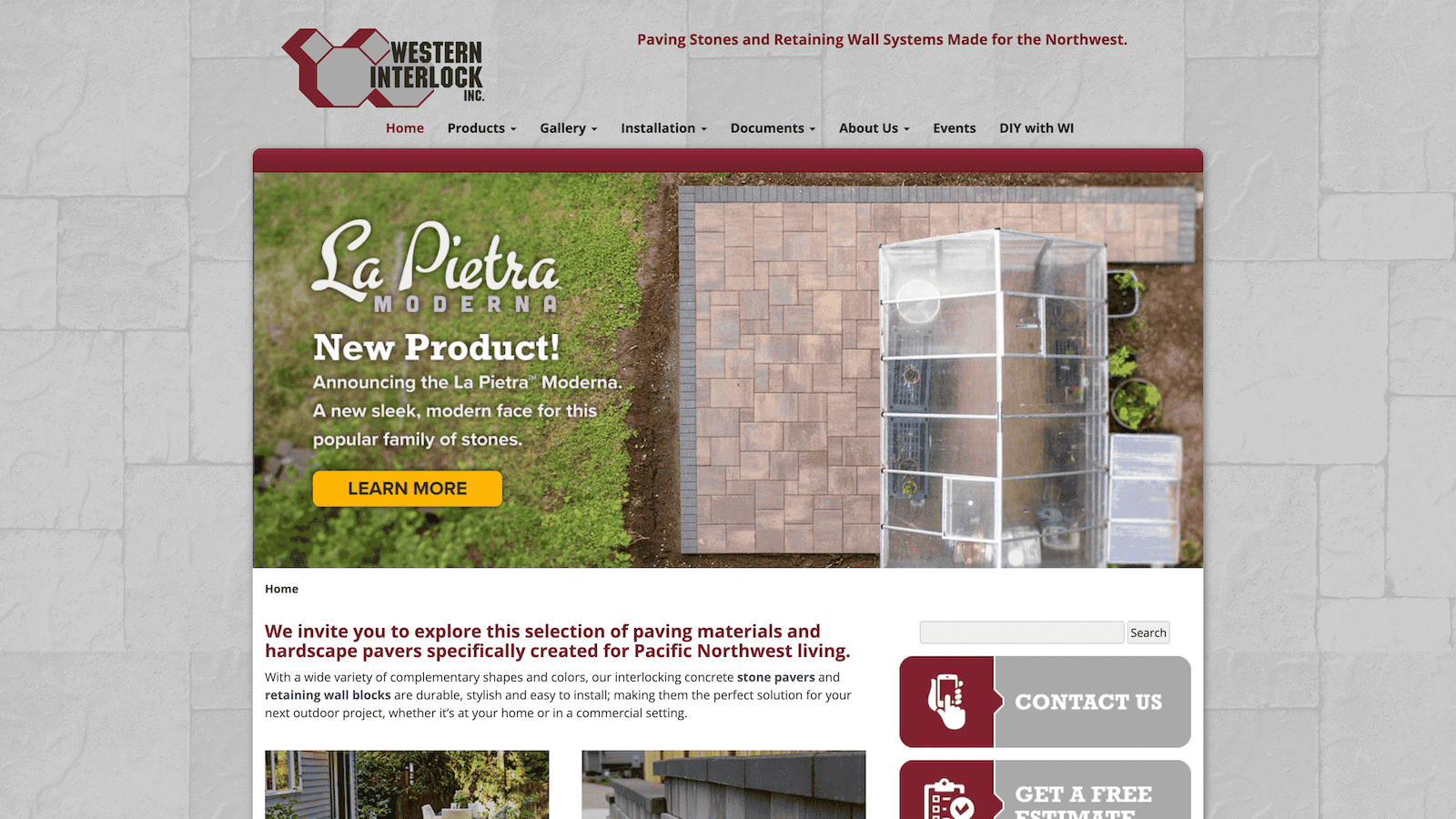
    1. Western Interlock

    The Western Interlock website needed a new look to align with its brand and accommodate high-traffic DIY blog content while ensuring easy navigation. 

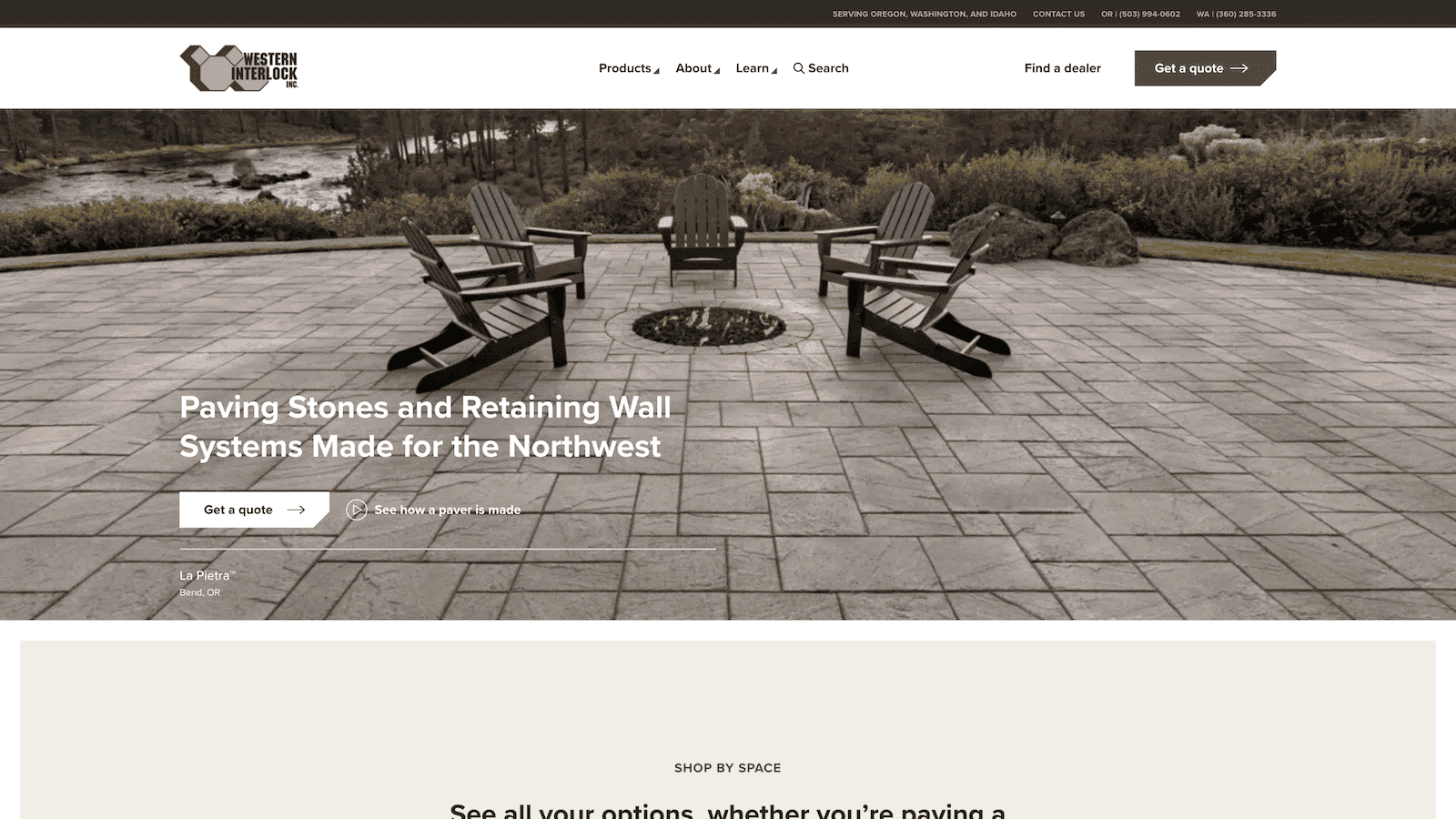
    The solution involved a brand refresh and a streamlined information architecture for user-friendly navigation. 

    The outcome is a visually appealing and fast website optimized for mobile and engagement. Shortly after launch, estimate requests and traffic more than doubled, making it a successful transformation. Specifically, a 65% increase in users and a 2.9% decreased bounce rate.

    western interlock — Before
    western interlock manufacturing website
    western interlock — After

    They are the only vendor that I’ve ever met that gets down and dirty to make sure work gets done well and on time.

    NATHAN, DIRECTOR OF MARKETING

    2. Totem Mats

    Totem Mats faced the challenge of an outdated and underperforming website that needed redesigning and additional features without losing organic search traction. They also required lead integration with Salesforce. 

    The solution involved a complete website overhaul, including visual enhancements, product page restructuring, and performance optimization. 

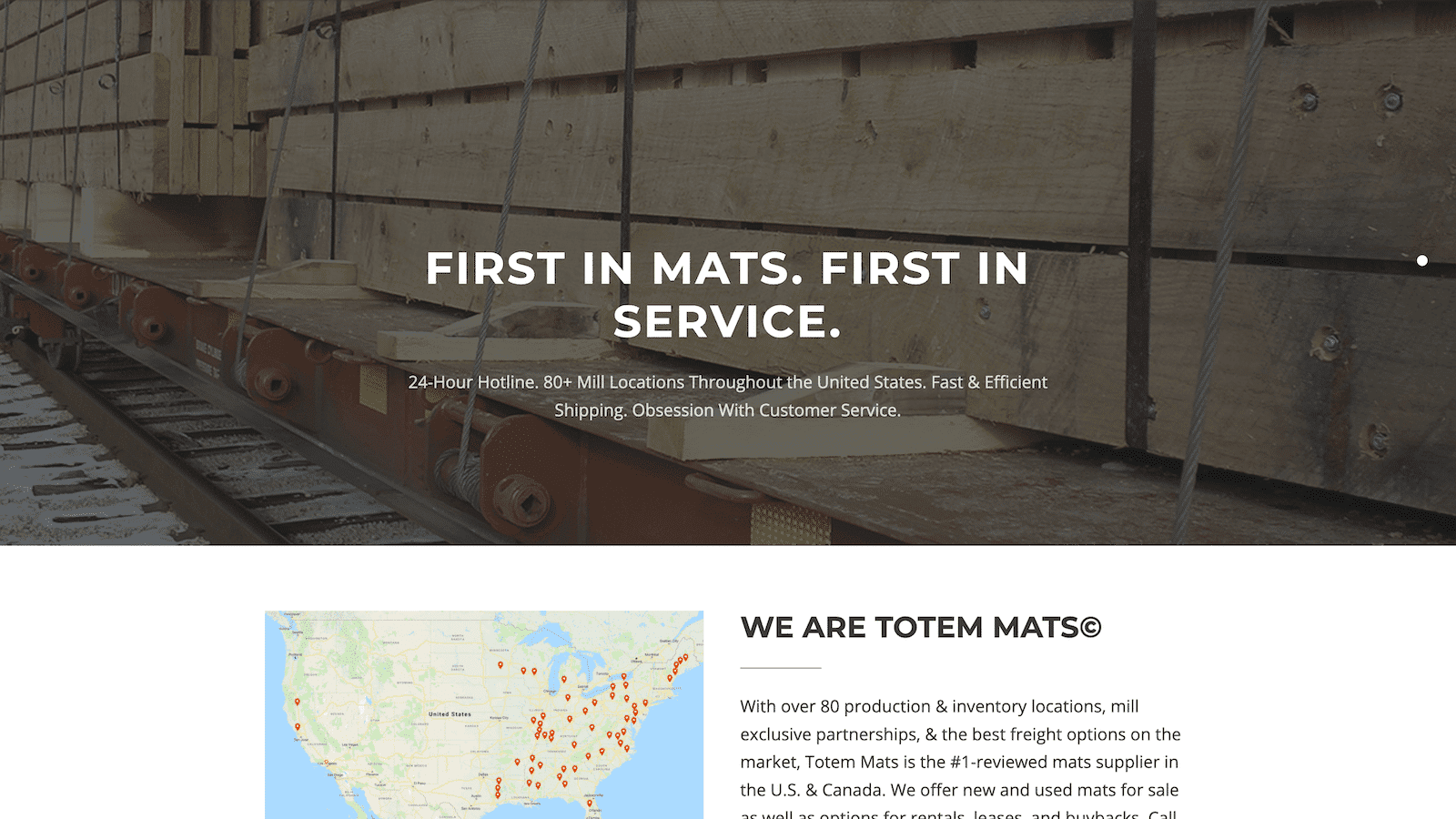
    The result was a seamless website launch with no traffic losses, a 69% increase in SEO traffic, improved lead generation, streamlined business processes, and increased confidence in the website’s appearance and functionality.

    Totem Mats — before
    totem mats — after

    Their continued efforts on everything we threw and their abilities to overcome challenging problems were incredible.

    Trevor Sarazin, CEO

    3. Shasta Power

    Shasta Power faced the challenge of needing a professional website but encountering design firms that didn’t consider their unique business needs. 

    The solution involved a comprehensive website process, starting with understanding goals, then a brand refresh, and creating a custom, responsive WordPress website with integrated business systems. 

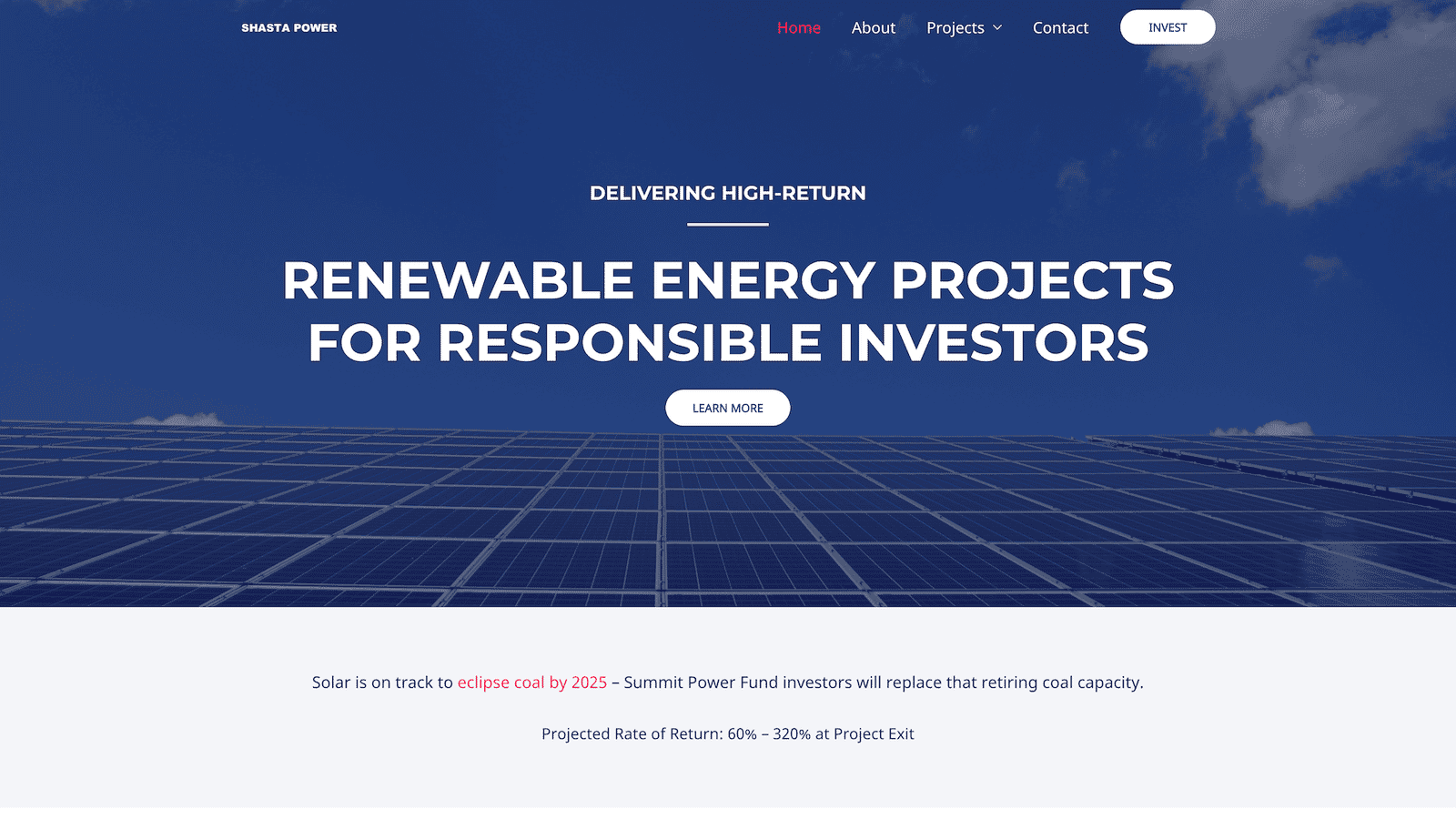
    The results were impressive, with a significant increase in awareness metrics, including a 600% rise in new followers and a 200% increase in site visitors. Despite a tight timeline, the brand’s quality was maintained, showcasing the project’s success.

    Shasta Power — before
    Shasta Power — after

    I get a sense of honesty and quality from them; they take their work seriously.

    MAX, co-FOUNDER

    Pro tools and resources for developing a website launch plan

    Developing a comprehensive website launch plan requires access to various tools and resources. Here are some valuable tools and resources we use regularly and will assist you in creating a successful website launch plan.

    1. Free website planning guide PDF

    If you haven’t yet, download our free Website Design Planner to streamline your web design planning process and ensure a clear roadmap for your project.

    Most website planners are just dressed-up spreadsheets that are boring and analytical. The Structure Website Planner is fun and helps you organize your goals and tasks to ensure you create your desired website.

    2. Virtual website workshop

    Register for your team’s private on-site (or virtual) website strategy workshop.

    In our fun and productive workshop with Structure, you’ll get coaching, feedback, and plans from website experts so you know you’re doing it right.

    3. Slickplan website planning tool

    If you’re semi-technical and detailed regarding digital strategy, Slickplan offers a low-cost digital website planning tool that covers much of the in-the-weeds planning.

    It’s a great tool to complement the Structure Website Planning Guide PDF if you’re doing it yourself.

    4. Structure web design, development, and management services

    If you’re not looking to do any work yourself but are just looking to hand the website project off to a team of experts, that’s okay!

    Structure can manage and complete the entire website launch planning and implementation process from start to finish.

    We’ve streamlined the sub-standard web design experience you get from most local agencies, so you’re in safe hands.

    5. WordPress & WP Engine

    If you’re looking for a fail-proof CMS + Host combo, go no further than WordPress and WP Engine.

    They’re industry-leading platforms that are the ones to beat. Being the most familiar platform + managed hosting, you will make your work easier regarding website launch plan implementation. 

    Common questions about how to launch a new website

    How do you announce a new website launch?

    When launching a new website, think of it like a food product label update in the grocery store.

    Customers care if it still meets their needs, not just the look. So, introduce your website as an improvement for them, not just a design change. And just like the food label, skip shouting it on external channels; instead, focus on welcoming users with a video or announcement bar on your site.

    What are the steps to launch a website?

    The steps to launching a website, from beginning to end, are:

    1. Define your goals
    2. Design your pages
    3. Develop your CMS
    4. Manage your website
    5. Grow your business

    For more detailed information, scroll back to the 5 Stages of a Successful Website Launch Plan section.

    How do I launch and promote my website?

    If you’re launching a new or redesigned website and need to promote it, here are the three next steps:

    1. Write blog articles about your product or service
    2. Run Paid Search ads to help people find you right away
    3. Create a free offer to generate leads and provide value to your customers

    What is the best day of the week to launch a website?

    Your buyer’s needs in this area are unpredictable. However, website launch timing matters for your business.

    For that reason, Tuesday is ideal.

    Mondays are for final preparations, and launching after Thursday risks a weekend workload. Tuesday offers a buffer with Wednesday and sets you up for a smooth week ahead.

    How long should it take to launch a website?

    3-6 months, on average. Most simple websites launch within three months, and websites with a standard level of complexity launch within six months.

    However, as you know, websites are complex. Therefore, there’s no definitive way to pinpoint a boilerplate website launch timeline. At Structure, we’ve launched websites in as little as 30 days and as long as two years. It all depends on the complexity, team, goals, and budget. 

  • Why Structure Uses WordPress CMS for Website Development

    Why Structure Uses WordPress CMS for Website Development

    One of the first questions we get during a Consult Call is, “Which website platform should we use, WordPress?”

    Our clients often suggest using WordPress alongside other platforms like Shopify, Squarespace, or HubSpot. But they almost always suggest WordPress because it’s the most popular Content Management System (CMS).

    There’s a reason The New York Times, Forbes, eBay, The Walt Disney Company, and Best Buy (among others) are powered by WordPress.

    However, when planning a website revamp, many decisions can feel crushing. An abundance of free resources is available to assist you with optimizing your site’s design and copywriting. However, choosing a suitable CMS can still be a tough decision.

    At Structure, we specialize in designing and developing custom WordPress websites. That’s the bulk of what we do. We also help our clients with web strategy, website management, and digital marketing. But most projects start with a custom WordPress website.

    Why a Custom WordPress Website is Valuable

    Most marketing starts with a custom WordPress website or landing page. This is because your website is at the heart of all your marketing efforts—digital and traditional.

    In our free webinar How to Build an Attractive, High-Converting Website That Makes You Proud, we discuss your website as a flywheel. Let me explain.

    Website Flywheel

    A flywheel is a mechanical device that conserves angular momentum to store rotational energy. That may sound not very easy, but it’s straightforward.

    A flywheel is a circular device used on trains, tractors, trucks, and any large machine with a big job to increase horsepower and create explosive momentum.

    Your website is like a flywheel. It’s intended to create momentum and be a force multiplier for your marketing and business efforts. And when it’s designed and built to accomplish that objective, more often than not, it succeeds!

    The Glaring Problem with Website Builders, Templates, and Themes

    Need help with a Squarespace or Wix website? We can’t help you (other than help you move your website away from them).

    Those website builders (like Wix, Squarespace, Duda, GoDaddy, Weebly, etc.) don’t help you create a flywheel that multiplies force for your business.

    Instead, they help you create a clusterfuck (pardon my French) of a website. It makes you want to throw your laptop out of your office window.

    Those are not my words, by the way. They came from a recent client who desperately needed help migrating his website from Squarespace to WordPress because Squarespace drove him mad!

    Website builders do this by requiring you to start the entire process by picking a template. Then, jumping right into the building without giving the nod to your goals or unique needs as a business. They skip the entire planning process, assuming you did or will never do it.

    Skipping website planning is a fatal mistake.

    WordPress templates or themes readily available have many of the same issues. It can work if you buy a template or theme that fits your plan. It will fail if you pick a template or theme as your plan.

    WordPress Website Facts

    Here are a handful of encouraging facts.

    • WordPress is used by 42.8% of the top 10 million websites
    • There are over 455 Million WordPress websites, accounting for more than 39% of all websites
    • 62% of Inc. 5,000 websites run on WordPress
    • The New York Times, Forbes, eBay, The Walt Disney Company, and Best Buy are powered by WordPress
    • WordPress has been around since May 27, 2003
    • There are over 58,000 plugins (integrations) available for WordPress
    • WordPress is the web’s most widely used CMS (content management system)

    We all know that facts tell and stories sell. So why does Structure use WordPress, and why do we recommend you use it for your project? Here are the reasons.

    Why Structure Uses WordPress (and You Should Use Too)

    1. WordPress is widely adopted

    As you can see from the facts above, WordPress dominates the website market. This means somebody will always be available to help you with troubleshooting or customization needs.

    I frequently mention this assurance to my clients. If an unfortunate event renders Structure unable to continue working with them, they would have no difficulty locating a developer replacement who could work on their WordPress websites.

    For the record, Structure isn’t going anywhere. However, knowing you’re not choosing an obscure platform only specialists can use is peace of mind.

    We recently migrated a client’s website from a platform called Higher Logic to WordPress. The client is so much happier after the transition. I share this story because Higher Logic is one of those obscure platforms. While some use it, it’s highly specialized and requires paying a high-rate developer to make almost any update.

    2. It is easy-to-use

    There’s a myth that WordPress offers a user-friendly interface that does not require coding knowledge or experience. It does provide a user-friendly interface. But we have to be realistic with setting expectations to ensure that we know not everyone understands it.

    “WordPress does not require coding knowledge or experience” is also misleading. It may not require knowing a coding language like CSS or Javascript. But a basic understanding of HTML and development principles will take a long way.

    If you do not have a basic understanding, you will struggle. That’s precisely why folks hire Structure to help. You value the system WordPress offers, but you don’t know how to manage the technical details of the platform yourself.

    You can easily add pages and posts to your site, customize layouts, create menus and links, upload images and videos, and more. This still makes WordPress an excellent choice for small businesses and large teams.

    WordPress has the potential to provide you with a simple-to-navigate backend CMS. Alas, that doesn’t always seem to be the case. I have conversations with numerous customers apprehensive about using WordPress due to their prior negative experiences while trying cumbersome interfaces.

    WordPress Training & Support

    Our website development packages at Structure include an optional 1-hour recorded training and support video call. In this call, we train you to use your website and navigate WordPress. Furthermore, we include two additional support hours within 30 days of launch. That way, you have no reservations about contacting us for questions, big or small.

    Last but not least, our WordPress websites are designed especially for user convenience. Content can easily and quickly be edited or updated with little technical expertise. We accomplish this by using Custom Fields. You can edit copy or media in the back end without breaking your website on the front end.

    3. It is excellent with SEO

    WordPress’s most powerful benefit is its impact on your SEO (Search Engine Optimization). Some powerful plugins like YoastSEO for WordPress and LinkWhisper can significantly enhance how your website is tagged to rank for Google. It also makes it brain-dead simple to optimize your content for search.

    It’s worth noting that SEO is not automatic, and WordPress doesn’t do all the work for you. However, the data structure allows you to input and optimize data without jerry-rigging anything.

    In short, think of WordPress SEO like T-ball. The baseball is just sitting on the tee—you need to hit it. Same thing with SEO on WordPress. It tees you up, and you have a swing if you know how to hit a ball.

    4. WordPress is owned

    This might be one of the most significant selling points of WordPress. It’s what’s called an ‘open source’ platform. It is accessible worldwide, and you don’t have to pay for a license.

    With a WordPress site, you own the code base and don’t have to pay a license fee to anyone to keep your website. You also can modify and change the code as needed.

    That said, you still have to pay for infrastructure costs like domain and website hosting, which often come all-inclusive with other platforms like Squarespace, Shopify, and Wix.

    5. WordPress is secure

    Website security has always been a concern but is becoming increasingly so as time goes on. As the internet becomes more widely adopted, cybercriminals and hackers (that’s what they’re called!) are getting more innovative and savvier, while website managers are getting more relaxed and trusting.

    If you’re worried about the safety and security of your website, you should be at ease because it’s a secure platform as long as you keep it up to date.

    WordPress security vulnerabilities commonly come from outdated plugins and themes, weak passwords, and other preventable issues. So you’ll need to ensure your WordPress Core, Themes, and Plugins are current. We recommend doing this monthly at a minimum. If you’re particularly concerned, weekly updates are sufficient.

    Managing Security Vulnerabilities

    Most of Structure’s clients don’t want to manage their security, let alone update their website monthly and ensure it is still in perfect working condition. We offer WordPress Website Management packages after completing a website project. We find that most of our clients beg for help in this area!

    All Structure WordPress Website Management packages include these features:

    • Plugin and WordPress Core Updates (monthly)
    • Dedicated Account Manager
    • 24-hour Response Time (during the workweek)
    • Detailed Website Report (monthly)
    • Cloud Backups (daily)
    • Advanced Security (Malware Scans, Firewall, Bot & Login Protection)
    • Activity Log
    • Uptime Monitoring

    The benefit of hiring Structure for WordPress Website Management is ensuring your site is safe, secure, always running 24/7, and working as expected to grow your business.

    6. WordPress is scalable

    WordPress is renowned for its scalability, as it can create a single-page website or an enterprise solution with tens of thousands of pages. The scope of your imagination and budget only limits you. Structure has built websites ranging from one page to hundreds of pages.

    WordPress is incredibly versatile, and you can use it to create any website:

    • eCommerce website
    • Business website
    • Blog website
    • Portfolio website
    • Event website
    • Personal website
    • Membership website
    • Nonprofit website
    • Informational website
    • Online forum

    WordPress is widely used for eCommerce, as well as blogs, news sites, membership sites, auction sites, and more. You can also choose from thousands of plugins and themes, so you’re never limited in design or functionality. 

    Integrations

    As we mentioned in the facts above, there are over 58,000 plugins available. That means there are 58,000+ ways you can integrate your business systems—no matter what they may be—with your WordPress website.

    A few popular plugin integrations we’ve configured are:

    • LearnDash
    • Salesforce
    • HubSpot
    • MailChimp
    • Intercom
    • Zapier
    • Convert Kit
    • Slack
    • Square
    • Authorize.net
    • Stripe
    • ShipStation
    • Airtable

    WordPress is not limited by space or bandwidth. Your website can grow as large as needed without any performance issues. Particularly those that might occur if you used a platform like Squarespace or Wix.

    Website Hosting

    For example, website Hosting is highly flexible and scalable. You’re not trapped by the quality of hosting that Squarespace or Shopify has chosen.

    If you’re a small business start, you can buy cheaper hosting. It will integrate with WordPress.

    Or maybe you’re a growing business with tens or hundreds of thousands of monthly visitors. You can plug in a quality host like WP Engine (our recommendation), which will integrate well.

    The scalable nature of WordPress makes it the ideal CMS for startups and growing businesses.

    7. WordPress is stable

    There’s a big problem with content management systems. Can you tie your business to something new if it won’t be around next year?

    If you’re evaluating some of the website builders out there, you should. be concerned—mainly those created and managed in other countries.

    However, WordPress has been around since May 27, 2003. It is so widely adopted you have the comfort of knowing that, in all likelihood, it’s not going anywhere.

    The platform is continually updated and improved, keeping current with the ever-changing technology landscape. And because it’s open source, developers are constantly working on significant updates, new features, and security patches. This means your website will stay up-to-date and secure.

  • The Expositors Academy E-Course WordPress Website Design & Development

    The Expositors Academy E-Course WordPress Website Design & Development

    OnePassion Ministries, founded by Dr. Steven J. Lawson, came to Structure looking for a professional website to market, sell, and manage their new online course: The Expositors Academy. We came in on the ground floor to define the website strategy, provide a custom design that fits their goals, and develop an e-commerce and learning management system to create a seamless experience for their students.

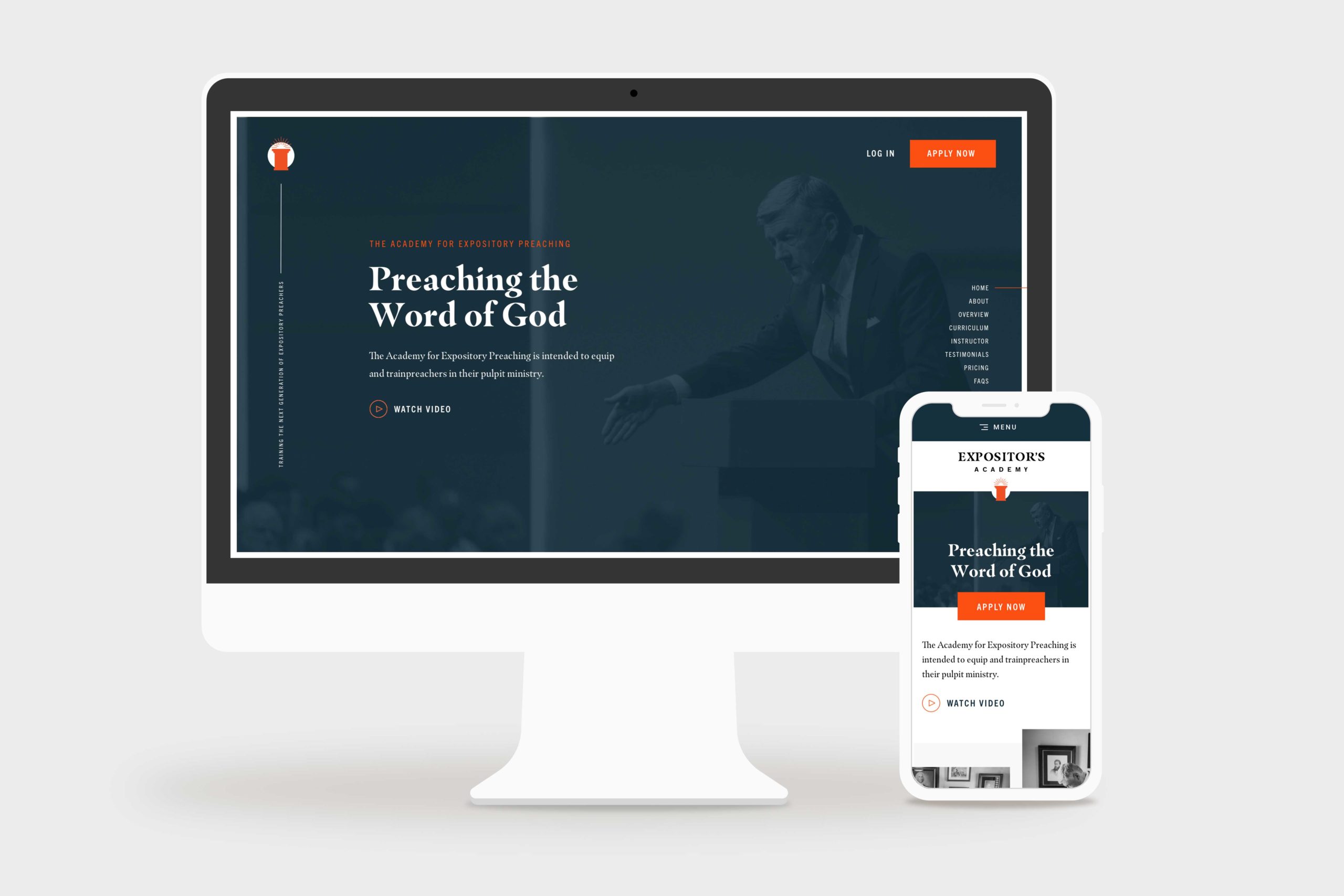
    The Expositors Academy Website Home Page Mockup
    the expositors academy home page hero, desktop and mobile

    Challenge

    One Passion Ministries had never launched a digital product like The Expositors Academy, so they were looking to us for ideas and action. Particularly in coordinating marketing, e-commerce, learning management, and business systems to launch their new course successfully.

    Solution

    Starting with strategy, we took The Expositors Academy through an end-to-end website design and development process. We used a thoughtful platform combination of WordPress, WooCommerce, and LearnDash, to create a first-rate online course experience.

    Results

    Within six months after launch, The Expositors Academy had 125+ students interacting with their platform. Better yet, The Expositors Academy manages the website and the product with little effort—and without constant bugs, issues, and maintenance headaches.

    I have had the opportunity to work closely with Simon and the Structure Team, and I couldn’t recommend them higher. They truly care about the service they provide and ensure that any project they are a part of is delivered with excellence. From creative ideas to execution, they are a professional team that will serve your business well.

    Jackson, Marketing Director

    Website Strategy

    When The Expositors Academy came to us, they were unsure which platforms, systems, or processes they needed to create an online course. 

    As is usually the case, while a website may look simple on the surface, a lot is happening in the background. That’s why we started with a website strategy package to help them plan and define precisely what they needed the website to accomplish.

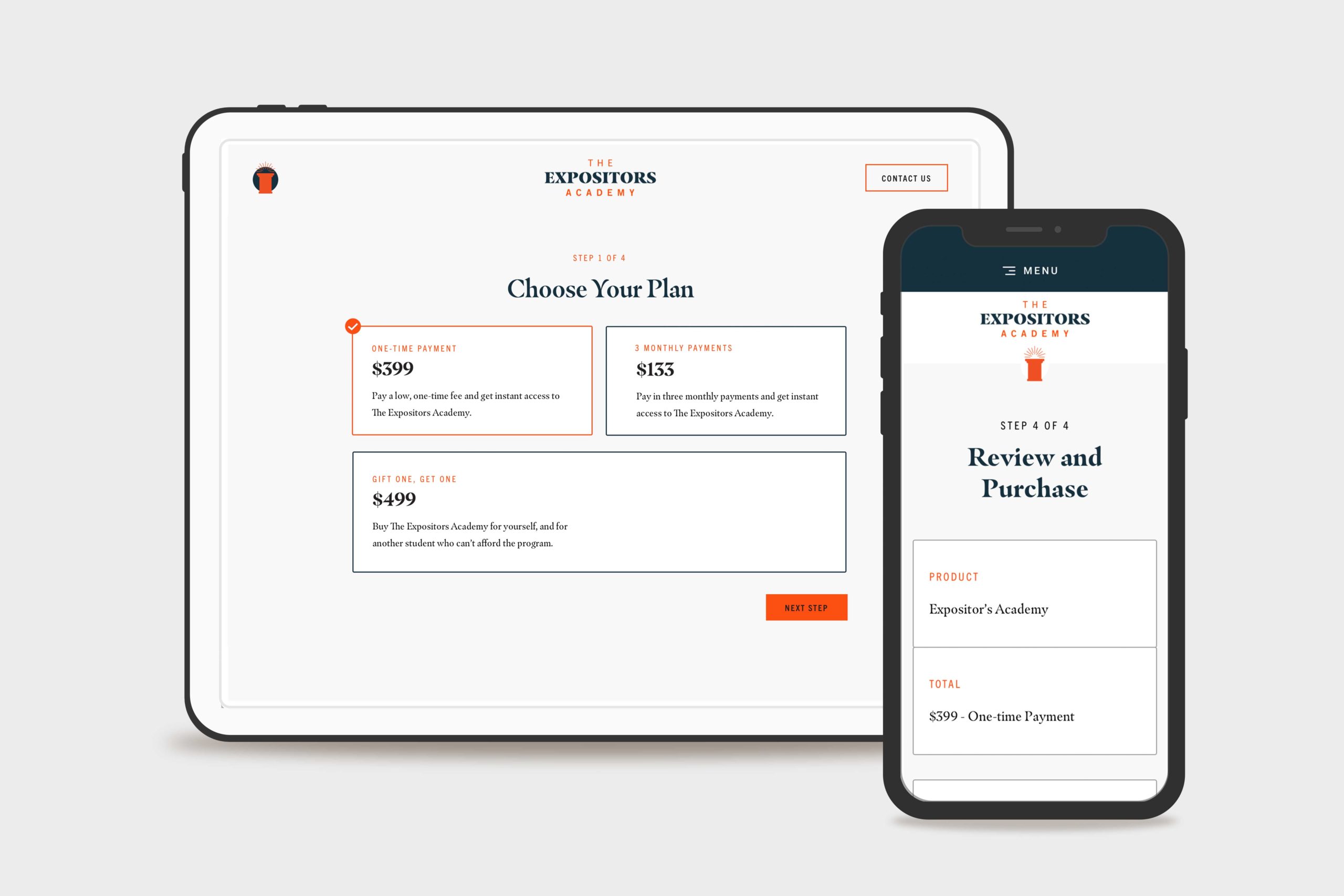
    They wanted three different payment options, including a subscription option and an option to purchase a course license for another student who couldn’t afford it.

    They also had a remote team of assignment graders who needed to keep track of submitted assignments, provide document markup, and communicate feedback directly to the student.

    Last but not least, they needed to automate email communication to students that weren’t keeping up with the schedule, missing assignment deadlines, or hadn’t logged on for a while.

    Our website strategy team researched the best learning management system to fit their needs. We evaluated different options like Teachable, Thinkific, Kajabi, and others. However, those options didn’t integrate easily with The Expositors Academy business systems and became cost-prohibitive when providing user accounts for dozens of graders to do their work.

    That’s when we landed on LearnDash because it fit their requirements and perfectly supported their sitemap and customer journey. 

    The Expositors Academy Website Custom WooCommerce Checkout Flow Mockup
    The Expositors Academy Website Custom WooCommerce Checkout

    Website Design

    Next, we began website design. The website design process resulted in 15 screens of ready-to-build, fully-responsive marketing, ecommerce, and online course designs.

    Marketing Website Design

    To keep the website simple and fees as low as possible, we designed a simple three-page marketing website to generate leads. The three pages were Home, Application, and Contact.

    • Prospective students could learn about the course and curriculum on the home page.
    • They could apply for the program on the application page and ensure they were the right fit.
    • On the contact page, users could ask questions or inquire about details they needed clarification on.

    E-commerce Design

    Furthermore, we designed a custom e-commerce experience that seamlessly guided students through Payment Options, Checkout, and Account Creation for the course. When they finished the checkout process, they were logged into the course and ready to start.

    Learning Management System Design

    Lastly, we customized the LearnDash course dashboard by combining The Expositors Academy brand styles with the default layouts provided by the plugin (including a few interface improvements, of course!).

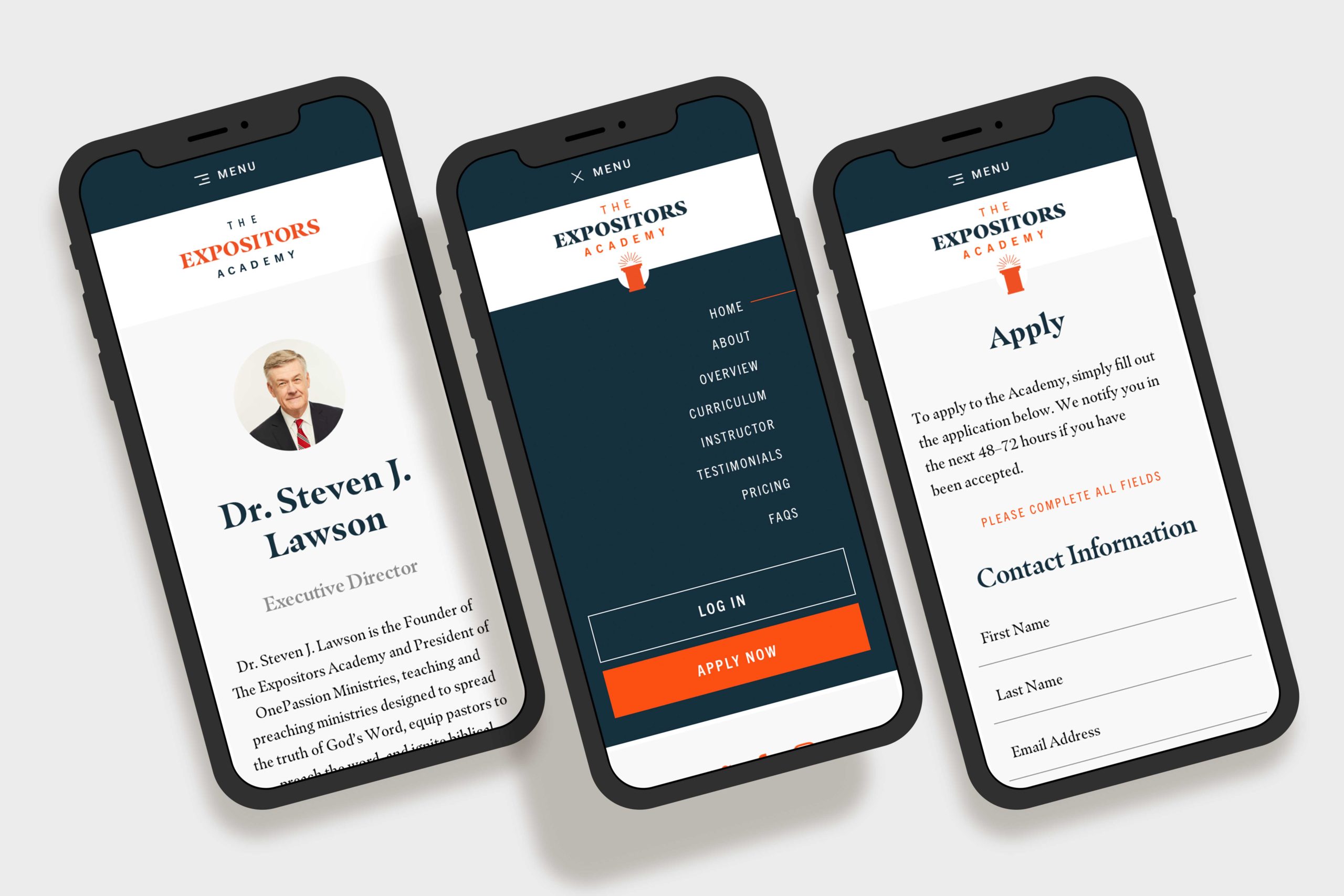
    The Expositors Academy Website Mobile Mockups
    The Expositors Academy Mobile Mockups

    Website Development

    The Expositors Academy was already familiar with WordPress CMS since we used it to build OnePassion.org, one of the other websites. 

    Front-end Website Development

    We developed a custom theme for The Expositors Academy built according to the design spec. We included custom Javascript animations from the Animate On Scroll Library to enhance user experience.

    Additionally, the website design called for a few other features like a nested accordion to house the curriculum information, an on-page navigation to help the user navigate the landing page sections, and a dynamic testimonial carousel.

    Back-end Website development

    We used WordPress and the LearnDash LMS WordPress plugin as the learning management platform. It was a helpful integration, so they could keep their marketing site and learning management system in the same place (and not have to manage multiple platforms).

    Using Genesis Custom Blocks with embedded Custom Fields, we set up the backend so they could edit the website content independently without breaking any formatting.

    Then, we integrated WooCommerce with WordPress and LearnDash, which made product creation, payment processing, order tracking, and more a breeze. Not to mention keeping the entire customer journey under one roof, from awareness to advocacy.

    QA, Training, and Support

    After populating the content we’d written and doing a thorough quality assurance process, we trained The Expositors Academy on a recorded video call. They walked away from the call with a thorough understanding of how the site worked and a recording and documentation for future reference.

    Final Thoughts

    The Expositors Academy online course WordPress website design and website development project is one we’re proud to share. It took months of united planning and preparation, with an incredible result.

    Ultimately, the website platform we built allowed the OnePassion Ministries team to enter the market in a new way and further their vision of training new expositors—and helping them reform the church.

    For additional reading, we designed and developed the nonprofit website for OnePassion Ministries at OnePassion.org .

  • Shasta Power Website Redesign

    Shasta Power Website Redesign

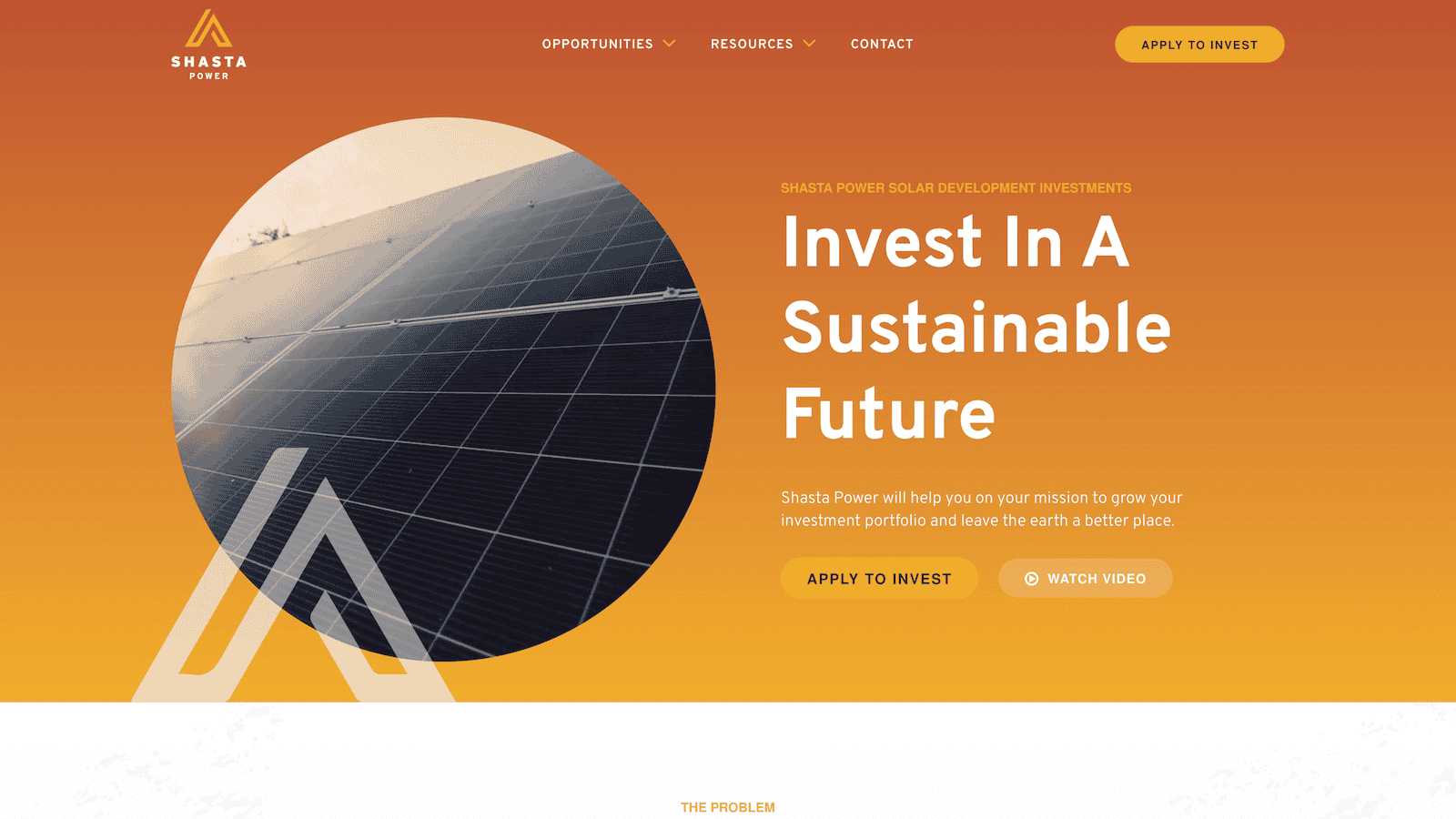
    Shasta Power came to us with an outdated, confusing website that didn’t represent their offering well. So we helped them revise their visual identity and message—culminating in an impactful website redesign.

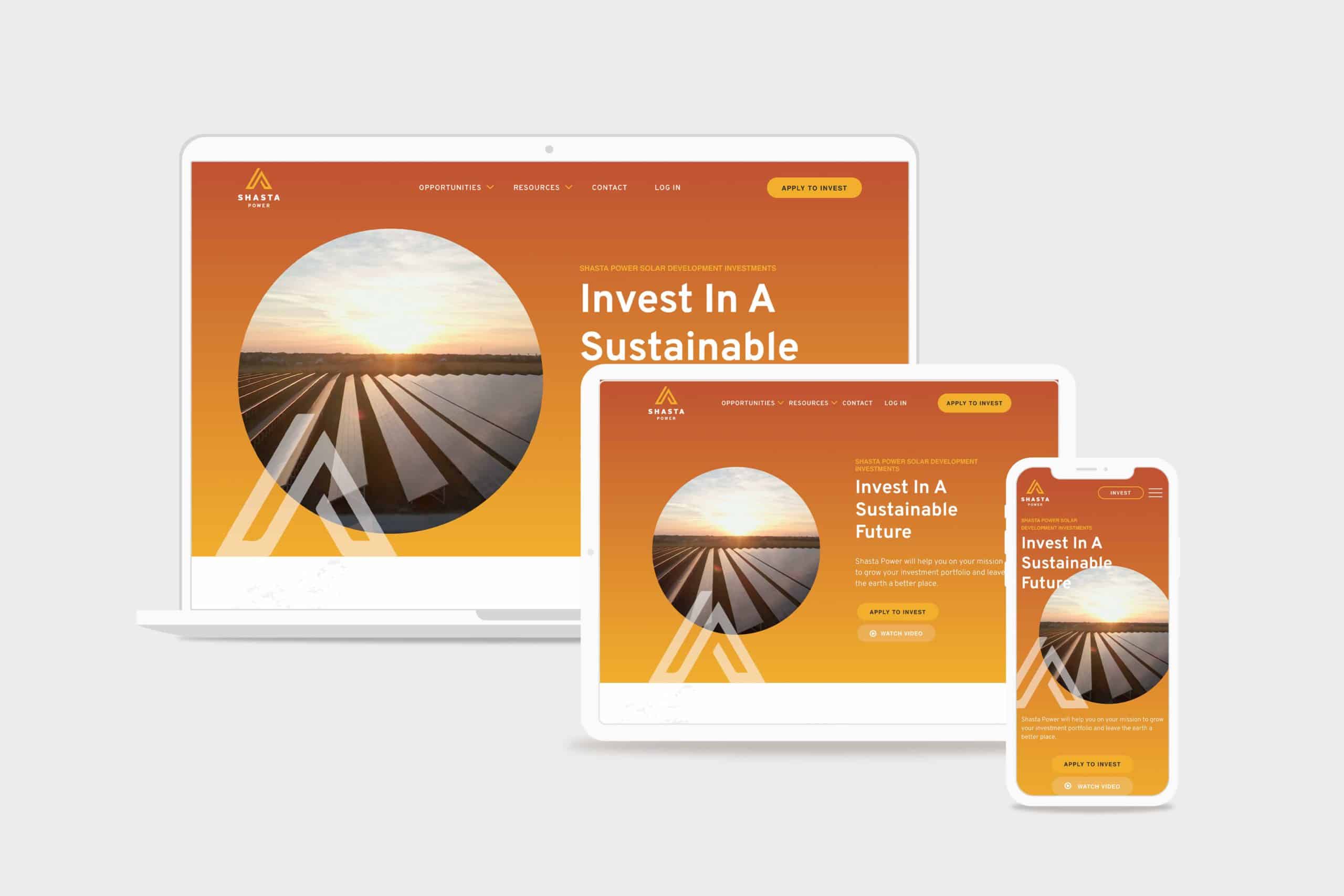
    Shasta Power Website Redesign Hero
    shasta power hero

    Challenge

    Shasta Power built its first website on a budget. It was time to invest in a professional website, but the other website design and development firms Shasta Power spoke to wanted to throw them into a box. They didn’t listen or care about the business or user’s needs.

    Solution

    We took Shasta Power through our Website Process, starting with understanding the website goals. We then did a brand refresh and designed a custom, responsive website. The website development was on WordPress and integrated its business systems with the website

    Results

    Awareness metrics have risen across the board, including new followers and site visitors, up over 600% and 200%, respectively. We worked quickly against a short timeline while maintaining an impressive quality standard for the brand.

    Shasta Power Website Redesign Before
    shastapower.com before
    Shasta Power Website Redesign After
    shastapower.com after

    If I had to boil it down to one thing, I would say their integrity is their best quality. I get a sense of honesty and quality from them; they take their work seriously and do it in a professional manner.

    max roe, partner
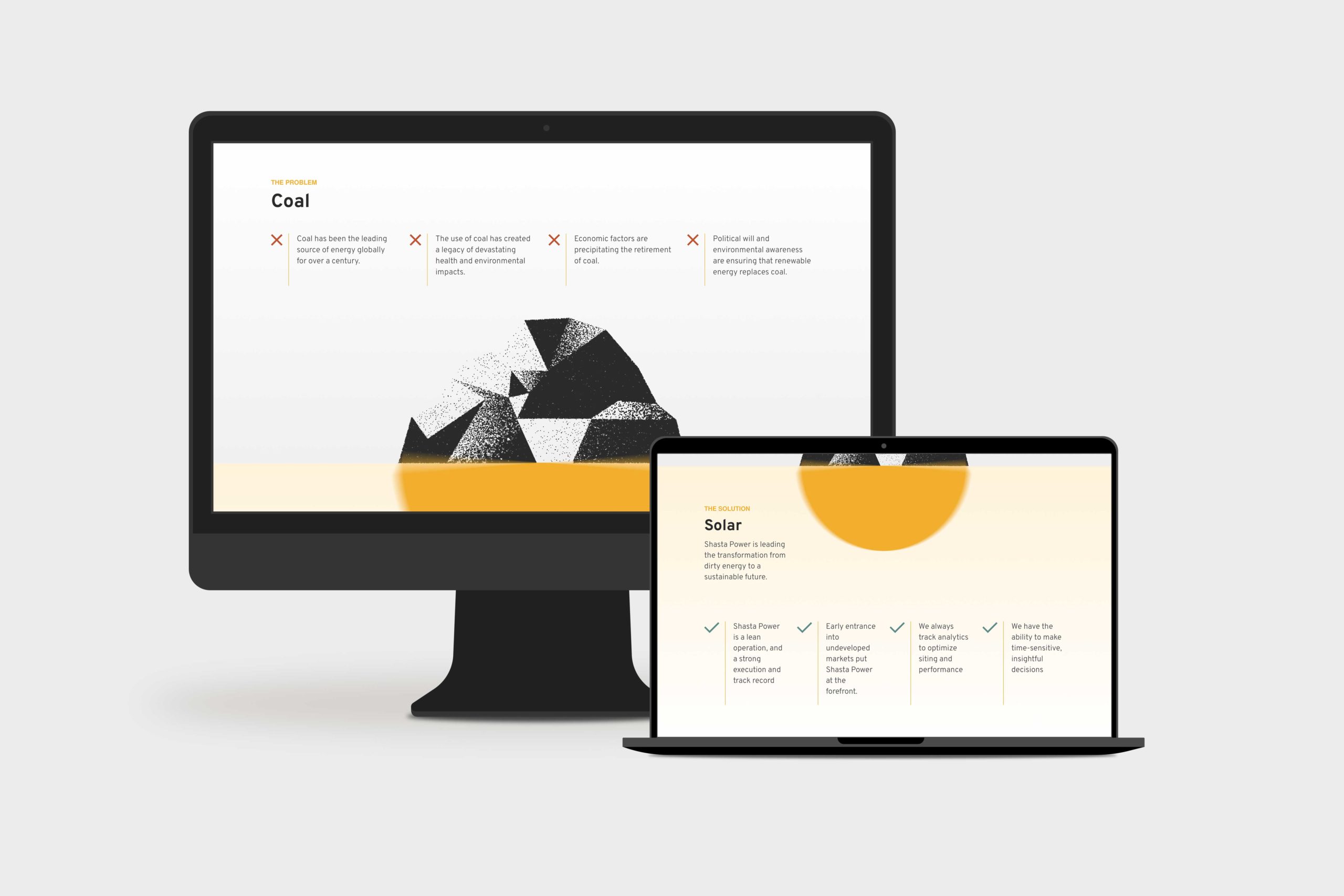
    Shasta Power Website Redesign Product Page
    summit power fund product page

    Logo Design

    When Shasta Power came to us, they didn’t have an official logo. So the first thing we did was explore logo options for their new website design. We delivered a handful of comps, ideas, and styles for them to review. After a few iterations, we landed on a logo that was strong, confident and represented Mount Shasta—the symbol behind the brand.

    Similarly, Shasta Power didn’t have any colors representing its product or mission. As a company as a solar investment firm, we developed a pallet that represented the earthy nature of their work. We lead with a solid orange and yellow gradient, with supporting blue, green, and clay colors representing the environments they develop in.

    Website Design

    As with all website design, you can’t have a great beautiful site that makes no sense. So we invested heavily in information architecture, wireframing, and content development. This strategic process helped ensure the site helped users progress through the content and was simple and easy to understand—all the while representing Shasta Power in its best light. Once we had the blueprint down, we applied the brand, and it turned out beautifully.

    Shasta Power wanted to use its website to generate leads, so we built a custom webinar registration flow. This included a landing page template they could use and replicate for any webinars they host for marketing or customer engagement. Additionally, it had a registration form and a webinar video page where they could embed their live content for users to engage with.

    Website Development

    Shasta power was familiar with WordPress CMS, which we love to build with. So we built their new site in a very similar way to their old site using a custom theme and Advanced Custom Fields content editing fields. This kept the entire experience familiar and allows them to swap out photos and make copy changes when they want to without worrying they’re going to break anything.

    On the front end, Shasta Power added an Animation Package so that the content fades smoothly as a user scrolls down the site. This small addition makes a massive difference for the user and helps them stay focused on the contact right in front of them while guiding them through the site.

    Website Management

    Shasta Power took advantage of our Startup Website Management Package, so they didn’t have to worry about regularly updating WordPress core, theme, or plug-ins. They also appreciated being able to reach out to us here and there to update content on the site or ask questions without starting a new project.

    Moreover, Shasta power has trusted us as an ongoing partner to help them grow their website through additional digital marketing initiatives.

  • 5 Stages of a Successful Website Redesign Process That Works Every Time

    5 Stages of a Successful Website Redesign Process That Works Every Time

    Redesigning a company website can feel intimidating, especially if you’ve never done it before or you’re already overwhelmed by the projects on your plate. It’s so much easier when you have a proven website redesign process to follow.

    In this article, we will walk you through the Structure Website Redesign Process that we’ve used for hundreds of clients over the last five years (September 20, 2023, at the time of this writing).

    To cut to the chase, we have a 5 Step Website Redesign Process that works every time (if you follow it!).

    1. Define
    2. Design
    3. Develop
    4. Manage
    5. Grow

    You can do these steps on your own or with your internal team. You could probably get a solid head start with this article and our Free Website Redesign Planning Guide.

    However, if you’re considering hiring an expert to help with your website redesign project, it’s much easier to trust someone who has a plan and has worked on it repeatedly.

    Unfortunately, you don’t get that with most local web design agencies or freelancers.

    This 5-Step Website Plan is the same process we’ve used for clients in executive coaching, manufacturing, private equity, e-commerce, cannabis, consumer packaged goods, and many more.

    If you’re in one of those industries, that’s great! But even if you’re not, this website redesign process will still work for you.

    And even if you’ve got a small website or spinning off a new one, you can use this process. While it’s perfect for a website redesign, it works great for a new website.

    Let’s build a website that keeps your customers hooked.

    Step 1: Define – Website Planning

    A website redesign isn’t art.

    It’s science.

    Unfortunately, in the many website redesign projects we’ve worked on, the primary problem with any web project that doesn’t meet goals or expectations is a failure to plan.

    Of course, at Structure, we start with planning. So that’s not an issue when you work with us.

    But in my experience as a digital marketing veteran at software companies and agencies, the same website issues have come up over the years.

    And they all come back to one thing: failure to plan.

    It’s not just my experience, either!

    Research suggests that 68% of marketers did a site redesign in the last 12 months – but 1/3 were unhappy with the results.

    Furthermore, failed website redesigns cost an average of $55,000 plus an additional $115,000 over the next 12 months to fix.

    Ralf Speth, CEO of Jaguar Land Rover, said it best:

    If you think good design is expensive, you should look at the cost of bad design.

    Likewise, if you think a good website is expensive, you should see the cost of a bad website.

    That is why we start every website redesign process with a website plan. And you should, too.

    Get Our Free Website Redesign Planning Guide

    Download the Structure Website Design Planner to plan a website launch that makes your project successful!

    How does the “define” stage of the Structure website redesign process work?

    All website projects start with a free 30-minute Consult Call where we’ll gain an understanding of what you’re hoping to create.

    We’ll ask questions like…

    • Why do you need a new website?
    • What do you need your website to do for your business?
    • How did your last website perform? What worked/didn’t work?
    • Which platforms are you using, and do you like them?

    During this call, we’ll also be able to recommend a website design package that fits your goals. Once you decide on a package, we’ll start with a virtual or in-person Website Workshop.

    During this workshop, we’ll help you define and document the following information:

    1. Basic company information
    2. Who is on your team
    3. The vision for your website
    4. A competitive analysis
    5. Brand documentation
    6. Your buyer’s journey
    7. A sitemap of your pages
    8. Content plans for each page
    9. Technology requirements
    10. Website build budget

    The final answers comprise your Website Plan.

    Step 2: Design – Website Layout

    Website design is more than mocking up a pretty version of your brand for a webpage; it’s designing a home for your customers to visit to engage with your business and buy from you!

    Whether you’re starting by looking for a fresh look for your website or you already know you want to add new functionality, the website redesign process hinges on understanding what makes an outstanding strategic design.

    Website Redesign Process: Define

    What is a strategic design, you might ask?

    A strategic design is these things:

    • Visually appealing and on-brand
    • Well-organized and easy to navigate
    • Engaging with compelling content
    • Designed for your target audience
    • Optimized for search engines
    • Responsive, so it looks good on all devices

    Creating a strategic website design that meets all these criteria can seem daunting, but it’s important to remember that your website is a vital part of your business and should reflect your brand and meet your business goals.

    In short, your website design should focus on how it works, not just how it looks.

    How does the “design” stage of the Structure website redesign process work?

    The Structure Website Design Package you choose will determine what you receive from the process. However, here are some of the deliverables you can expect:

    • Wireframes
    • Desktop Designs
    • Mobile Designs
    • Tablet Designs
    • Content & Media
    • Functional Specification

    If you’re unsure what this means, that’s okay! Our team of website design experts can help. We’ll coach and consult with you to clearly understand the goals and needs of your website, and then we’ll create a custom website design that’s right for you.

    Step 3: Develop – Build

    During the website development process, the aim is to create a site that aligns with the design concepts established in the prior phase.

    Moreover, this is the stage where you guarantee that your website operates smoothly, catering to the objectives, technology, and user requirements outlined in the Website Plan.

    This is another reason the website plan is so critical. It is a guiding source of truth throughout the website redesign process.

    Achieving these objectives will create a website that accomplishes your plan and sets you up to crush your business goals.

    Website Redesign Process: Development

    How does the “development” stage of the Structure website redesign process work?

    Upon your approval of the Functional Specification (the final design deliverable), our development team will begin building your website on a separate development site so your live website isn’t affected. 

    We’ll optimize your website for all devices and browsers and essential SEO, accessibility, and load speed as standard practice.

    Then, we’ll break your website. But don’t worry, it won’t stay broken!

    We’ll fix any issues and put checks in place to ensure it’s bulletproof for your team and users.

    Testing is completed with a Training Call so you know exactly how everything works. Then, you’ll get to review and approve your website.

    When you approve, we’ll launch your website and push it live onto your domain for customers to use and love. 

    If you’re lost by now, here’s a quick recap:

    1. Structure Builds Your Website
    2. Structure Completes Quality Assurance (testing)
    3. Structure Provides Website Training
    4. Your Review
    5. Structure Launches Your Website

    Ultimately, by the end of this step, you’ll have a new website to delight every visitor.

    Your website will be easy to manage and set up to work for your business.

    And we have a Work For Free Warranty to cover you in case of any unexpected flaws.

    Step 4: Manage – Updates & Monitoring

    All websites must be updated and optimized, especially after being redesigned.

    It’s a common practice for local agencies to “lock” you into a management plan with them. Often, this subscription is part of the deal. Or, they might hold the key to your hosting.

    Either way, we’re not fans of locking you into anywhere you don’t want to be.

    That includes a management or hosting plan you don’t know why you’re paying for. That’s not our style.

    Website Redesign Process: Support

    We want to hand off your website to your team with training and support to ensure it’s working and meeting your business goals.

    You’ll have every tool and resource if you want to manage it yourself.

    However, managing your website takes time. It can easily take a few hours a week.

    Most clients don’t have a team to hand their website to, so we continue working with an active WordPress Website Management package.

    We love managing websites we’ve built, and it’s honestly one of our favorite partnerships for long-term growth.

    The reason is that we’re “in your corner” to support any ongoing initiatives, optimizations, and projects.

    We’re here for whatever you need, as long as you need it.

    How does the “manage” stage of the Structure website redesign process work?

    Website management with Structure is more hands-off for you than most other steps in the website redesign process.

    This means you may not see much of what’s happening in the background.

    But as soon as you hand off your website for management, we immediately do the following:

    • Setup daily site backups
    • Test forms and conversion funnels
    • Make monthly plugin and software updates
    • Report on website performance monthly
    • Audit website performance & SEO annually
    • Make ourselves readily available to answer any questions you have

    That’s it! If you want to learn more, you can download our free PDF Overview (no email required).

    Step 5: Grow – Increase Results

    In the end, the effectiveness of your website launch hinges on its capacity to generate traffic, capture leads, and drive sales.

    However, achieving these objectives becomes impossible if your website isn’t functioning correctly. In this final phase, you will execute marketing campaigns tailored to your target audience.

    Subsequently, you will consistently fine-tune your strategies in response to the distinctive challenges and opportunities you encounter. The growth phase is where your website truly reaches its full potential.

    How does the “grow” stage of the Structure website redesign process work?

    Often, we work with our clients to develop a sales funnel to drive sign-ups and sales.

    For most clients, this means focusing on three initiatives, in order:

    1. Acquire Traffic
    2. Generate Leads
    3. Increase Sales

    Website Redesign Process Common Questions

    [gs_faq id=”2091″]

    [gs_faq id=”2093″]

    [gs_faq id=”903″]

    [gs_faq id=”892″]

    [gs_faq id=”895″]

    [gs_faq id=”897″]

    [gs_faq id=”2095″]

    [gs_faq id=”2097″]

    [gs_faq id=”2099″]

    [gs_faq id=”2102″]