Tag: Custom Website

  • What Does a Custom WordPress Website Cost in 2025?

    What Does a Custom WordPress Website Cost in 2025?

    You need a new website, and you’re considering the cost of a custom WordPress website. Let’s talk about that a bit more.

    If you own a business, you know the drill: you look over your website and sweat because it is less than great. Not only that, but you can tell without a doubt that it is hard for customers to use—it’s even hard for you to use! What can you possibly do about it?

    Hiring a web designer or web design agency is a significant step and typically one that makes you gulp at the expense of the investment. However, if your website is a significant factor in bringing in leads and sales, it is something you don’t want to mess up and should consider investing in.

    Pricing your custom WordPress website shouldn’t be a mystery

    Cost is the most significant fear factor for most of us in investing in a custom WordPress website. It can sometimes be unclear what factors play into the website cost and if it is worth the investment—or if you should do it yourself.

    Two of the biggest mistakes people make when building a website are paying too much or not nearly enough—either overpaying or underpaying.

    Over the years, we’ve seen many great companies get taken in by a less-than-professional agency that promises the world but doesn’t deliver. Or sometimes, a company doesn’t want to spend much money, so they hire a freelancer or obscure web developer who stops replying to emails halfway through the process. The company is out of the amount of its deposit, and the site never gets launched.

    So, how do you avoid the two traps of either overpaying or underpaying? How much is the right amount? What’s the right price?

    What factors affect the cost of a custom WordPress website?

    Three main factors will affect the cost of your custom WordPress website.

    1. What are your specific needs?

    Every business and individual is different and will look for different things on their company’s website. Are you looking for an extensive website with pages of products and lots of team bios? That will factor into how much the final cost will be: more web pages means more design time, which means more cost.

    2. What platform do you want to use?

    Some platforms are more second nature to Structure than others. We work primarily with WordPress and WooCommerce.

    Some platforms cost more than others, so consider the cost differences as you plan your website.

    If you use a hosted solution like Shopify or Squarespace, you won’t pay an initial cost, but you will have monthly fees between $30 and $300/month. That fee includes upgrades and security updates, which you would need to pay someone else to do on a self-hosted solution.

    WordPress is open-source, so it is free to download and install. However, it would be best if you hosted it, which costs between $5 and $500/month.

    Magento has open-source and enterprise versions with a license fee of around $15k/year. You would need to host this platform, as well.

    3. What expert help is available for you?

    Make sure you research the best website designers in your field. There is a difference between a freelancer, an in-house web designer, and a web agency.

    They will incur small to high costs, respectively. Be aware of what you are looking for and who will do the most professional job for your needs.

    Additional factors that affect custom WordPress website cost

    These questions are all things to remember as you plan a conversation with your designer and what questions they will ask. All of these factors will affect the final price of a custom WordPress website.

    Is your website new or a redesign?

    A website redesign is like a house remodel—you have an existing website that’s outdated or doesn’t function properly. A new website is like a new house build—you’ve identified some land and want to build a house.

    When building a new house, you must establish the infrastructure (water, sewer, power, etc.) The same thing to a website; you need web hosting, a website domain, and possibly even a CDN. These are upfront costs that only need to be done once.

    With a website redesign, you’ll use the existing infrastructure to remodel, revamp, or rebrand the templates. In this case, you’ll save on some infrastructure costs.

    How many page templates do you need?

    Templates are the building blocks of standard web pages; sometimes, the same template will be used as the basis for a few different web pages. For example, on an ecommerce website, a product display page (PDP) is a standard template to communicate everything about the product being sold. This template is one design but can be used for multiple products.

    Other standard page templates are Home, About, Contact, and Blog. For an ecommerce website, you have additional page templates such as Cart, Checkout, and Order Confirmation. That’s one of the main reasons ecommerce websites are more expensive.

    The number of page templates you will need will vary according to your website and could affect the cost if many templates are required.

    How many pages does your website have?

    The number of pages needed for your website will depend on what information needs to be available to your customers. Extensive information on your website may require additional pages and could increase the total cost.

    Note that more pages don’t necessarily mean more page templates. However, since each page has unique content, you’ll need to consider the creation and population of that content on your website. Think copywriting, images, icons, illustrations, etc.

    Does your website have a blog?

    Blogs are beneficial for getting information to your potential clients or customers. Not to mention the foundation for SEO (Search Engine Optimization)! However, they will slightly increase the amount you should budget for the website project as you’ll need at least two templates for a standard blog: Category Archive and Post templates.

    The Category Archive template is the main blog feed to filter and see the most recent posts. The Post template is the actual blog post itself. You see it when you click on a blog post in the main blog feed.

    Advanced blogs or media sites will have additional page templates, such as Tag and Taxonomy templates. However, these aren’t common for most businesses.

    Do you already have media content?

    If you already have a supply of stock photos, sourcing or creating new images may not be something you need to factor into the cost. However, if you need your web designer to come up with illustrations, photographs, or video content, it will increase the overall price tag of your site.

    Does your website need e-commerce and payment processing?

    Using Stripe or other payment processors in conjunction with your site will bump up the detail that goes into the design and ultimately cost a bit more.

    Additionally, as mentioned above in the templates selection, an ecommerce site has additional page templates that will increase the cost.

    Will your website require any specialized features?

    Including unique features such as a quoting system, maps, payment processing, user accounts, integration with a CRM, etc., will inevitably increase the budget you should set aside to ensure your entire site can do exactly what you want to do.

    Ballpark custom WordPress website costs

    Small business website

    An informational or small business website with 8-16 pages will probably run between $10,000 and $15,000.

    Medium-to-large business website

    A large corporate website with 25-75 pages will be between $15,000 and $35,000.

    Ecommerce website

    An e-commerce website featuring 10 to 1000 products will cost $20,000 to $55,000.

    Complex website or application

    A database-driven website or application with 20-2000 pages will run between $25,000 and $75,000.

    As you can see, the size and complexity of the site are the primary factors in the final cost.

    Main costs of a custom WordPress website

    So, what elements of the web design process are the main factors in the cost?

    A website is not just composed of pretty pages. It takes intention to ensure that each piece of the website is crafted most effectively to get the business results you’re looking for. It’s an investment, and your custom WordPress website investment should have a direct return.

    Strategy

    A website needs to be carefully thought through. You must plan and define the pages you need and map out how they will work together for a smooth transition into a sale—or at the very least, an excellent impression.

    Content

    Your website logo, copywriting, images, video, illustrations, and more need to communicate to your potential customers how you will transform their lives.

    Design

    Your website blueprint is one of the critical parts of the process. Each page’s layout must be carefully created and its usability detailed.

    Development

    The bones of your website will need to be built so that your custom website will function and work in the way you and your customers or clients expect. This is called website development.

    Additional custom WordPress website costs to consider

    Hosting

    Web hosting is simply the service that allows you to post a unique website online. Server space for your custom WordPress website will be an additional cost. Expect $150–500 per year. And remember: you get what you pay for when it comes to hosting. We recommend WP Engine for all our client sites, which runs about $300/yr for fast, reliable hosting.

    SEO

    Search engine optimization is optimizing the content of your website, so it’s easy for search engines and customers to find. Doing okay takes research, planning, and implementation—and thus typically incurs extra fees.

    Data or content migration

    If you’re moving from one host to another (e.g., HostGator to WP Engine), or one platform to another (e.g., Squarespace to WordPress), part of the process will need to include moving data or content from your old site to your new website—and ensuring you don’t lose anything in the process. Depending on your website’s size and technical setup, this can be simple or complex.

    Integrations

    Your new website will possibly also need to be connected with other data sources, such as your CRM (Customer Relationship Management System) like Salesforce or Hubspot, ERP (Enterprise Resource Planner), and ESP (Email Service Provider) like MailChimp or ActiveCampaign.

    Internal costs of a custom WordPress website

    Strategy and planning

    Your web designer will need to have several conversations to capture your vision for the website design and run ideas or details past you.

    Content creation

    There will most certainly be photo and video creation necessary in your website design and copywriting. Sometimes, companies have these assets ready to use or want their in-house team to capture them. Either way, your web designer will have to review the material and decide what and how to use it on your custom website.

    Review and feedback

    Your website designer wants you to be happy with the result! This will include video calls, screen sharing, phone calls, and emails back and forth. We believe that the best work comes out of the best relationships. Therefore, clear, thorough communication is essential to a successful project.

    Opportunity costs of a custom WordPress website

    How many leads or sales would you generate in a year if your website worked?

    A website can create a significant increase in sales. You should be willing to spend a portion of that amount, as long as it is reasonable, to have a website that works and drives sales.

    If your website is old, broken, or confusing, it costs you money every day that it stays up. But it doesn’t have to! Your website could be your company’s best sales tool. It could produce leads and increase income at all hours of the day and night. However, when your website is sloppy and hard to understand and navigate, potential customers will tune you out and take their money elsewhere.

    Should you DIY or hire a freelancer or web design agency?

    So, what is the best way to build a website? Should you try to tackle it yourself? Hire a freelancer who does independent work. Or should we go with a more professional design agency? Each of these is an option with differing advantages, disadvantages, and prices. In most cases, businesses will partner with either a freelance web designer or a web design agency to create a professional website.

    DIY website cost

    A DIY site is the cheapest option upfront—but in the long run, it might cost you more than even what you would pay to hire a freelancer ($500–$5000 for a custom site) or a web design agency ($3,000–$100,000 for a custom site.).

    Freelancer website cost

    A freelancer is generally an experienced web designer who is not entirely as low-cost upfront as a DIY site but is not wholly as professional as a web design agency. A freelancer is excellent if you want a more budget-friendly option but lack the experience to build it yourself. Freelancers operate independently of larger agencies and may have more flexibility than established web design agencies.

    Web design agency custom WordPress website cost

    A web design agency will also have the necessary experience to create a website with a third-party builder. An agency is different from a freelancer, however, in that agencies have an entire team working on your site’s various components.

    The main reason to go with a freelancer or agency is the experience necessary when using a third-party website builder (such as Wix or Squarespace). Even though these website builders are made to be easy to learn and could help you create an attractive website, they don’t ensure that the result is user-friendly along with being good-looking. A user-friendly site is critical—if none of your site visitors understand where to learn more or purchase, they will close it as fast as they can, and you will lose the sale and the potential of a good impression.

    How to pay for a custom WordPress website

    The upfront cost of hiring an experienced designer to build a custom website can look daunting—and understandably so. You could take out a loan, of course, but that can be a lot of headaches and is not always necessary.

    Payment arrangements

    Arrangements can be made for you to make the payment process more feasible. Two or three payments are the most common method for a custom design. Some agencies are also open to dividing the cost of the website out over several months and having you pay a flat monthly fee.

    Pay upfront

    A final option could be to pay the total amount upfront and ask for a discount. Many agencies are glad to knock a bit off the price if they know they can receive the entire payment simultaneously.

    What does a custom WordPress website cost from Structure?

    Here at Structure, we aren’t the do-it-cheap or the do-it-yourself option; we are the do-it-right-option. We work hard to ensure that your final design reflects your business’ style and values.

    Base fees

    The standard fee per page template here at Structure is $1,500.

    Additional fees

    On top of the base fees, you can also expect the following:

    • $750+ per page for Copywriting
    • $1,500+ for Foundational SEO
    • $250+ per integration with CRM, ERP, ESP
    • $1,500+ for data migration or re-platforming

    Payment options

    We offer two main options for ways you can pay. One option is at milestones—you pay part of the amount when the strategy is complete, another part when the first draft is done, and so forth.

    You also could opt for the monthly flat fee option: we spread the work out over a certain amount of months, and you pay the same price every month until the website is complete.

    It’s time for a custom WordPress website that works

    Your website could be making money for your business. Watch our free website training 5 Reasons Your Website Doesn’t Create Sales, and you’ll know how to increase sales, create fans for your business, and stop losing to the competition.


  • Website Plan for Impact: Creating Content that Resonates with Your Audience

    Website Plan for Impact: Creating Content that Resonates with Your Audience

    In today’s fast-paced digital world, your website is more than just a virtual storefront; it’s the digital face of your business. It’s often the very first interaction potential customers have with your company, making it a pivotal element in shaping their perception, influencing their decisions, and ultimately, determining your success. A well-crafted website possesses the remarkable power in creating content that resonates with your audience, drive conversions, and propel your business to new heights.

    However, achieving these lofty objectives requires more than just a cursory effort—it necessitates a thoughtful and strategic approach. This comprehensive guide is your compass to ensure that your website doesn’t just exist but truly resonates with your audience, leaving a mark on their digital journey.

    Step 1: Defining Your Objectives

    The journey to creating content that resonates and an impactful website begins with setting clear, well-defined objectives that serve as your guiding star. Let’s delve into the crucial goals that you should consider:

    1. Crafting an Aesthetically Pleasing Website

    Your website should be a visual masterpiece that not only captures the attention of your visitors but also stands out amidst the sea of digital competition. It should serve as a captivating visual representation of your brand, forging an immediate and profound connection with your target audience. To achieve this:

    • Visual Appeal: Embrace modern design elements and maintain unwavering consistency in color schemes, fonts, and imagery, all meticulously aligned with your brand’s visual identity.
    • User-Friendly Navigation: Ensure that visitors can seamlessly find what they seek through intuitive menus and a clear website structure, minimizing any friction in their digital journey.

    2. Amplifying Online Visibility

    A beautiful website, while crucial, is of limited value if it languishes in the digital shadows, unnoticed by your potential audience. Enhancing your online visibility entails ensuring that your website prominently appears on search engine results pages (SERPs) and that it draws a steady stream of organic traffic. Consider the following:

    • Search Engine Optimization (SEO): Harness the power of SEO to optimize your website’s content, meta tags, and structure, positioning it favorably on search engines like Google. A robust SEO strategy will significantly enhance your website’s discoverability.
    • Content Strategy: Develop a comprehensive content strategy that encompasses regular updates, engaging blog posts, and valuable resources. Not only will this attract visitors by creating content that resonates with your target audience, but it will also foster repeat visits and sustained engagement.

    3. Elevating Online User Experience

    A stellar user experience is the cornerstone of visitor retention and conversion. It goes beyond aesthetics and encompasses functionality and usability. To achieve this:

    • Responsive Design: Ensure that your website boasts impeccable responsiveness, adapting seamlessly to an array of devices and screen sizes. A consistent user experience across all platforms is non-negotiable.
    • User Experience (UX): Devote meticulous attention to the overall user experience, addressing any hiccups such as slow page loading times, broken links, or convoluted navigation. A frictionless user journey is key to keeping visitors engaged.

    4. Initiating Online Lead Generation

    Your website should be a well-oiled lead generation machine, efficiently capturing contact information from potential customers. To accomplish this:

    • Lead Capture Mechanisms: Strategically pepper your website with lead capture forms, offering irresistible incentives such as e-books, newsletters, or free trials in exchange for contact details. These mechanisms will serve as the conduits for building valuable relationships.
    • Call to Action (CTA): Leverage clear and compelling Calls to Action (CTAs) that gently guide visitors toward desired actions, be it requesting a demo, signing up for a free trial, or reaching out to your expert team.

    5. Remaining Competitive

    The digital arena is an ever-evolving landscape, demanding that your website not only keeps pace but leads the charge with new and innovative features. To remain competitive:

    • Incorporate Modern Features: Consider the integration of cutting-edge features such as chatbots, interactive elements, or immersive virtual tours, which will provide visitors with an engaging and memorable experience, ensuring they return for more.
    • Regular Updates: Pledge to carry out regular updates and enhancements to your website, ensuring that it remains fresh, relevant, and competitive within your industry.

    Step 2: Addressing Challenges

    Building a website that aligns with your objectives can be complicated and have many challenges. Recognizing and addressing these potential roadblocks is a crucial aspect of your journey toward digital excellence. Here are some common challenges you might encounter and strategies to surmount them:

    Challenge 1: Limited Design Knowledge

    Solution: If you find yourself lacking in the realm of design expertise, consider collaborating with a seasoned web designer who boasts a robust design portfolio and possesses the skills necessary to translate your vision into a visually stunning and engaging website.

    Challenge 2: Time Constraints

    Solution: The juggling act of balancing multiple responsibilities can be demanding. Seek out a web designer who excels in project management, one who can set clear project timelines, adhere to deadlines, and keep you consistently updated on progress.

    Challenge 3: Budget Constraints

    Solution: Staying within budget is a paramount concern for many businesses. In your quest for a web designer, prioritize those who offer competitive rates and can provide long-term value, even if the initial investment appears slightly higher.

    Challenge 4: Finding the Right Fit

    Solution: To ensure that your website deeply resonates with your audience, work collaboratively with a web designer who not only understands your industry but also possesses experience working with similar companies. Such expertise enables them to align your website with the specific preferences and expectations of your target audience.

    Challenge 5: Measuring Success

    Solution: To gauge the impact of your website, it is imperative that you choose a web designer who is well-versed in defining key performance indicators (KPIs) and proficient in implementing analytics tools. This empowers you to systematically track performance and make informed decisions to enhance your website’s efficacy.

    Step 3: Essential Criteria for Hiring a Web Designer

    Selecting the right web designer is a pivotal decision on your path to creating content that resonates and a website that profoundly speaks to your audience. Consider the following criteria to ensure that your choice aligns with your objectives:

    1. Technical Design Skills

    It is paramount that the web designer possesses the requisite technical business skills, including:

    • Front-End Development: The ability to craft visually appealing and functionally impeccable websites using HTML, CSS, and JavaScript.
    • Responsive Design: Proficiency in designing websites that gracefully adapt to various devices and screen sizes.
    • UI/UX Design: Adeptness at creating user-friendly interfaces and delivering engaging user experiences.

    2. Business Industry Knowledge

    It is imperative to engage a web designer who possesses an intimate understanding of the field of your business. Look for candidates who:

    • Have Worked with Similar Companies: Prior experience with companies like yours will serve as a testament to their grasp of the industry’s unique dynamics.
    • Stay Updated: Seek individuals who demonstrate a commitment to staying abreast of the latest trends and web design innovations in your field, ensuring that your website remains at the cutting edge.

    3. Marketing Content Creativity

    A creative web designer possesses the ability to infuse your website with distinctive elements that set it apart from the digital noise. Look for someone who can:

    • Innovate: Generate unique ideas that infuse your website with memorability and distinctiveness.
    • Reflect Your Brand: Capture and convey your brand’s unique identity and values through design elements, ensuring that your website is an authentic representation of your business. You’ll be able to inject content that resonates with your audience.

    4. Project Management

    Given the time constraints often faced by marketing managers, a web designer who excels in project management is indispensable. Ensure that your chosen designer can:

    • Formulate Clear Timelines: Request a comprehensive project plan complete with milestones, deadlines, and a transparent communication schedule, providing clarity and predictability.
    • Meet Deadlines: Verify the designer’s track record of punctual project completion through references and a review of their past projects.

    5. Understand Cost-Effectiveness

    While budget considerations are undoubtedly pivotal, they should not be the sole determinant in your decision-making process. Prioritize a designer who:

    • Delivers Value: Weigh the overall value that the designer brings to the project. Consider that a slightly higher upfront cost may be justified if it results in a more effective website that generates greater long-term returns.
    • Transparent Pricing: Ensure that the designer’s pricing structure is transparent and devoid of hidden costs or unexpected fees.

    6. Communication Skills

    Effective communication is the bedrock upon which successful collaborations are built. Select a web designer who demonstrates the ability to:

    • Understand Your Goals: They should possess the capacity to fully grasp your marketing objectives and translate them into a website design that resonates effectively.
    • Provide Regular Updates: Communication should be characterized by openness and consistency, with regular updates on project progress and the prompt identification of potential roadblocks.

    7. Analytics and SEO Knowledge

    To systematically measure the success of your website, it is imperative that your chosen web designer possesses a solid understanding of analytics and SEO principles. Inquire about their:

    • Analytics Expertise: Engage in discussions about their experience with tools such as Google Analytics and their proficiency in configuring meaningful key performance indicators (KPIs) that align with your objectives.
    • SEO Strategy: Probe their approach to on-page SEO, including keyword research and content optimization strategies designed to enhance search engine rankings.

    8. References and Reviews

    Before making your final decision remember, conduct due diligence through the following steps:

    • Check References: Reach out to past clients to solicit insights about their experiences working with the designer. Inquire about the outcomes of their projects and the ease of collaboration.
    • Read Reviews and Testimonials: Scour online platforms for reviews and testimonials that shed light on the designer’s reputation and reliability within the industry.

    Step 4: Conclusion – Creating Content That Resonates (And Your Website Too!)

    Your journey toward crafting a website and creating content that resonates with your audience is a compelling and multifaceted endeavor. It presents an amalgamation of challenges and opportunities that demand your utmost dedication and strategic thinking.

    Remember, your website is not a static entity; it is a dynamic and ever-evolving asset. It must continually adapt to the shifting sands of audience preferences and technological advancements. With the right web designer as your trusted ally, you can create a digital space that not only captivates visitors but also enhances your brand’s visibility, fosters meaningful engagement, and drives tangible results. It is more than just a website; it is your digital introduction to the world, and with meticulous planning, informed decision-making, and unwavering commitment, it can leave a lasting, positive, and enduring impression that resonates with your audience for years to come.

    Remember, your website is not a static entity; it’s a dynamic asset that must continually evolve in response to shifting audience preferences and technological advancements. With the right web designer as your ally, you can create a digital space that captivates visitors, elevates your brand’s visibility, and stimulates meaningful engagement. It’s not just a website; it’s your digital handshake with the world, and with meticulous planning, it can leave an enduring, positive impression.

  • Strategic Web Design: Your Blueprint for Captivating User Experience

    Strategic Web Design: Your Blueprint for Captivating User Experience

    In today’s digital age, a company’s website is often the first point of contact for potential customers. It serves as a virtual storefront, a platform for brand communication, and an information hub. As such, strategic web design to build a website that appeals visually and provides a seamless and captivating user experience is paramount.

    This is where strategic web design comes into play. It’s a multifaceted approach that combines aesthetics, functionality, and user-centric thinking to create a digital space that resonates with visitors.

    This article will delve into the fundamental principles of strategic web design and explore how it can be your blueprint for captivating user experiences.

    Understanding Strategic Digital Web

    Strategic web design goes beyond mere aesthetics. It’s a holistic approach that considers the website’s goals, the target audience, and the user journey. It seamlessly integrates design elements with functionality to create an immersive and user-friendly experience. Let’s break down the core aspects of strategic web design:

    1. User-Centric Design

    At the heart of strategic web design lies the user. Understanding your target audience’s needs, preferences, and behaviors is crucial for creating a design that resonates. Conduct thorough research to gather insights into your users’ demographics, motivations, and pain points. This information will guide your design decisions, ensuring the website meets users’ expectations.

    2. Clear Navigation and Information Architecture

    A well-structured website is like a well-organized store – it helps users quickly find what they want. Implement a clear and intuitive navigation system that guides users through your content. To simplify the user journey, utilize categories, dropdown menus, and search functionality. A thoughtful information architecture streamlines the experience and prevents users from feeling overwhelmed.

    3. Visual Consistency and Branding

    Consistency in visual elements is essential for building a solid brand identity. Choose a cohesive color palette, typography, and imagery that reflect your brand’s personality. Consistency enhances the visual appeal and creates a sense of familiarity for users as they navigate different pages of your website.

    4. Responsive Design

    In an era where users access websites from various devices, responsive design is no longer an option – it’s a necessity. Ensure your website is optimized for different screen sizes, whether a desktop, tablet, or smartphone. A responsive design guarantees users a seamless experience, regardless of their device.

    5. Speed and Performance

    In the fast-paced digital landscape, a slow-loading website can drive users away. Optimize images, minimize code, and leverage caching techniques to enhance your website’s loading speed. A speedy website improves user experience and positively impacts your search engine rankings.

    6. Compelling Visuals and Content

    Humans are visual creatures, and captivating imagery can significantly enhance user engagement. Invest in high-quality visuals that resonate with your brand and content. Additionally, craft compelling and concise content that communicates your message effectively. Balancing visuals and content creates a harmonious user experience that keeps visitors engaged.

    7. Call-to-Action (CTA) Placement

    Strategic placement of CTAs is crucial for guiding users towards desired actions. Whether purchasing, subscribing to a newsletter, or signing up, strategically position CTAs throughout your website. Use contrasting colors and persuasive language to draw attention to these elements.

    8. Accessibility for All Users

    An inclusive website is a hallmark of strategic web design. Consider users with disabilities by implementing accessible design practices. Use alt text for images, ensure proper color contrast, and provide keyboard navigation options. An accessible website expands your reach and demonstrates your commitment to inclusivity.

    9. Minimize Distractions

    While including various design elements is tempting, excess clutter can overwhelm users. Prioritize the essential features and minimize distractions that could divert users from your primary message or goal. A clutter-free design guides users’ focus and enhances their overall experience.

    Putting Strategic Web Design into Action Online

    Now that we’ve explored the foundational principles of strategic web design let’s take a step-by-step approach to implementing these principles:

    1. Define Your Goals and Audience

    Begin by identifying the primary goals of your website. Are you aiming to sell products, share information, or provide a platform for engagement? Next, create detailed user personas that represent your target audience. Understand their demographics, preferences, and pain points for your design choices.

    2. Plan Your Information Architecture

    Devise a comprehensive blueprint for your website’s framework, methodically arranging content into coherent categories and sections. Forge a navigation menu that prioritizes user-friendliness, streamlining the user’s expedition through your digital domain. It’s imperative to remember that the accessibility of desired information should be achievable within a few clicks, ensuring a seamless and efficient user experience.

    3. Design for Responsive Experience

    Choose a responsive design framework that adapts seamlessly to various devices. Test your website on different screen sizes to ensure consistent functionality and visual appeal. Remember, a positive mobile experience is non-negotiable in today’s mobile-centric world.

    4. Craft Compelling Visuals and Content

    Invest in professional imagery that aligns with your brand identity. Use visuals to complement your content and create an immersive experience. Write concise and impactful content that communicates your message effectively. To enhance readability, break up content with headings, bullet points, and visuals.

    5. Implement Clear CTAs

    Position calls-to-action (CTAs) strategically across pertinent pages, orchestrating a pathway that steers users with purpose towards conversion. Employ language infused with actionable intent alongside designs that arrest attention, effectively alluring users into active engagement. The artful arrangement of CTAs yields a potent influence, wielding the potential to enhance your website’s conversion rates dramatically.

    6. Ensure Speed and Performance

    Regularly optimize your website’s performance by compressing images, minimizing code, and leveraging browser caching. Conduct speed tests to identify areas for improvement. A fast-loading website improves user experience and contributes to SEO success.

    7. Test and Iterate

    Initiate the unveiling of your website and commence the collection of invaluable user insights. Vigilantly monitor user conduct utilizing the array of analytical tools at your disposal. Are users seamlessly traversing the pathways you envisioned? Are stumbling blocks impeding their journey? Harness this trove of data to effectuate judicious enhancements and informed design refinements, empowering your website’s evolution.

    8. Maintain Accessibility

    Regularly audit your website for accessibility compliance. Ensure it’s compatible with screen readers, offers keyboard navigation, and meets color contrast requirements. Accessibility isn’t just a legal obligation but a moral imperative fostering inclusivity.

    Conclusion: Strategic Web Design

    The bedrock of an enthralling user experience lies in strategic web design within the ever-evolving and dynamic expanse of the digital landscape. The fusion of user-centric design principles, intuitive navigation, immersive visuals, and inclusive practices empowers the creation of a virtual haven that captures visitors’ attention and catalyzes profound engagement. It’s paramount to bear in mind that the formulation of a strategically orchestrated website is far from a singular endeavor; instead, it is an ongoing journey that demands persistent vigilance, meticulous enhancement, and agile adaptation to harmonize with the evolving panorama of user expectations and technological strides. Through an adept strategic lens applied to web design, the platform is laid for the emergence of a sustained and resonant online presence, an enduring testament to your digital footprint.

  • Private Equity Website Design That Builds Investor Trust

    Private Equity Website Design That Builds Investor Trust

    As we explore the dynamic landscape of private equity, we encounter a world where expert evaluations of financial opportunities and strategic decisions drive growth. In this high-stakes environment, private equity website design plays a crucial role—serving as a digital bridge between firms and investors. A well-designed website is no longer just a marketing asset; it’s a strategic tool for showcasing credibility, communicating value, and enhancing investor trust.

    In this ever-changing environment, the emergence of private equity website design as a transformative catalyst is genuinely remarkable. The convergence of private equity and web design heralds a new era characterized by enhanced investor engagement, heightened transparency, and streamlined efficiency. This comprehensive article aims to delve deeper into web design’s profound impact on the private equity sphere. We will unravel how it shapes communication strategies, elevates branding efforts, and simplifies interactions, ultimately nurturing a symbiotic relationship between investors and fund managers.

    Let us begin by delving into “The Convergence of Capital and Creativity:

    An Introduction to Private Equity Web Design.” In an industry where strategic allocation of capital can steer the trajectory of enterprises, the art of effectively engaging investors holds paramount importance. Web design is the virtual gateway, enabling private equity firms to spotlight their unique value propositions, communicate their strategic outlooks, and provide insights into their operational frameworks. The fusion of private equity and web design is a testament to the adaptability and evolution of financial practices in the digital age.

    The Impact of a Strong Online Presence

    In a world where companies compete fiercely for the attention of investors, a website that looks good and is easy to use is like an open door to making a good impression. Private equity website design creates a digital image that shows their values, style, and how they invest. Clear and easy-to-use navigation, captivating pictures, and smooth user experiences show professionalism and make potential investors feel confident.

    A well-made website is like a digital store inviting investors to explore the company’s offerings in a way like meeting in person. How the site looks, the colors used, and the pictures all help to shape the company’s identity. By adding branding to the design, private equity firms make a unified and recognizable look that investors find familiar and trustworthy.

    Being Open with Interactive Reports

    Transparency is a cornerstone of successful investor relations within the private equity world. Web design is pivotal in spreading the word about fund performance reports, portfolio updates, and other relevant information. Interactive dashboards and data visualizations transform complex data into understandable insights, enabling investors to monitor the progress of their investments. This high level of transparency nurtures trust, reduces information imbalances, and empowers investors to make informed choices.

    By integrating web-based reporting platforms, private equity firms can provide investors access to up-to-date information, eliminating the delays that traditional reporting methods can bring. Investors can analyze performance metrics, compare fund benchmarks, and assess risk exposures more promptly. This improved access enhances the investor experience and positions the firm as a source of timely and valuable insights.

    Making Communication Better

    Effective communication between private equity firms and investors is essential for nurturing lasting relationships. Web design amplifies this communication by offering personalized interaction channels. Integrated messaging systems, online investor portals, and secure document-sharing platforms simplify information exchange, promoting efficient dialogues and reducing administrative burdens.

    Investor portals, powered by robust web design, offer investors a central hub to access documents, reports, and updates. These portals can be tailored to cater to different investor categories, providing a customized experience that aligns with investor preferences and needs. Furthermore, two-way communication channels enable investors to ask questions, share feedback, and engage in discussions with fund managers, enriching the overall engagement process.

    Trust Through Being Experts

    A robust web design isn’t just a display of a company’s financial performance; it also projects its expertise in its respective industry. Private equity firms leverage their websites to disseminate insights, trends, and in-depth analyses, effectively showcasing their in-depth knowledge. This information-sharing transparency enhances their credibility, fostering trust among investors who regard them as dependable partners to rely on and gain knowledge from.

    Including blogs, articles, and research reports on a company’s website is a conduit for sharing valuable insights. Private equity firms establish themselves as frontrunners in their domain by elucidating shifts within the industry, proposing innovative investment strategies, and discussing emerging developments. This enhances their image and attracts investors who seek a deeper understanding of the market’s intricacies.

    Making Investor Checks Easier

    Web design is key to making the process of checking out investments easier. Investors can use websites to find legal papers, information about rules, and the terms of funds, making it faster to check everything. If the website is organized well, investors can quickly find and read what they need, making investing easier and quicker.

    Virtual places where data is stored, right on private equity websites, give a safe space for sharing private papers when checking things out. Because the design is smart, investors can find their way through tough info, pick papers they want, and keep track of their checking process. This organized way of working makes investing feel better and lets people know everything’s being looked at closely.

    Being Ready for Phones and Tablets

    In a time where we use our phones a lot, making sure a website looks good on small screens is essential. A website that works well on phones and tablets means investors can see info and use the site just as easily, whether they’re on a big computer or a small device. This flexibility makes things more accessible and makes the experience better.

    Having a website that works well on phones isn’t just about being easy to use, it’s about showing investors the company cares about what they like. An investor who can go on a website without any trouble on their phone is likelier to check things out and stay connected to updates.

    The Path Forward: Tailored Experiences and AI-Driven Insights

    Looking forward, the role of web design within the ambit of private equity continues to evolve. The concept of personalization, propelled by the prowess of Artificial Intelligence (AI), is primed to redefine investor engagement. Web-based platforms can harness AI capabilities to analyze investor behavior and preferences, thus tailoring content and interactions accordingly. Personalized recommendations, relevant content offerings, and targeted communication collectively enhance the investor journey, fostering robust relationships and augmenting overall satisfaction.

    Moreover, the infusion of AI-driven insights is orchestrating a transformation in data analysis within private equity. Web design interfaces integrating AI-powered analytics extend real-time insights into market trends, the competitive landscape, and investment opportunities. Armed with these insights, professionals within the realm of private equity are empowered to make data-informed decisions, optimize investment strategies, and seize emerging prospects.

    Conclusion: Private Equity Website Design Is The New Way To Talk With Investors

    As private equity continues to evolve, its fusion with web design sparks a profound transformation in investor engagement. By integrating innovative design principles, technological advancements, and user-centric interfaces, private equity firms are empowered to create a digital ecosystem that resonates with investors and enhances their confidence.

    The era of private equity website design symbolizes a shift towards greater transparency, streamlined communication, and elevated investor experiences.

    An unwavering pursuit of excellence marks this evolution, a steadfast commitment to aligning investor interests, and a dedicated embrace of digital innovation. The convergence of capital and creativity captures the essence of modern finance—an ever-evolving landscape where technology enhances human capabilities facilitates collaboration, and nurtures enduring partnerships. As private equity ventures into the future, the resonance between design and investment unfolds a tapestry of heightened investor engagement, fortified relationships, and a collective dedication to growth and success. Through the harmonious blend of private equity and web design, a new horizon of financial interaction emerges—one that skillfully wields the digital canvas to craft a portrait of innovation, trust, and enduring value.

    Furthermore, as private equity ventures into the unknown future, the blend of design and investment unfolds a richer view of how investors engage, relationships grow stronger, and success is achieved. This mix of private equity and web design creates a new way of doing financial business—using digital tools to showcase innovation, trust, and lasting value. In this ongoing story, the partnership between financial expertise and creative design sets the stage for a strong bond that adapts to change, overcomes obstacles, and leaves a legacy of collaboration for future generations. Through this partnership, the world of private equity keeps evolving, reminding us that when capital and creativity come together, there’s no limit to what can be achieved.

  • The Expositors Academy E-Course WordPress Website Design & Development

    The Expositors Academy E-Course WordPress Website Design & Development

    OnePassion Ministries, founded by Dr. Steven J. Lawson, came to Structure looking for a professional website to market, sell, and manage their new online course: The Expositors Academy. We came in on the ground floor to define the website strategy, provide a custom design that fits their goals, and develop an e-commerce and learning management system to create a seamless experience for their students.

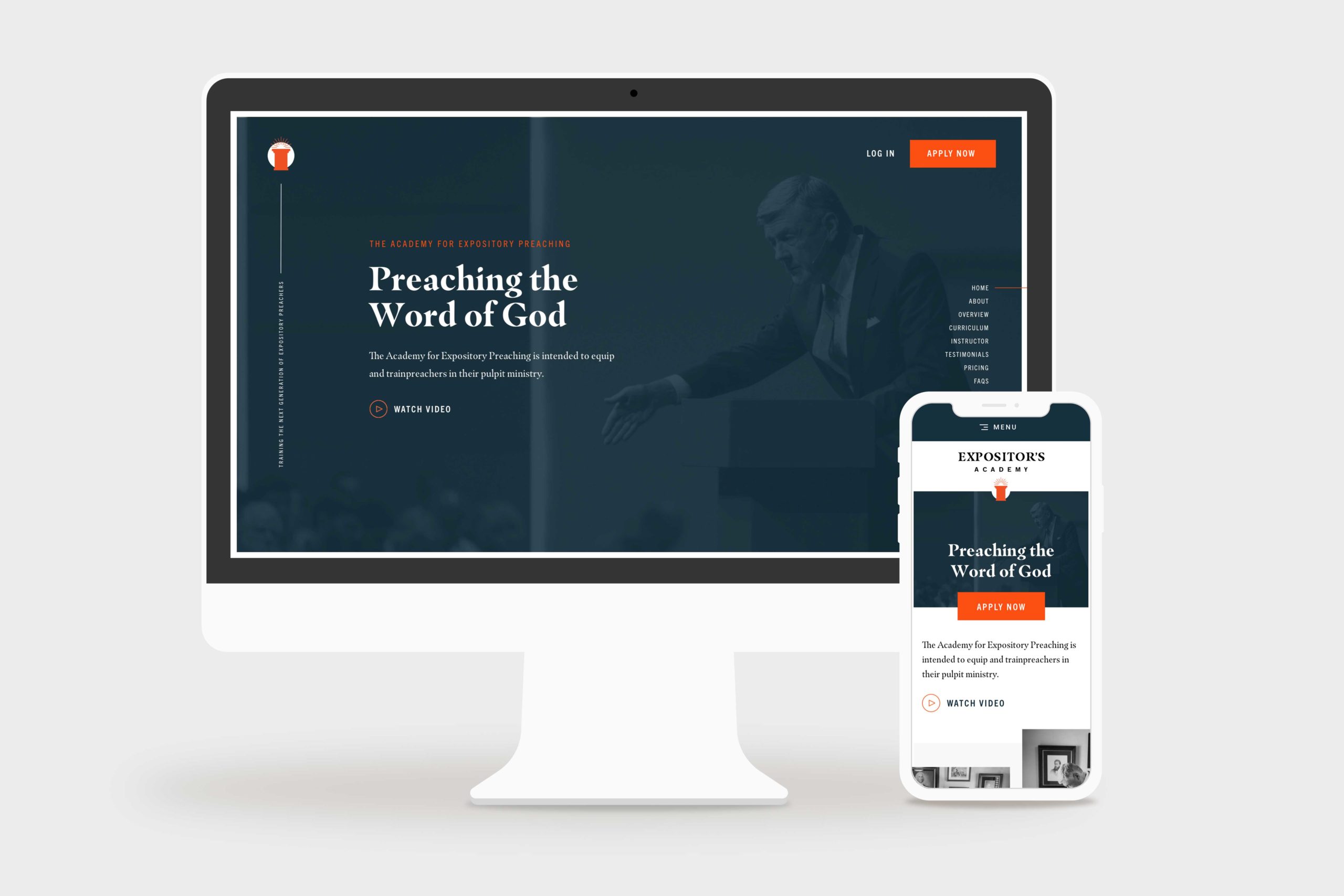
    The Expositors Academy Website Home Page Mockup
    the expositors academy home page hero, desktop and mobile

    Challenge

    One Passion Ministries had never launched a digital product like The Expositors Academy, so they were looking to us for ideas and action. Particularly in coordinating marketing, e-commerce, learning management, and business systems to launch their new course successfully.

    Solution

    Starting with strategy, we took The Expositors Academy through an end-to-end website design and development process. We used a thoughtful platform combination of WordPress, WooCommerce, and LearnDash, to create a first-rate online course experience.

    Results

    Within six months after launch, The Expositors Academy had 125+ students interacting with their platform. Better yet, The Expositors Academy manages the website and the product with little effort—and without constant bugs, issues, and maintenance headaches.

    I have had the opportunity to work closely with Simon and the Structure Team, and I couldn’t recommend them higher. They truly care about the service they provide and ensure that any project they are a part of is delivered with excellence. From creative ideas to execution, they are a professional team that will serve your business well.

    Jackson, Marketing Director

    Website Strategy

    When The Expositors Academy came to us, they were unsure which platforms, systems, or processes they needed to create an online course. 

    As is usually the case, while a website may look simple on the surface, a lot is happening in the background. That’s why we started with a website strategy package to help them plan and define precisely what they needed the website to accomplish.

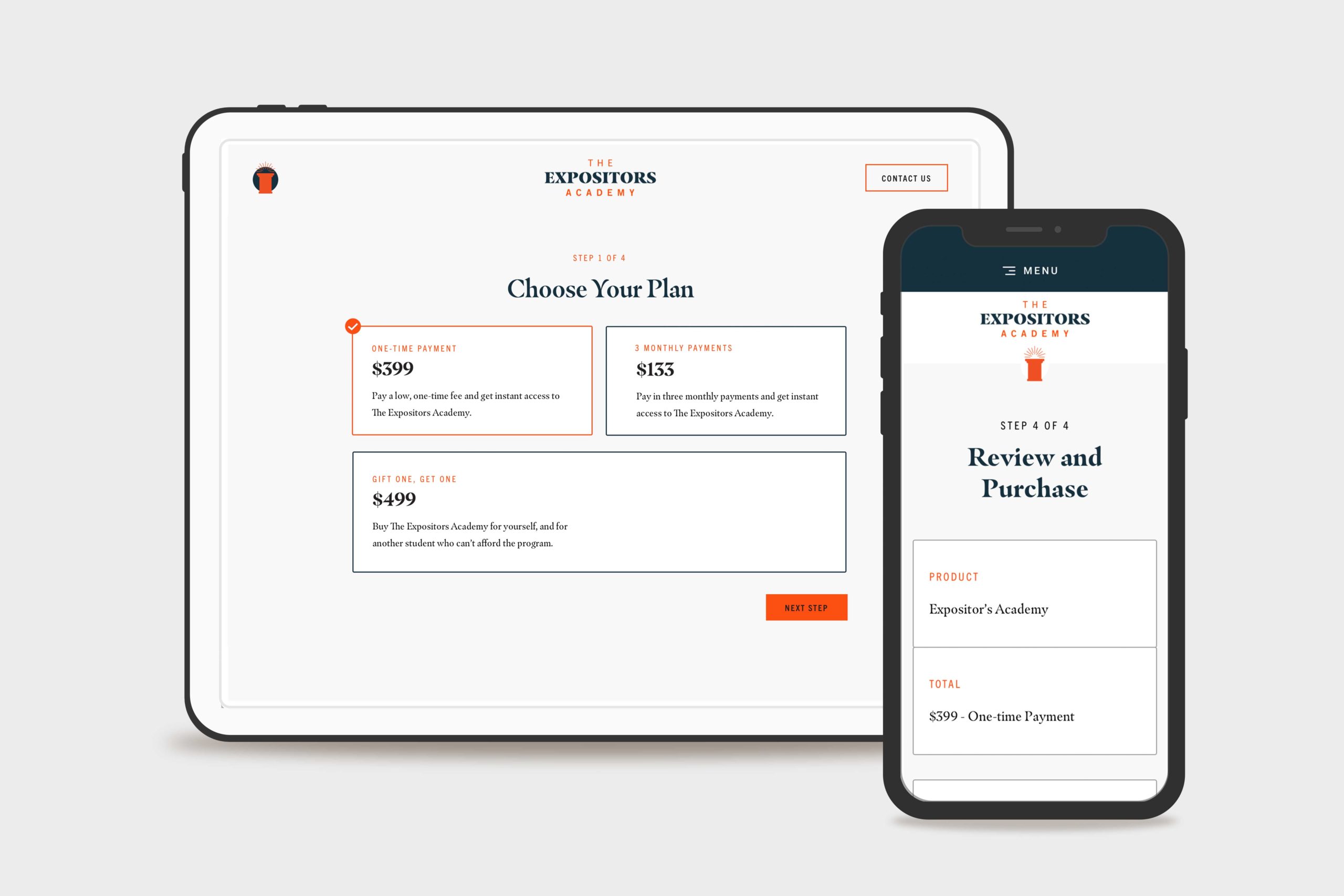
    They wanted three different payment options, including a subscription option and an option to purchase a course license for another student who couldn’t afford it.

    They also had a remote team of assignment graders who needed to keep track of submitted assignments, provide document markup, and communicate feedback directly to the student.

    Last but not least, they needed to automate email communication to students that weren’t keeping up with the schedule, missing assignment deadlines, or hadn’t logged on for a while.

    Our website strategy team researched the best learning management system to fit their needs. We evaluated different options like Teachable, Thinkific, Kajabi, and others. However, those options didn’t integrate easily with The Expositors Academy business systems and became cost-prohibitive when providing user accounts for dozens of graders to do their work.

    That’s when we landed on LearnDash because it fit their requirements and perfectly supported their sitemap and customer journey. 

    The Expositors Academy Website Custom WooCommerce Checkout Flow Mockup
    The Expositors Academy Website Custom WooCommerce Checkout

    Website Design

    Next, we began website design. The website design process resulted in 15 screens of ready-to-build, fully-responsive marketing, ecommerce, and online course designs.

    Marketing Website Design

    To keep the website simple and fees as low as possible, we designed a simple three-page marketing website to generate leads. The three pages were Home, Application, and Contact.

    • Prospective students could learn about the course and curriculum on the home page.
    • They could apply for the program on the application page and ensure they were the right fit.
    • On the contact page, users could ask questions or inquire about details they needed clarification on.

    E-commerce Design

    Furthermore, we designed a custom e-commerce experience that seamlessly guided students through Payment Options, Checkout, and Account Creation for the course. When they finished the checkout process, they were logged into the course and ready to start.

    Learning Management System Design

    Lastly, we customized the LearnDash course dashboard by combining The Expositors Academy brand styles with the default layouts provided by the plugin (including a few interface improvements, of course!).

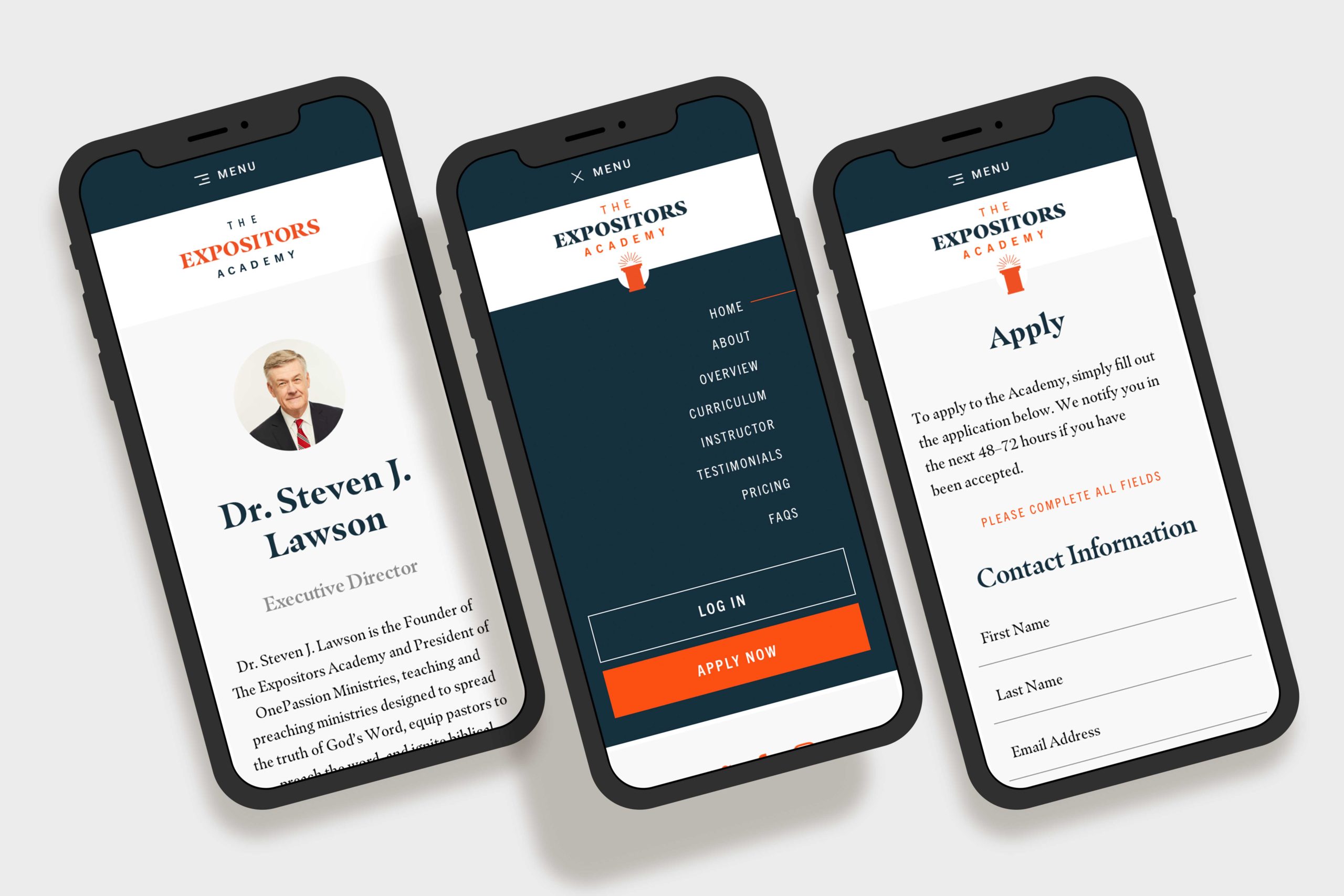
    The Expositors Academy Website Mobile Mockups
    The Expositors Academy Mobile Mockups

    Website Development

    The Expositors Academy was already familiar with WordPress CMS since we used it to build OnePassion.org, one of the other websites. 

    Front-end Website Development

    We developed a custom theme for The Expositors Academy built according to the design spec. We included custom Javascript animations from the Animate On Scroll Library to enhance user experience.

    Additionally, the website design called for a few other features like a nested accordion to house the curriculum information, an on-page navigation to help the user navigate the landing page sections, and a dynamic testimonial carousel.

    Back-end Website development

    We used WordPress and the LearnDash LMS WordPress plugin as the learning management platform. It was a helpful integration, so they could keep their marketing site and learning management system in the same place (and not have to manage multiple platforms).

    Using Genesis Custom Blocks with embedded Custom Fields, we set up the backend so they could edit the website content independently without breaking any formatting.

    Then, we integrated WooCommerce with WordPress and LearnDash, which made product creation, payment processing, order tracking, and more a breeze. Not to mention keeping the entire customer journey under one roof, from awareness to advocacy.

    QA, Training, and Support

    After populating the content we’d written and doing a thorough quality assurance process, we trained The Expositors Academy on a recorded video call. They walked away from the call with a thorough understanding of how the site worked and a recording and documentation for future reference.

    Final Thoughts

    The Expositors Academy online course WordPress website design and website development project is one we’re proud to share. It took months of united planning and preparation, with an incredible result.

    Ultimately, the website platform we built allowed the OnePassion Ministries team to enter the market in a new way and further their vision of training new expositors—and helping them reform the church.

    For additional reading, we designed and developed the nonprofit website for OnePassion Ministries at OnePassion.org .

  • How to Find & Hire a Professional Website Designer that Fits Your Budget

    How to Find & Hire a Professional Website Designer that Fits Your Budget

    You know you need a new website, but how do you hire a professional website designer with the skill sets you need? How can you find someone in your budget to deliver your desired product? Should you just DIY? This article provides answers to these exact questions—and many more. 

    This article is for you if you’re a marketing leader, business owner, or website manager. We’ll guide you through finding a trusted website to show you precisely what you should look for.

    When looking into building a new website or updating an existing site, one of the first choices you’ll have to make is whether you should do it yourself with a DIY website builder, hire a freelancer, or hire a professional web designer. And if you hire a professional, where do you start?

    Many ecommerce and website platforms claim to be so easy to use that it makes you feel like even your grandma could create an attractive website by herself in no time. 

    However, not so long ago, there would have been no question of hiring a pro to create your website. The rise of online tools like website builders like Wix, Squarespace, SiteBuilder, and others has made it much easier for anyone to build a decent website. 

    Just because you can, though, doesn’t always mean you should. It’s a decision that’s worth weighing carefully since, for some projects, a professional cannot be replaced by a tool.

    In the end, with web design and development, you can use a DIY website builder, hire a freelancer, or a web design agency. Each option offers different advantages and disadvantages and varying prices. 

    It’s a decision that’s worth weighing carefully since, for some projects, a professional cannot be replaced by a tool.

    However, every growing business eventually needs to partner with a professional freelance web designer or web design agency to create a website that works for their business. Here’s how to find and hire a professional website designer you feel great about that fits your job and budget.

    Considerations on Choosing a Website Builder vs. Web Designer

    Suppose you are like most people who are smart and savvy enough to use a DIY website builder to create your new website. Why not do that rather than find a professional web designer? Here are a few thoughts to consider.

    Templates are generic

    Unfortunately, the ease of using DIY website platforms like Wix, Squarespace, SiteBuilder, and others, is also their Achilles heel. They skip the design process by offering design templates for you. That’s all fine and good. However, it’s hard to stand out when you use a generic template. 

    When you do, your website looks like thousands of others. Getting stand-out business results is hard when you’re thrust directly into building your website without considering website strategy and web design, which is where the professional web design process starts.

    Most people still need help with their website after using a DIY website builder

    Most people who use a DIY website builder want to throw their laptops out the window because it’s frustrating when your DIY website doesn’t stand up to the quality of your competitor’s custom website. 

    Most people realize they need some design help if they want a professional website that attracts potential customers, processes sales, and provides other tangible results for their business. 

    You wouldn’t believe the number of Consult Calls where a potential client seeks our professional web design services after failing to do it themselves.

    A third-party website builder, like Wix or Squarespace, still requires web design experience. Even though these do-it-yourself (DIY) website builders can help your team create an attractive website, they don’t ensure a user-friendly site, which is critical if you want people to purchase your product or contact your company.

    DIY website builders don’t replace professional web designers

    A visual website builder does not replace finding and hiring professional web design services. In other words, you don’t use a DIY website builder if you need a professional website design. Those two solutions are for different problems.

    If you’re starting and don’t have a big budget, you should consider a DIY platform because you don’t need a professional website.

    If you’re a growing business with an established customer base and a website, you should consider finding a professional website designer because a DIY builder won’t cut it.

    Suppose you’re willing to spend more to get more. In that case, you should hire a professional web designer to create a premium, customized web experience that creates value for your business and customers.

    Typical Troubles When Trying to Find & Hire a Professional Website Designer

    At first, it seems like it should be easy to find and hire a professional website designer. After all, web designers are everywhere! 

    However, as you may have already discovered, sifting through the many web designers to find one with the skills and experience that match your needs can feel overwhelming. Not to mention that it’s a significant challenge to find and hire a professional website designer within your budget.

    As you start to wrap your head around what it will take to hire someone, you also begin to see some problems. 

    Most professional website designers are hard to find

    You’d think a website designer would have a website that’s easy to find. Not always! More often than not, they don’t have much of a presence on the internet because they’re inundated with client work.

    That’s both positive and negative. On the one hand, they’re focused on their clients! That’s a noble trait for any professional to be focused on caring for their customers. On the other hand, when new clients are looking for their services, they’re almost impossible to find.

    That’s precisely why you’re reading this article today! “How do I find them?!” 

    Most professional website designers are inefficient

    Once you find one, finding one that fits your budget is a challenge.

    That’s because they want to design cool stuff! Budgets, timelines, and processes. Yeah, right! Most agencies, especially local agencies, became an agency because their founder started as either freelance web designers or developers and eventually built a team around themself to complement their skills.

    However, they don’t invest in their operations. If they were a designer, they hired a developer and vice versa. Then they hire a writer and an SEO manager. Their team then becomes excellent at doing work but not organizing it. 

    The result is that they get bogged down, bottlenecked, and struggle to deliver what they promised within the scope they promised it.

    Most website designers are one trick ponies

    Many web designers only have one or the other skill set in their toolbox. They may be incredibly skilled at web design and able to design a beautiful website from scratch, but they might lack the technical skills to develop your site on a web platform.

    On the other hand, web developers tend to have excellent technical chops and understand how web platforms work, but they may not have the eye for web design that you need to create a professional-looking website.

    Most web designers don’t have clear pricing

    The age-old question getting millions of searches monthly: “What does a website cost?” The answer depends on dozens of factors, including the website designer.

    You can shop around and quickly receive a quote from one website designer for $5,000 and another for $50,000. You told them both the same thing; what’s the difference? 

    The difference is precisely the problem. 

    Most website designers don’t have a standardized pricing process that helps them provide cost-effective and consistent pricing to their clients. They make guesses and hope it works out. Frequently, their guesses are either way too high or way too low.

    This is why Structure uses simple website design packages that are clear and defined. This greatly benefits our clients because they can select the package that fits their budget.

    When to Find & Hire a Professional Web Designer

    Website design agencies have teams of skilled web designers and developers that can help you create the website you’ve always wanted. Additionally, they have standardized pricing processes that ensure you’re not overcharged or undercharged for your project.

    If you don’t know what you need, hire a web design agency

    Designing and building a professional website requires planning. Suppose you do not know your project requirements, budget, timeline, or expectations. In that case, you’ll need an experienced agency to consult with you to evaluate your current website, identify what you need, and propose what you should spend. That’s called Website Strategy or Website Planning

    Most of the time, this happens when established businesses have an existing web presence. Still, their website is difficult to use, holding them back from growth, or doesn’t reflect the quality of their products or services anymore. 

    Whether it wasn’t designed or built correctly, or your business has outgrown its website, you’ll need a multi-skilled web designer or web design team who can help.

    In this case, you need to find and hire a professional web designer with a track record of website redesigns specializing in web design strategy and user experience design. Typically, this is a web design agency or website design service like Structure.

    Hiring a web design team will help you identify what’s currently working on your site, research to understand how users interact with your site, and then redesign your website using the existing infrastructure. If they’re as good as they say they are, they’ll know that it’s best not to reinvent the wheel and to use as much existing content and structure as possible. 

    Hiring a design team isn’t cheap, but you’ll do it right.

    If you have a complex website, hire a website design agency

    What is a complex website, you might ask? A complex website would include a website with functionality for e-commerce, multi-site capability, high traffic, dealer or store location finders, and product quizzes, to name a few. Sometimes even a website with only a few pages can be complex if it supports data integration or processing with business systems like a CRM (Customer Relationship Management), ERP (Enterprise Resource Planning), or ESP (Email Service Provider).

    For example, one of our website design, development, and website management clients, TotemMats.com, has a simple website that doesn’t look very complex. However, the short contact form on every page captures data and sends it to multiple business systems in particular ways that require precise configuration and management.

    Everyone wants e-commerce these days. Still, most don’t realize there’s far more than goes on in the background to support beautiful product pages, smooth checkout experience, and shipping notifications than just how it looks to the customer. Even when you use a CMS like WordPress with an out-of-the-box ecommerce platform like WooCommerce (our recommended ecommerce setup), there are still many requirements to consider and implement: product information, payment processing, shipping options, inventory tracking, and management, notifications, and so much more.

    If you want a custom design, hire a web design agency

    Most freelance web designers use website templates to complete their work. They either use a template entirely or find one online and customize it to meet your requirements. While that can be a cost-saver if that’s what you’re looking for, it means that your website is not genuinely custom or unique to you.

    If you want a custom website design, hire a web design agency to take you through a custom website design process. If they’re good, they’ll consider your current brand and audit your website, including how people use it. They’ll create a custom design that supports your objectives and builds on the success you already have. You’ll improve the wheel without unnecessarily reinventing it.

    This is an often unknown benefit of hiring a professional website designer if you’re redesigning your website. They have a process in place to identify and leverage the good that you have. They’ll also make improvements that won’t hurt your traffic or sales but will improve them.

    Another downside of using a template is that they don’t consider your current pages, templates, or what’s working. A template is a default that might hurt a otherwise valuable page that should’ve stayed as close to the original as possible. A good web design agency will know this and help you navigate the process.

    If you have a budget larger than $5,000, hire a web design agency

    If you have a large budget and want to get the most out of web design, hire a web design agency. An experienced web design agency will take your website from concept to completion in one package. They’ll help you assess requirements, plan wireframes, determine content strategy, develop mockups, etc. They’ll also help you create designs and assets, integrate any features or functionality needed (e.g., an e-commerce platform or web application), and launch the website.

    A web design agency also typically offers web hosting, maintenance, security, and digital marketing services—all of which are essential components of long-term success on the web. Furthermore, they’ll provide ongoing support to ensure that your website is always up-to-date and secure.

    In short, web design agencies aren’t cheap. However, they have the expertise, resources, and experience to bring your web project from concept to completion—no matter how large or complex. They can help you envision a website supporting your business’s long-term goals and creating an engaging user experience.

    If you need ongoing website support, hire a web design agency

    If your web developer isn’t in-house, they may not be the right choice for updating content or managing web hosting services. Agencies usually offer web maintenance and hosting services. That way, you don’t have to worry about finding and managing separate web maintenance contracts.

    In addition, should any web development issues arise, a web design agency can provide the expertise needed to resolve them quickly. If a web developer isn’t available or doesn’t have the necessary level of knowledge, it could take longer to resolve any issues.

    Ultimately, web design isn’t a one-time event—it’s an ongoing process. To ensure your website meets your requirements and remains successful over time, web design agencies are often the best choice for web projects of any size. They provide the necessary web maintenance services, web hosting expertise, web optimization advice, and web design services under one roof.

    How to Find a Web Design Agency

    Here are a few ways to find the perfect web design agency for your project! Take your time and do plenty of research. This will help you find the right web designer that fits your budget and meets your needs.

    Search on Google for an agency near you

    Start by searching in Google for “custom website designer in Oregon” or “custom web design agency in Arizona,” for example. Just change out the state for wherever you live. If you’re in a large metropolitan area, try “website designer in Boise.”

    The more specific you are, the better results you’ll get. If you want to find and hire a professional website designer specializing in manufacturing websites, try “manufacturing website designer in Oregon.”

    A web designer should have a portfolio of designed or developed websites that you can review. Look for style, functionality, and usability.

    Search on LinkedIn when looking to find and hire a professional website designer

    You can also search LinkedIn for a web designer focusing on your industry or region. You can use the search box for free. Or, if you have a Premium account, use the Sales Navigator features to find specific website designers you might be looking for.

    Ask for referrals in your network

    Don’t forget that you can message professionals in your network. Ask if they know anyone who could help you with web design services or refer you to someone who does.

    Ask friends, family, colleagues, and professional contacts for web design referrals. People often know web designers who fit their budget and provide the style of web design they’re looking for. This can be done on LinkedIn or anywhere.

    Post an RFP on an agency matchmaking platform

    Through platforms like Breef, companies can post a job and receive pitches from vetted agencies. You’ll get access to an intuitive platform to post your job requirements and budget. Then receive proposals from web designers matching your needs.

    Search review and referral sites

    Check out web directories such as Clutch or Agency Spotter. You’ll find agencies with reviews from past clients and an overview of their services and portfolio.

    Find agencies in website footers

    Finally, look at websites of companies like yours that have an excellent web presence. See if they list their web designer in their website’s footer or elsewhere onsite. If they do, you have a great starting point for a few specific web design agencies to reach out to.

    When to Find & Hire a Freelance Web Designer

    Freelance web designers are often a great solution. If you’re on a budget and need to start quickly, finding and hiring a web designer is the way. Freelancers are also great if you seek web design services but don’t require ongoing support.

    If you know what you need, you might consider a freelancer

    Do you have wireframes and project specs ready to go? Are your website goals documented and clear? Do you have a list of all the functionality required? If so, you can find freelancers who will run with your goals and strategy.

    You might not need a full-time freelancer to build your new website if you’re that savvy. A part-time front-end developer/web designer be efficient enough to make a few tweaks.

    However, you might need to start there if you don’t have your website planned and ready to plug in a designer. Or, consider hiring a web design firm to help you iron out those details.

    If you have a simple website, you might consider a freelancer

    If you’re looking for a web designer to update an essential website or build a simple one, freelancers may be your best bet. They can work quickly and efficiently with the right specs, often cheaper than web design firms.

    A simple website would not include e-commerce functionality, events, complex forms, or web apps. Typically these types of websites are strictly informational or, we’d call, brochure websites.

    The waters can get rough if you think you have a simple website, but it’s more complex than you realize. You might hire a freelancer who doesn’t scope the project correctly. They might think it’s a simple, straightforward project, and the bar is low.

    Then, they’re over their head, and you’re frustrated that it’s way more complicated than it should be. When, in fact, it was already complex to begin with.

    That’s why you should only hire a freelancer if you already have a website plan. In that situation, the expectations are clear, and you’ll get what you set out for.

    If you want a quick and dirty process, you might consider hiring a freelancer

    It’s no secret; a web design agency has many clients, team members, and projects. One of the things you pay for with an agency is a Project Manager. The project manager gives you a white-glove experience throughout the web design process, from kickoff to launch. You’ll have a curated, clean expertise because they deal with the dirty details.

    One detail they deal with is all the specialized human resources required to complete your project. The upside of this approach is that the Project Manager knows the process backward and forward and can deliver a great result. The downside is that a team of people is directly working on your project, not the Project Manager. The work has to get handed off from one person or group to another, coordinated by the Project Manager, which elongates the timeline.

    However, contracting with a freelance web designer is an excellent option if you want to manage the project yourself. Some web designers will even offer discounts for clients who don’t need as much handholding throughout the web design process.

    If you have a budget of $5,000 or less, you might consider a freelancer

    Hiring an agency may not be ideal or economical if you’re on a tight budget. That’s why freelance web designers are an excellent option for small businesses with a $5,000 or less budget. Many web design agencies may require retainers or offer packages that start at a higher price than your entire budget.

    Freelance web designers may have exceptionally reasonable rates for smaller projects. You can even find and hire a professional website designer that offers a la carte services, so you only pay for the pieces of web design you need.

    How to Find a Freelance Web Designer

    Ask for referrals in your network

    Send a message to professionals in your network and ask for freelance web designer referrals. LinkedIn is a great place to start, but you can also contact friends, family, colleagues, and professional contacts. Many people know freelancers who fit their budget and provide the style of web design they’re looking for.

    Search on a freelance hiring platform

    Freelance web designer hiring platforms are great places to start your search. You can find and hire a professional website designer with specific skills, portfolios of work, and competitive pricing levels. Many platforms also feature pre-vetted web designers who have passed the platform’s vetting process.

    Here are a handful of freelance web design platforms to consider using.

    1. Toptal
    2. Upwork
    3. Dribbble
    4. Behance
    5. People Per Hour

    Run a design contest

    Design contest sites are web design marketplaces where designers can bid on web design projects. The web designer with the best web design concept wins the job, and you only pay for the winning web design concept.

    Once you post your project, web designers can submit concepts. You can review them in real time and provide feedback until you find the web design you want to purchase.

    1. 99designs
    2. Crowdspring

    How to Evaluate and Hire a Professional Website Designer

    Don’t be like a dog who finally catches its tail. Once he gets it, he doesn’t know what to do with it! Once you decide whether to use a DIY website builder, hire a freelancer, or a web design agency and identify a few prospects, it’s time to evaluate them.

    1. Review the designer’s portfolio/work

    First things first: review the web designer’s portfolio. Look for web design projects similar to what you need. Also, review the web designer’s style and ensure it aligns with your brand. If you don’t love the web designer’s portfolio, you probably won’t love what they do for you.

    2. Read reviews

    Look for web design reviews from previous clients. This can give you a good gauge of the web designer’s customer service and final product quality. Typically a web designer’s website will feature reviews. But if it doesn’t, check out third-party review sites like Clutch, BBB, and Trustpilot.

    3. Check out the pricing

    Finding a web design company that doesn’t force you to overspend (or underspend) is crucial. Checking the price tags of various designers will help you determine which ones fit your budget.

    This can be tricky because it’s hard to pinpoint an exact price for building a website. The cost depends upon what you need on your site. This is one of the ways you can evaluate the difference between a good website designer and a great website designer.

    Excellent, experienced website designers will have a process for providing accurate quotes. Novice website designers will scramble to offer a semi-realistic quote.

    Furthermore, many companies don’t publish their prices online. They want you to contact them to get their pricing. This makes comparing costs challenging and seeing which company fits your needs and budget best.

    Because pricing can be ambiguous and mysterious, Structure provides a WebsiteBuilder Quiz allowing you to input your desired information. We’ll instantly recommend a website design package that fits your selections and invite you to book a Consult Call to discuss it with one of our website experts.

    4. Schedule a consultation call

    Once you’ve identified web designers with the portfolio, style, and reviews you’re looking for, schedule a consultation call or video chat. This is the web designer’s chance to demonstrate their web design skills and ask clarification questions about your web project.

    This is also your opportunity to assess the web designer’s communication capability and ensure they understand precisely what you’re looking for. Determining if the web designer is a good fit for you and your web project is essential. If something doesn’t feel right, move on and find another web designer who fits better.

    How to Ensure Your Web Designer is a Good Fit

    1. Ask for a written proposal with costs and a timeline

    Finally, ensure the web designer has experience delivering projects within your budget range and timeline. Don’t be afraid to discuss budgets and deadlines upfront. This will help you find and hire a professional website designer to deliver a great product with your requirements.

    2. Request references

    Lastly, always request web design references from the web designer. Ask their web design clients to provide feedback on web designers’ customer service, quality of work, and how well they stayed within budget and deadlines. References are a great way to ensure you’re hiring a web designer with a track record of success.

    Common Questions About How to Find & Hire Professional a Website Designer

    What is a website builder?

    A website builder is a web design tool that allows users to create and customize webpages with drag-and-drop tools—without requiring design and coding knowledge. Each tool’s design capabilities vary, but most provide customizable templates, web hosting, domain name registration, web analytics tracking, ecommerce, and more.

    Website builders can be an excellent way for someone to get started who doesn’t know anything about website infrastructure, strategy, design, development, or management. However, running a website with a builder is incrementally more expensive and won’t sustain all your web needs as your business grows. That’s when people often turn to a professional for help.

    Who should use a website builder?

    While it might seem like a good idea to hire a professional website designer, for many businesses, it’s not the best move. If your business falls into one of these categories, you’re probably better off using a website builder.

    • Hobby
    • Blogger
    • Unfunded Startup / New Business
    • Solopreneur
    • Unproven Concept
    • Small Non-profit

    A website should pay for itself within a few short years. If you can’t get a return on a professional website in that time range, go with a website builder.

    Is a DIY website builder or professional web designer best for me?

    Working with a professional website designer isn’t free or cheap. Design firms usually start around $5,000 for their services. However, you could lose a lot more than that if you DIY haphazardly.

    If you’re a new business, with a new website, on a tight budget, then an affordable website builder is the way to go.

    If you own a business with an existing website generating over $250,000 per year, using a ‘free’ website builder could cost your company countless hours and significant revenue in lost sales from beginner website mistakes.

    What’s the difference between a freelancer and an agency?

    A web designer freelancer is an independent contractor who provides web design services. Freelance web designers typically charge by the hour, and they’re great for web projects with smaller budgets.

    On the other hand, web design agencies employ web designers to fulfill web design projects. Agencies usually offer a more comprehensive range of web design services, including web design, development, and maintenance. Agencies are a great choice for web projects with higher budgets.

    How much does it cost to hire a professional website designer?

    The cost of hiring a web designer varies based on the type of project you’re looking to have completed – whether that be an ecommerce web design, web application, or web maintenance. The web designer’s expertise and the complexity of your web project also determine the web designer’s price.

    Generally speaking, web design projects with more complex requirements cost more than straightforward ones. Web design freelancers typically charge between $500 – $5,000 per project. Web design agencies charge between $3,000 – $100,000 on average.

    What’s the difference between a UX designer, a UI designer, and a web designer?

    UX design focuses on user experience, web design is about visual appeal, and UI design combines both.

    • UX designers create web flow diagrams to determine users’ steps when using the website.
    • Web designers build web pages based on these flows, following the web design guidelines set by UX designers.
    • UI designers create user interface elements like buttons, typography, and web elements. They work closely with web designers to ensure web design follows web development standards.

    Should I hire a web designer that uses themes or templates?

    Not if you can afford it! Doing web design with themes is a fast way to create web pages. But it’s not the most custom-fit web solution. A web designer that uses themes or templates won’t be able to provide as many web design features and options as a web designer who works from scratch.

    Hiring a web designer who builds web pages from the ground up ensures you get a custom-fit web design. This web design approach will take longer and cost more. However, it will provide you with a unique web product like your brand.

    How do I find a web designer I’ll love?

    Want to find a web designer you’ll love? It starts with identifying web designers with experience in similar web projects. You can ask web design firms and development agencies for references or check out web design portfolios.

    Once you find potential web designers, interview them and ensure their web design skills meet your web project requirements. Don’t forget to ask web designers for references from past web projects. Review their web design portfolio to determine the quality of their web design work.