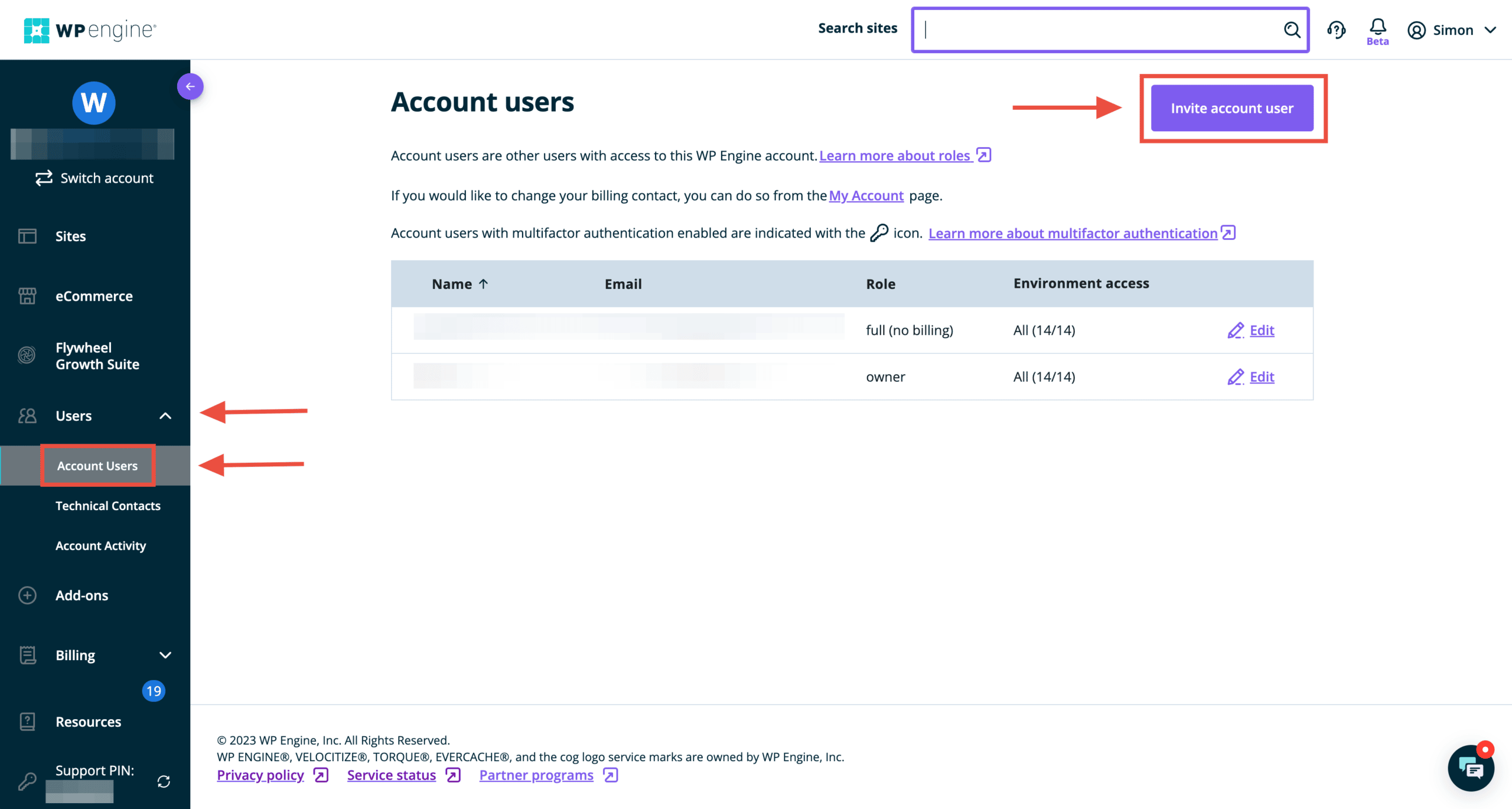
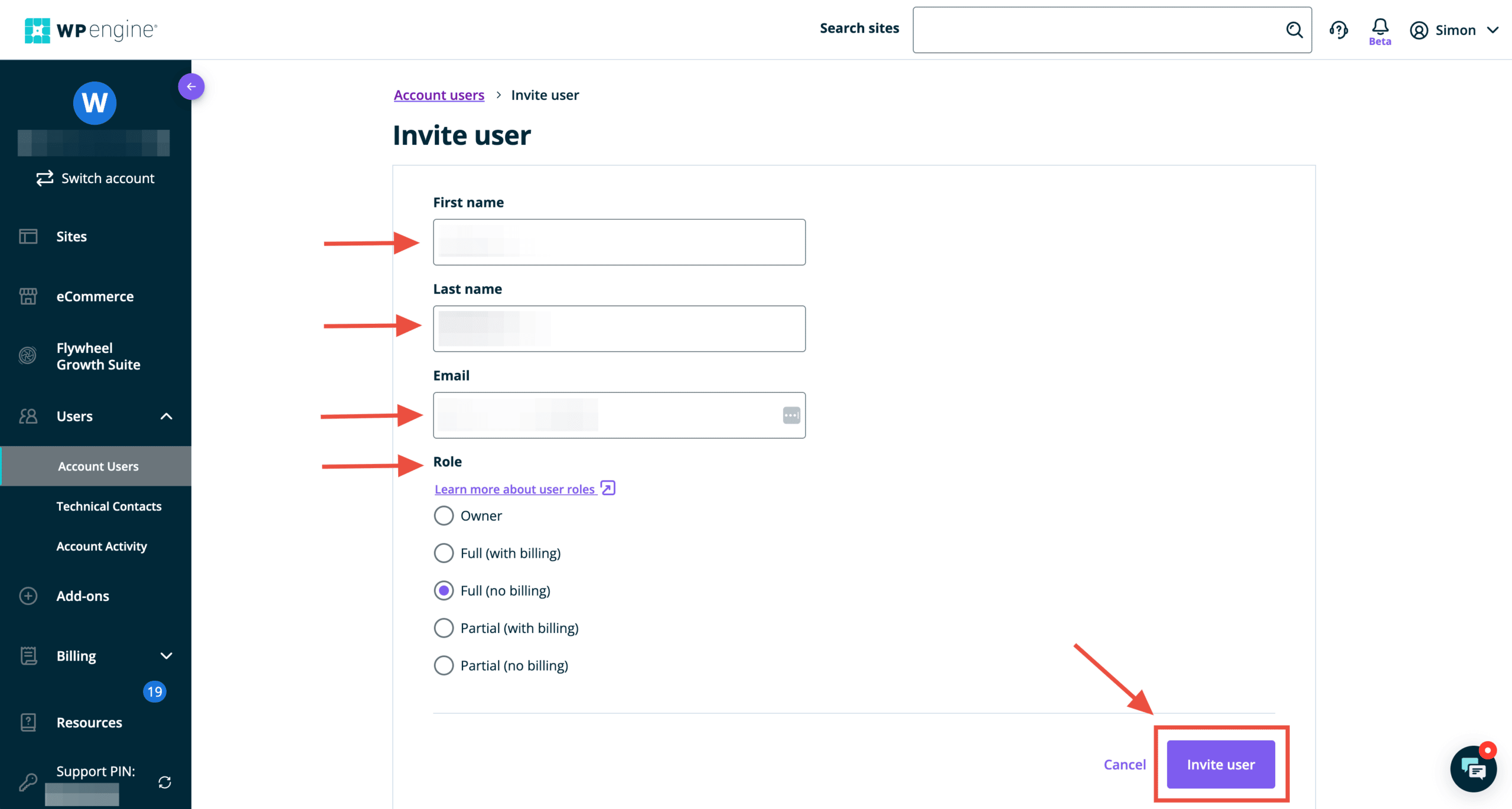
Structure is proudly a WP Engine preferred partner. We believe WP Engine provides the best managed WordPress hosting service and recommend it to all our Website Design and WordPress Management clients. This guide will provide you with WP Engine delegate access instructions so we can have the proper permissions to provide assistance with your website.
WP Engine demonstrates its commitment to usability and developers in everything they do, including when it comes to granting access to a WP Engine WordPress installation.
Get a FREE Customized Digital Growth Plan
Take our 10-minute Digital Maturity Assessment and receive a FREE, personalized digital growth score that uncovers gaps and drives your business forward.
WP Engine Delegate Access: Why should you share user access?
WP Engine account holders often add extra users to their accounts to receive more specialized assistance.
For instance, you might want a developer who can manage your website’s SFTP credentials or database or an agency like Structure to help with WordPress Management. With this approach, it is much easier and more efficient to get help when needed!
Here’s how to share access to your WP Engine website:
Running a website is hard. There are many areas to focus on, from content creation and admin to updates and security. Here’s how to untangle your WordPress management mess—and get a system in place so your website works.
Structure’s mission is to deliver the best website design, build, and management experience available and ultimately improve our client’s business by helping them turn their website into an asset instead of a liability.
In this article, we’ll help you do that by explaining what WordPress management is, what you should know, and how to find help.
If you have a small house, a simple family, and low foot traffic, your home will endure less wear and tear and require less maintenance.
However, your home will endure more wear and tear if you have a larger house, a more complex family, and entertain often. It will, therefore, require more maintenance.
When you’ve got a busy house, it’s a party! But the walls get scuffed up, the dishwasher goes out, and a window gets broken now and then—the same thing with your business.
If you’ve got a small website with only a few things going on, it will require much less maintenance. You might be able to go months without making an update.
However, suppose you have a more extensive website that integrates with complex business systems and workflows, stores customer account data, and supports high traffic through a blog. In that case, your website will require more maintenance.
1. You think you don’t need to manage your WordPress website
I recently had a conversation with one of our clients who was considering signing up for the Essential WordPress Management Package. During our conversation, he mentioned his reservations about buying the package.
“My only reservation is that we had the prior website up for several years without website management. It seemed to always run fine without any extra fees or work.”
An outdated WordPress website like this opened them up to massive security vulnerabilities, and it’s a wonder their site didn’t get hacked. I’ve seen it happen before!
It was so outdated that elements on the website’s front end were broken (like its header navigation), keeping customers from finding certain pages. The logo wasn’t even showing. That’s why you need to manage your WordPress website.
What happens if you do actively manage your website
Here are a few wins when you keep up on updates and general management:
Fix security vulnerabilities
Repair functionality bugs
Add updated security features
Replace and update functionality
Improve the performance of the whole ecosystem
Another of our WordPress website management clients likens the management and maintenance tasks to getting an oil change in their car. To keep the engine running like a well-oiled machine, you’ve got to change the oil frequently.
What happens if you don’t actively manage your website
By not managing your site correctly and performing routine updates, you risk:
Your site is broken or down
Customers can’t checkout or contact you
Content formatting is missing or broken
All of your information gets stolen
Your site is transformed into another site
Your site is used to spread viruses and malware
You may not notice any issues immediately if you don’t manage your website. Updates don’t fix what will happen. They fix what may occur, and what may happen is far worse.
Keep your WordPress website up to date. It fixes potential issues that could ruin your site, reputation, data, etc. Hopefully, you don’t find yourself a target. But if you are, it will be a massive problem.
2. You think you can do it yourself
Yes, you can manage your WordPress website yourself. However, I’ve never seen anyone do it!
At a minimum, WordPress Management involves regular (ideally monthly) WordPress Core, Theme, and Plugin updates.
At a maximum, management involves:
Adding Security and Firewall Protection (and monitoring it), so you don’t get hacked,
Activity Reporting so you can look back and see who did what on the backend of your website… and when,
Uptime Monitoring so we get alerted the moment your site goes down (if it ever does), and we can resolve it (no joke, this happened to a client this morning, and we were fixing the issue 30 minutes before they even realized the site was down), and
Daily Backup Storage so your site can be restored to a functioning machine if there’s an issue.
Our Website Management packages include all of these items. We also test all updates on a Staging site before updating our client’s Production site. That way, we catch bugs or broken items before they affect website visitors. This requires thorough knowledge of the website and Quality Assurance testing to ensure that everything works as intended after updates are made.
Lastly, we ensure you get a Dedicated Account Manager, 24-hour Response Time (During the Workweek), and a Monthly Detailed Website Report. Hence, you have full access and visibility into our work.
You might be website savvy and have time to do all this yourself. In that case, you don’t need our help!
Focus on growing your business
But most of the time, our clients don’t want to be bogged down managing their websites. They’d rather have us keep watch and make the necessary updates.
I seem to have many analogies for website management, but one of them is that I like to think of it as property management. If you own one or more properties, you could manage them yourself.
However, then you’re the one who’s on the hook managing them and responding to issues when they arise. That’s precisely the reason many opt to hire a property management company. They don’t want to do it themselves.
We’ve found that those who say they want to manage their website themselves don’t want to manage their website themselves. They don’t want to pay for website management at all. You don’t let your business books go outdated without adverse downstream effects. Neither should you ignore your WordPress website.
Don’t fool yourself by thinking you’ll keep your website updated if you won’t. Hire a professional to help.
3. You think you can hire a freelance WordPress developer for less
Unprofessional, overpriced WordPress website developers are the reality for so many businesses. This is a severe problem in our industry—and one Structure doesn’t take lightly.
Because of these “bad experiences,” a handful of myths floating around about WordPress Website Management, making it hard to see the value in hiring professional help. One of them is that WordPress website management is expensive.
If you’ve heard it said that “WordPress” management is expensive. That usually means paying high upfront costs, long-term commitments, or surprising fees that can feel like nickel and diming.
On the other hand, some WordPress website management is cheap. It is so cheap that it can only be offered at such a low price because it’s either outsourced overseas or low-quality.
At Structure, we’ve set a small monthly fee with no upfront or long-term commitment. Furthermore, you can lower your monthly fee by consenting to an annual commitment. You save quite a bit of money if you commit to a year!
For example, our Essential WordPress Management Package costs no more than outsourcing bookkeeping with Bench. If you can pay a minimum of $249/mo (when paid upfront) to ensure your books are in order, you should be able to pay a minimum of $249/mo (when paid upfront) to ensure your website is in order.
WordPress management and maintenance options
You’re convinced that you need to manage your WordPress website actively. You have a few options for keeping it up to date.
1. Manage your own WordPress website
This is an excellent option if you’re website savvy and have the time. You can download plugins, configure settings, and update your site yourself. This is a good choice if you don’t plan to update your WordPress website frequently.
In this case, you’re either completely savvy, or you have a simple website and little to no traffic that would be interrupted if there was an issue.
2. Create an in-house WordPress website management team
This is an excellent option if you have the budget and resources available. You can hire a team of experts to manage your WordPress website. This allows you to control every aspect of website management and maintenance.
One of the most significant benefits of having an in-house team is that your response time to any issue will be almost immediate—and you’ll have the resources to tackle the problem. However, to build a full-stack in-house WordPress website management team, you’ll need the following specialized roles:
Two primary ways people outsource WordPress maintenance and management are managed hosting or Hiring an Agency.
Managed Hosting
The first option is to pay for a managed WordPress hosting plan, which means the provider takes over much of the technical legwork that goes into running your WordPress site. They also provide premium customer support that goes above and beyond what you usually get with web hosting.
Companies like WP Engine (our recommendation), Bluehost, SiteGround, and others offer managed WordPress hosting plans. These can be a great way to offload some of your site management responsibilities, though you must pay more than you do for “unmanaged” hosting.
Specifically, managed hosting services can significantly help you with infrastructure issues, particularly when you have downtime or an SSL expiration. However, they’re not so great for maintenance issues, as they’re constrained on what they’ll touch on your website. And while they’re typically accessible via chat, you usually talk to a technical support agent. Most of what they’ll say will likely go right over your head!
That’s why we recommend using a managed hosting plan for infrastructure management alongside an agency partner who can help maintain your site while overseeing the managed hosting.
Agency Management Services
Structure offers WordPress website management service packages that fit almost every website and business. We provide everything you need to ensure your WordPress website stays up-to-date, secure, and optimized.
We offer plans for both small and large businesses. Our Essential plan is perfect for companies with a smaller budget—it starts at just $249/mo when paid upfront. And for larger companies needing more attention and features, our Professional plan is ideal—starting at $499/mo (when paid upfront).
No matter the size of your business or budget, we can help manage and maintain your website. We have years of experience with WordPress websites and will work with you to ensure that your website is always up-to-date, secure, and optimized for performance.
If you’re looking for an experienced team to manage your WordPress website, Structure is here to help.
The primary areas that WordPress Management services cover
1. Administration
If you’re like most companies, multiple people have logins and could be updating content or data at any given time.
Backups are essential for restoration. Without them, a healthy and fully functional version of your website would be impossible to return to if it is the victim of malicious online activity.
Backups are the saving grace in any situation, even when mistakes occur, or data is accidentally lost without malicious intent.
Having a reliable maintenance service to install your site backup if anything goes awry swiftly is immensely priceless. It eliminates the anxiety of potentially losing it all. Although small companies will find this feature incredibly useful, well-informed solopreneurs can back up their sites independently and may not need this specific service.
All of our Structure WordPress management packages include backups and backup restoration. If you’re on the Professional WordPress Website Management package or higher, you also get 2+ additional hours of bug fixes if any functionality needs to be repaired or restored.
3. Theme, Plugin, and WP Core Updates
WordPress sites are constantly updated. Plugins, themes, and WP Core must be regularly updated (at least once monthly) to keep your website functioning as expected, secure from potential threats, and running efficiently.
The problem is that updates can sometimes conflict with other elements of your website or cause other problems—if done incorrectly or without proper attention. That’s why making all updates on a staging environment is crucial before updating your life site.
This Theme, Plugin, and WP Core Update Quality Assurance process is one we employ at Structure, and we would recommend it no matter the status of your website.
4. Security Monitoring
Malware Scans & Removal
Unfortunately, malicious actors are out there waiting to take advantage of any vulnerabilities they find on your website. They can cause irreparable damage, steal user data, or even completely erase your site if you’re not careful. That’s why it’s essential to have security monitoring in place—to alert you when anything suspicious is detected quickly and to help you remove any malicious code or activity.
Fortunately, that’s precisely what our Structure WordPress management services provide. Our packages include daily malware scans and removal if anything is discovered.
Firewall
A firewall is essential for any website. It’s the first line of defense against malicious actors and can help protect your site from potential threats.
Structure’s management services include a responsive web application firewall (WAF). This will stop suspicious traffic before reaching your server and protect against malicious attacks, including DDoS, SQL injections, and more. They also offer a secure login interface with two-factor authentication to help protect your site from unauthorized access.
Bot Protection
One of the most common cyber-attacks is bots. Cyber thieves use bots to steal data, spread malware, etc.
Our Structure WordPress management packages include robust bot protection that will help keep your site secure from malicious activity. It monitors suspicious activity and blocks any requests before they reach your server.
Login Protection
Often, your WordPress website will be the target of brute-force attacks. This is when someone attempts to guess your login credentials repeatedly until they can gain access to your site.
At Structure, each package includes intelligent login protection and two-factor authentication for maximum security. This helps protect against potential cyber threats by making it harder for unauthorized users to gain access to your site.
Activity Log
Activity logging is another essential security measure that helps keep your website safe and secure. It gives you a clear view of what’s happening on your site, including user activity, successful logins or failed attempts, etc.
With our Structure WordPress management packages, you get access to an easy-to-read activity log that lets you monitor all the activity on your site in real-time. This helps you stay on top of any suspicious activity and take action if necessary.
Uptime Monitoring
It’s also important to keep an eye on the uptime of your website. You need to ensure it’s functioning correctly and that no issues affect its performance.
Our Structure WordPress management packages include regular uptime monitoring, so you can be sure your site is always running at peak efficiency. We’ll alert you if your website ever goes down and help you get it back up and running as quickly as possible.
5. Reporting
Lastly, good website Management would include tracking metrics and reporting on them. You want to keep a record week-over-week and month-over-month to know the trends and spot any off-the-wall activity.
Our Structure WordPress management packages deliver a detailed weekly or monthly PDF report that gives you an in-depth look at your site’s performance. If you want real-time visibility, you can view your WordPress management dashboard.
We’ll also track and report on critical metrics such as page visits, time spent on each page, bounce rates, conversions, etc., so you can see how your website is doing.
WordPress Management FAQs
What happens if you don’t update WordPress?
Nothing will happen immediately if you don’t update your WordPress installation, plugins, and themes. However, you open yourself to possible attacks and functionality issues by not updating your installation, plugins, or themes over time.
What are the best WordPress Maintenance and Management Services?
There are many WordPress maintenance and management services available. Some of the best available are:
Note that each service producer has their specialty and will serve your business differently. Evaluate each service individually and talk to their teams.
What are the best ways to secure your WordPress site?
The best way to secure your WordPress site is to use a combination of security measures such as:
Strong passwords
Two-factor authentication
SSL / TLS encryption
Backups
Monitoring activity logs
Uptime monitoring
Regular updates and patches
Additionally, using a quality-managed WordPress hosting provider can help keep your site secure, as they will provide additional layers of protection and make sure your site is always running optimally.
What is the importance of WordPress management?
The importance of WordPress website management lies in its ability to keep your site secure, up-to-date, and running smoothly. It can also help you track web performance metrics so you can identify any issues and take action to improve them.
You don’t have to do anything with a managed service for your WordPress site, from security patches and updates to backups and performance optimization. This allows you to focus on what matters most – growing your business.
What type of reporting do Structure WordPress management packages offer?
Our Structure WordPress management packages provide you with a detailed weekly or monthly PDF report so that you can track your website’s progress. If you’re searching for an even more in-depth overview, log into our exclusive dashboard and get real-time visibility to monitor your site’s performance!
What’s the difference between WordPress management and maintenance?
Website management and website maintenance have very similar meanings. Generally, website management refers to monitoring and optimizing your site’s performance, while website maintenance involves updating plugins, themes, core files, and other components that keep your site running smoothly.
In other words, website maintenance is something you do when you manage a website. When you manage your website, you oversee all aspects of its functioning. When you maintain your website, you take specific action to improve its performance.
The Structure Professional and Premium WordPress Website Management packages include WordPress maintenance, which includes:
Performance Checks
2 or 3 hours of additional Content Updates & Bug Fixes
Retainer Rollover
1-Point or 5-Point Website Audit
What do WordPress maintenance services do?
WordPress maintenance services take direct action to keep your website up-to-date and secure. These services ensure that your site remains functional and safe. Some WordPress maintenance services also optimize performance to ensure your site runs at peak performance.
Like Structure, they may offer services like content updates, bug fixes, retainer rollover, website audits, etc. All these services help you maintain a well-running website that is secure and reliable for your visitors.
What do WordPress management services cost?
The cost of WordPress website management services varies depending on the type and level of service you’re looking for. Structure offers three tiers of plans (Essential, Professional, and Premium) to suit various budgets. Our Basic plan starts at $249/month (when paid annually), while our Premium plan is $1,099/month (when paid annually).
If you’d like professional help putting WordPress into maintenance mode while you make updates on your website, schedule a free Consult Call with Structure.
Do you manage WooCommerce websites?
Websites with advanced functionality like WooCommerce require our Professional Plan, as do membership sites, multi-language sites, any sites with on-site payments, etc.
They take more resources for us to manage. We’ll dedicate the resources we need to keep your website secure, fast, and running smoothly.
Are there any WordPress maintenance services that are free?
Yes, there are some free WordPress services available. Some of the most popular ones include Jetpack and WP-Optimize.
Jetpack is a plugin with many features, including security, performance optimization, automated backups, malware scanning, and more.
WP-Optimize optimizes your WordPress database, efficiently removing post revisions, trashed items, and other unnecessary data. Both are great tools to help you keep your WordPress site running as efficiently as possible.
For more advanced needs, paid maintenance services are available from companies such as Structure that can provide more in-depth support for a fee.
One of the first questions we get during a Consult Call is, “Which website platform should we use, WordPress?”
Our clients often suggest using WordPress alongside other platforms like Shopify, Squarespace, or HubSpot. But they almost always suggest WordPress because it’s the most popular Content Management System (CMS).
There’s a reason The New York Times, Forbes, eBay, The Walt Disney Company, and Best Buy (among others) are powered by WordPress.
However, when planning a website revamp, many decisions can feel crushing. An abundance of free resources is available to assist you with optimizing your site’s design and copywriting. However, choosing a suitable CMS can still be a tough decision.
At Structure, we specialize in designing and developing custom WordPress websites. That’s the bulk of what we do. We also help our clients with web strategy, website management, and digital marketing. But most projects start with a custom WordPress website.
Why a Custom WordPress Website is Valuable
Most marketing starts with a custom WordPress website or landing page. This is because your website is at the heart of all your marketing efforts—digital and traditional.
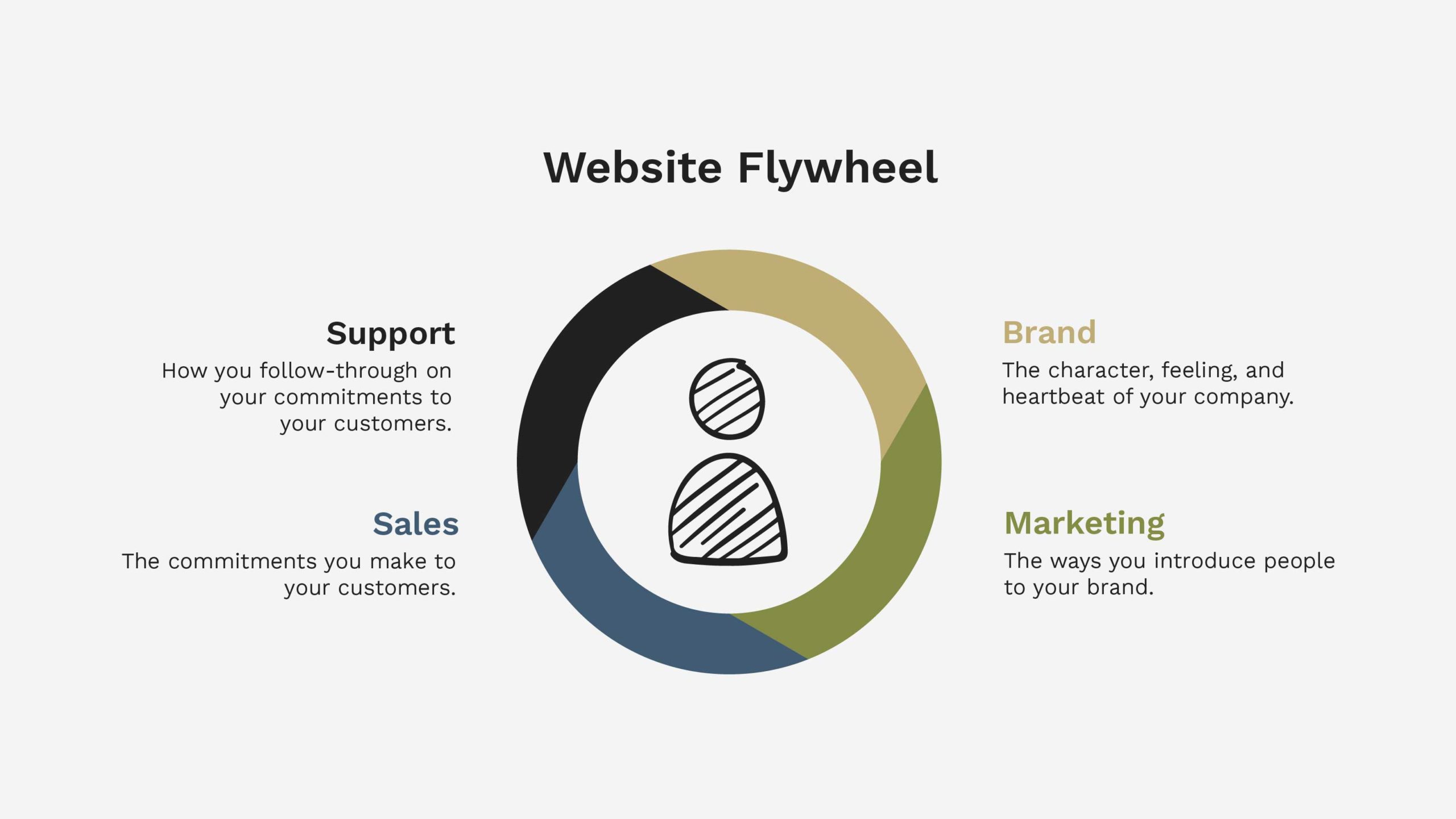
A flywheel is a mechanical device that conserves angular momentum to store rotational energy. That may sound not very easy, but it’s straightforward.
A flywheel is a circular device used on trains, tractors, trucks, and any large machine with a big job to increase horsepower and create explosive momentum.
Your website is like a flywheel. It’s intended to create momentum and be a force multiplier for your marketing and business efforts. And when it’s designed and built to accomplish that objective, more often than not, it succeeds!
The Glaring Problem with Website Builders, Templates, and Themes
Need help with a Squarespace or Wix website? We can’t help you (other than help you move your website away from them).
Those website builders (like Wix, Squarespace, Duda, GoDaddy, Weebly, etc.) don’t help you create a flywheel that multiplies force for your business.
Instead, they help you create a clusterfuck (pardon my French) of a website. It makes you want to throw your laptop out of your office window.
Those are not my words, by the way. They came from a recent client who desperately needed help migrating his website from Squarespace to WordPress because Squarespace drove him mad!
Website builders do this by requiring you to start the entire process by picking a template. Then, jumping right into the building without giving the nod to your goals or unique needs as a business. They skip the entire planning process, assuming you did or will never do it.
WordPress is used by 42.8% of the top 10 million websites
There are over 455 Million WordPress websites, accounting for more than 39% of all websites
62% of Inc. 5,000 websites run on WordPress
The New York Times, Forbes, eBay, The Walt Disney Company, and Best Buy are powered by WordPress
WordPress has been around since May 27, 2003
There are over 58,000 plugins (integrations) available for WordPress
WordPress is the web’s most widely used CMS (content management system)
We all know that facts tell and stories sell. So why does Structure use WordPress, and why do we recommend you use it for your project? Here are the reasons.
Why Structure Uses WordPress (and You Should Use Too)
1. WordPress is widely adopted
As you can see from the facts above, WordPress dominates the website market. This means somebody will always be available to help you with troubleshooting or customization needs.
I frequently mention this assurance to my clients. If an unfortunate event renders Structure unable to continue working with them, they would have no difficulty locating a developer replacement who could work on their WordPress websites.
For the record, Structure isn’t going anywhere. However, knowing you’re not choosing an obscure platform only specialists can use is peace of mind.
We recently migrated a client’s website from a platform called Higher Logic to WordPress. The client is so much happier after the transition. I share this story because Higher Logic is one of those obscure platforms. While some use it, it’s highly specialized and requires paying a high-rate developer to make almost any update.
2. It is easy-to-use
There’s a myth that WordPress offers a user-friendly interface that does not require coding knowledge or experience. It does provide a user-friendly interface. But we have to be realistic with setting expectations to ensure that we know not everyone understands it.
“WordPress does not require coding knowledge or experience” is also misleading. It may not require knowing a coding language like CSS or Javascript. But a basic understanding of HTML and development principles will take a long way.
If you do not have a basic understanding, you will struggle. That’s precisely why folks hire Structure to help. You value the system WordPress offers, but you don’t know how to manage the technical details of the platform yourself.
You can easily add pages and posts to your site, customize layouts, create menus and links, upload images and videos, and more. This still makes WordPress an excellent choice for small businesses and large teams.
WordPress has the potential to provide you with a simple-to-navigate backend CMS. Alas, that doesn’t always seem to be the case. I have conversations with numerous customers apprehensive about using WordPress due to their prior negative experiences while trying cumbersome interfaces.
WordPress Training & Support
Our website development packages at Structure include an optional 1-hour recorded training and support video call. In this call, we train you to use your website and navigate WordPress. Furthermore, we include two additional support hours within 30 days of launch. That way, you have no reservations about contacting us for questions, big or small.
Last but not least, our WordPress websites are designed especially for user convenience. Content can easily and quickly be edited or updated with little technical expertise. We accomplish this by using Custom Fields. You can edit copy or media in the back end without breaking your website on the front end.
3. It is excellent with SEO
WordPress’s most powerful benefit is its impact on your SEO (Search Engine Optimization). Some powerful plugins like YoastSEO for WordPress and LinkWhisper can significantly enhance how your website is tagged to rank for Google. It also makes it brain-dead simple to optimize your content for search.
It’s worth noting that SEO is not automatic, and WordPress doesn’t do all the work for you. However, the data structure allows you to input and optimize data without jerry-rigging anything.
In short, think of WordPress SEO like T-ball. The baseball is just sitting on the tee—you need to hit it. Same thing with SEO on WordPress. It tees you up, and you have a swing if you know how to hit a ball.
4. WordPress is owned
This might be one of the most significant selling points of WordPress. It’s what’s called an ‘open source’ platform. It is accessible worldwide, and you don’t have to pay for a license.
With a WordPress site, you own the code base and don’t have to pay a license fee to anyone to keep your website. You also can modify and change the code as needed.
That said, you still have to pay for infrastructure costs like domain and website hosting, which often come all-inclusive with other platforms like Squarespace, Shopify, and Wix.
5. WordPress is secure
Website security has always been a concern but is becoming increasingly so as time goes on. As the internet becomes more widely adopted, cybercriminals and hackers (that’s what they’re called!) are getting more innovative and savvier, while website managers are getting more relaxed and trusting.
If you’re worried about the safety and security of your website, you should be at ease because it’s a secure platform as long as you keep it up to date.
WordPress security vulnerabilities commonly come from outdated plugins and themes, weak passwords, and other preventable issues. So you’ll need to ensure your WordPress Core, Themes, and Plugins are current. We recommend doing this monthly at a minimum. If you’re particularly concerned, weekly updates are sufficient.
The benefit of hiring Structure for WordPress Website Management is ensuring your site is safe, secure, always running 24/7, and working as expected to grow your business.
WordPress is widely used for eCommerce, as well as blogs, news sites, membership sites, auction sites, and more. You can also choose from thousands of plugins and themes, so you’re never limited in design or functionality.
Integrations
As we mentioned in the facts above, there are over 58,000 plugins available. That means there are 58,000+ ways you can integrate your business systems—no matter what they may be—with your WordPress website.
A few popular plugin integrations we’ve configured are:
LearnDash
Salesforce
HubSpot
MailChimp
Intercom
Zapier
Convert Kit
Slack
Square
Authorize.net
Stripe
ShipStation
Airtable
WordPress is not limited by space or bandwidth. Your website can grow as large as needed without any performance issues. Particularly those that might occur if you used a platform like Squarespace or Wix.
Website Hosting
For example, website Hosting is highly flexible and scalable. You’re not trapped by the quality of hosting that Squarespace or Shopify has chosen.
If you’re a small business start, you can buy cheaper hosting. It will integrate with WordPress.
Or maybe you’re a growing business with tens or hundreds of thousands of monthly visitors. You can plug in a quality host like WP Engine (our recommendation), which will integrate well.
The scalable nature of WordPress makes it the ideal CMS for startups and growing businesses.
7. WordPress is stable
There’s a big problem with content management systems. Can you tie your business to something new if it won’t be around next year?
If you’re evaluating some of the website builders out there, you should. be concerned—mainly those created and managed in other countries.
However, WordPress has been around since May 27, 2003. It is so widely adopted you have the comfort of knowing that, in all likelihood, it’s not going anywhere.
The platform is continually updated and improved, keeping current with the ever-changing technology landscape. And because it’s open source, developers are constantly working on significant updates, new features, and security patches. This means your website will stay up-to-date and secure.
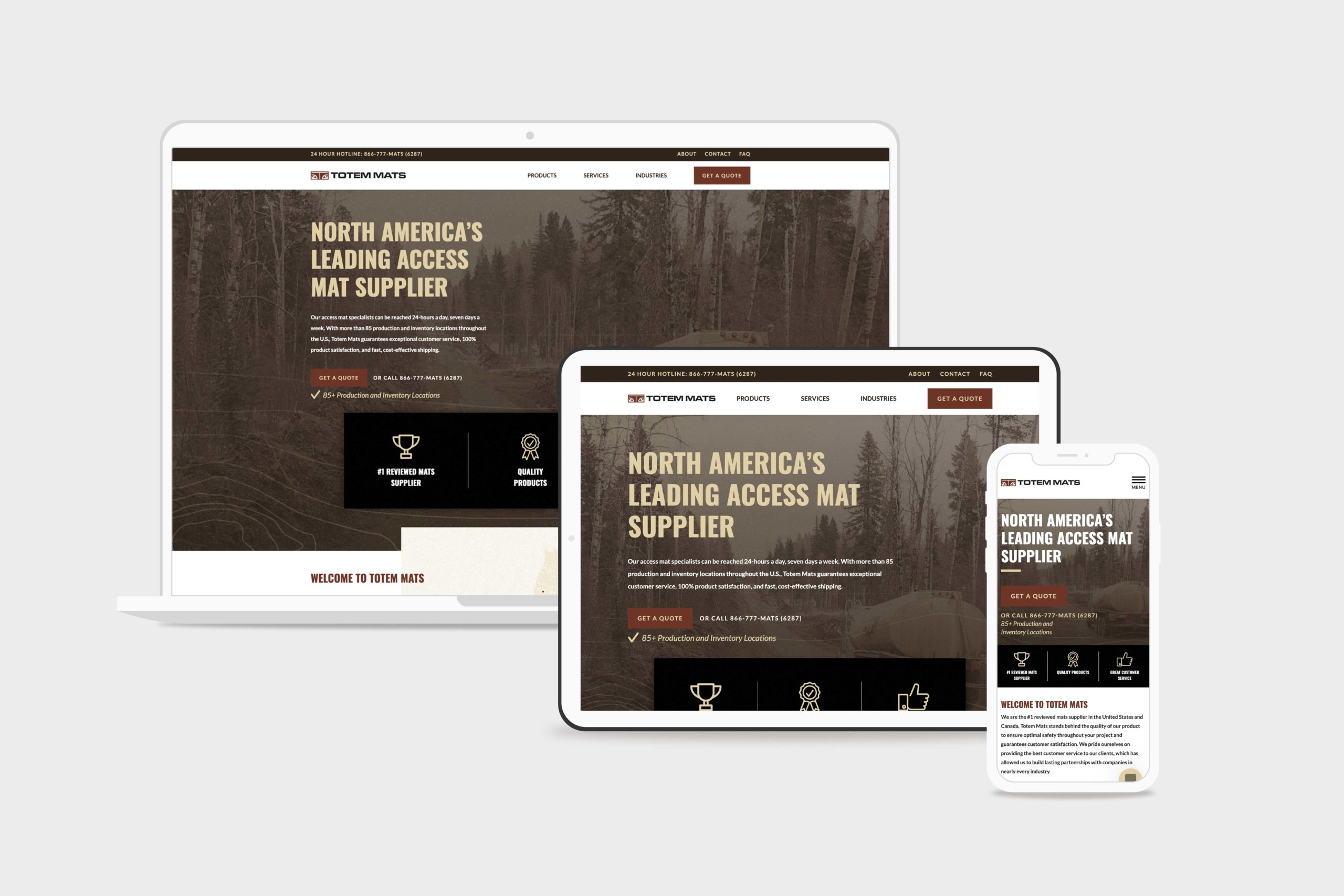
Totem Mats is a leading access mat supplier in the United States, with over 85 production and inventory locations throughout the U.S. They came to Structure because they felt like their website wasn’t competing in the marketplace. They wanted to create an excellent first impression and drive more leads and sales.
Challenge
When Totem Mats contacted Structure, their website was broken, outdated, and underperforming. They needed to be redesigned and rebuilt with a fresh look and additional features without losing traction in Organic search. Furthermore, they needed the leads they generated on the website to feed to Salesforce, their ERP/CRM.
Solution
Totem Mats got a facelift from the ground up. We enhanced their overall look and feel with a refined color palette and texture pack, culminating in an updated visual design. Our UX design team restructured the product pages to showcase their products better, and our development team ensured the site was built lean to perform well in low-data environments.
Results
The updated Totem Mats WordPress website launched without a hitch, including no noticeable traffic losses. SEO traffic increased by 69%. Lead generation efforts improved and the website automated many business processes that were previously manual, saving time and money. Lastly, the website looks strong and helped the Totem Mats team feel more confident.
Since the launch of the new website, we have successfully forged ahead with no discernable traffic losses whatsoever. Credit to Simon (Structure) and his meticulousness in executing this project so well. I have personally been involved directly or peripherally in many website redesign projects, and on many occasions, there is a significant drop in SEO traffic after a redesign. We got things right.
Kyle, totem mats SEO Advisor
Website Design & Development
There’s a rule in website design, and that is this: keep what works. In this project, our WordPress website design team aimed to keep what was working for Totem Mats while improving in the underperforming areas.
For Totem Mats, that was the first impression in their website hero, the navigation, the product pages, and the contact form.
Transforming the hero
There’s another rule in web design: if someone isn’t interested in the first five seconds after landing on your website, they will leave.
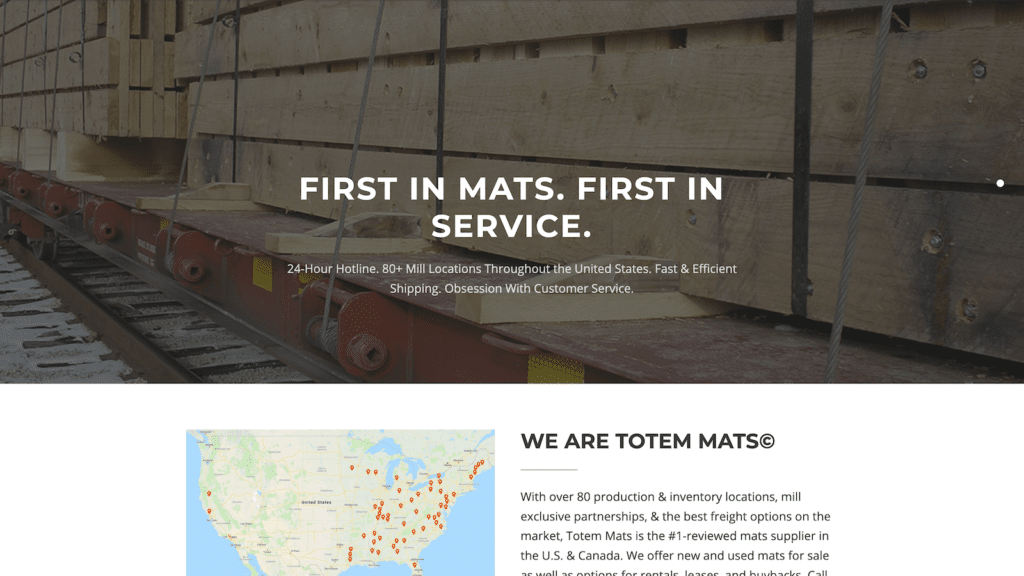
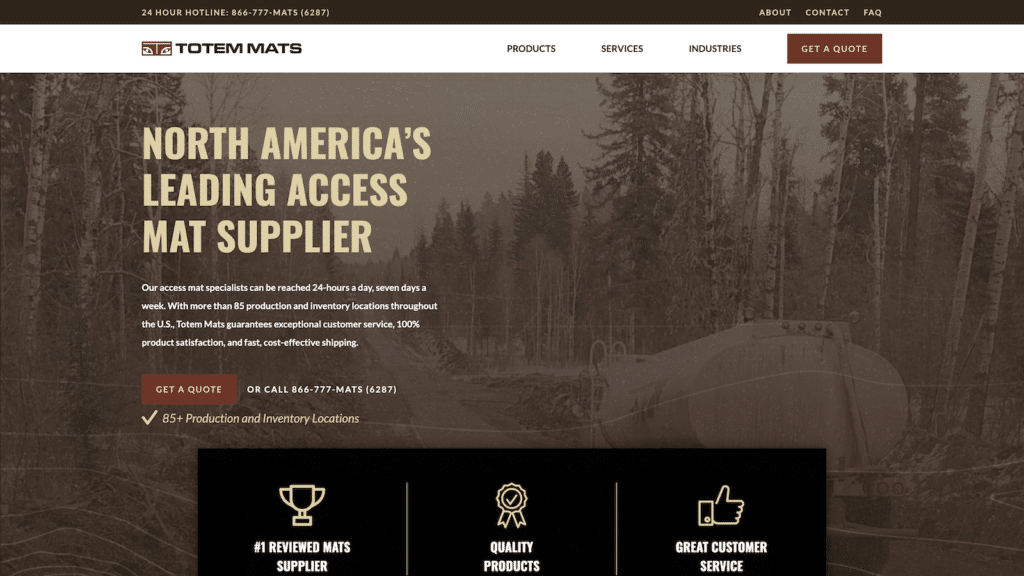
So we traded the old Totem Mats hero with something more interesting: a big, tall, and tan Oswald font over a highly designed background image of a tanker truck driving on their access mats.
There’s nothing like showing the product in action!
A home page hero should show the transformation or result that your product or service provides. For Totem Mats, that’s access to inaccessible areas.
totemmats.com before
totemmats.com after
Their continued efforts on everything we threw and their abilities to overcome challenging problems were incredible.
Trevor, ceo
Improving the website navigation
The old Totem Mats website had a navigation menu in the code. Because it was outdated, the menus had broken, leaving no way for customers to find product pages or contact the company. Yikes!
We prioritized the navigation with a contact menu at the very top, and a primary pages menu below it—including a Get a Quote call-to-action button.
The only caveat, however, is that many of Totem Mats’ customers would buy multiple products in the same order. Therefore, it was essential to making it easy to navigate between products to compare and contrast. And the Products tab in the navigation menu wasn’t cut it.
We devised a resource-style category navigation menu so customers could easily navigate through it.
Driving Leads with a Quote Request Form
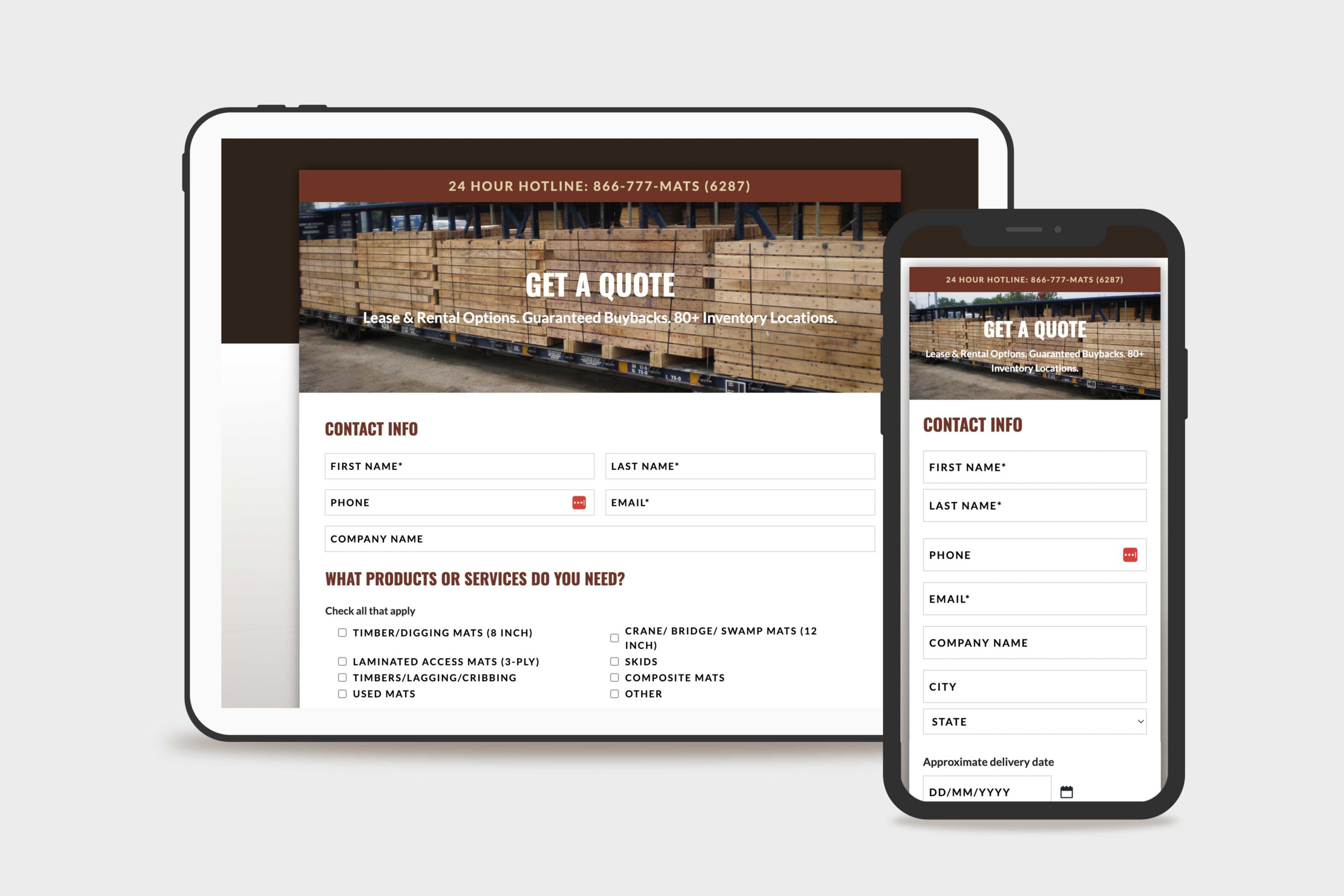
What was previously a simple, boring contact form became a lead generation machine after we added a Quote Request form.
Connecting Gravity Forms to Salesforce
We mapped specific form fields directly to the Totem Mats Salesforce account so team members could manage every request using the CRM Perks Gravity Forms Salesforce Plugin.
Getting contact data to map perfectly to Salesforce (or any CRM for that matter) can be a difficult task—as was the case with the Totem Mats quote request Salesforce integration. One challenging field was the Company Name field, as customers from the same company would spell or case the company name differently. The result was Salesforce developed multiple accounts for the same company. This was confusing to the sales team and needed to be remedied.
We implemented a custom Gravity Forms ZoomInfo integration to create predictions so that quote requesters could quickly add their company name consistently every time. The experience is much like Google autocomplete predictions. The data from the form field is cross-checked with ZoomInfo’s database and sent directly to Salesforce.
Gravity Forms Split Testing
The Totem Mats Request a Quote form is lengthy. While it provides an abundance of information for their sales team, they feared it would detract from the number of leads who would fill out the form.
We answered that question by running an A/B testing campaign using a Gravity Wiz split testing snippet to determine which fields were vital. In this test, we showed three quote form variants to users at an equal ratio and determined which version was filled out the most.
WordPress Website Management
Managing a custom WordPress website can be complex, especially when you’re running paid advertising campaigns, relying on it to generate qualified leads, and want to put the best foot forward in the market like Totem Mats.
The most valuable aspect of our Essential WordPress Website Management package to Totem Mats was the ability to have a dedicated Account Manager they could message directly about marketing or website questions—and get a thoughtful, detailed response within 24 hours most of the time.
In addition, they appreciate having a well-oiled website machine that’s up-to-date, secure, and working for them without having to think much about it regularly.
LearnDash is a powerful learning management system (LMS) that integrates directly with WordPress, making creating (and selling) online courses easy. It is the most trusted WordPress LMS because of its robust features, reliable support, and industry expertise.
What Is WordPress LearnDash LMS?
With LearnDash, you can easily create and manage online courses to deliver engaging learning experiences to students. You can customize course materials, track progress and even add quizzes and surveys for assessment.
Who is LearnDash for?
It’s an ideal solution for businesses looking to create interactive, structured learning experiences for their employees or customers.
From major universities to Fortune 500 companies and best-selling authors, LearnDash is the WordPress LMS chosen for its user interface, extensive support system, advanced capabilities, and simple course creation process. It’s no wonder that so many people trust this platform!
What are the features and benefits of LearnDash LMS?
LearnDash also includes various features and options that make it easier to manage your courses. You can use the drag-and-drop editor to create an engaging curriculum quickly, or the advanced learner management system lets you easily assign users to specific course materials. Plus, there are tools for managing learner groups and tracking learner progress.
With LearnDash, you can create engaging, practical online courses quickly. It’s the ideal solution for businesses looking to deliver quality learning experiences to their employees or customers. So what are you waiting for? Get started with LearnDash today and start creating interactive, structured learning experiences!
Multi-tier courses
Add custom colors & logos
Drip-feed content
Advanced quizzing
Lesson timers
Course prerequisites
Learner Focus Mode
Forums
Course points
Certificates & badges
E-commerce support (one-time purchases, subscriptions, bundles, and more)
Learner profiles
Automatic notifications
Group management
Detailed reporting
Assignments
Expire access
Use any WordPress theme
Which apps and systems does LearnDash integrate with?
If you need more functionality for your online courses, you’ll do well with LearnDash. Integrate with the most popular apps for running your business, like Slack, Zoom, and Google Calendar, and many more.
PayPal
Stripe
WooCommerce
2checkout
bbPress
BuddyPress
MailChimp
SamCart
BadgeOS
Slack
ActiveMember360
GamiPress
ConvertKit
EasyDigitalDownloads
EventEspresso
Memberium
PaidMembershipsPro
Restrict Content Pro
Zapier
Gravity Forms
The Events Calendar
What does LearnDash cost?
There are two options to purchase and use LearnDash.
WordPress Plugin
A premium WordPress plugin you can install on your website. The purchase of a license grants you access to product updates, new features, and support for an entire year. The world is your oyster!
1 Site
$199/year
10 Sites
$399/year
Unlimited
$799/year
learndash WordPress plugin pricing
LearnDash Cloud
The ready-to-go or done-for-you option, complete with templates and customization tools to, let you build courses that match your brand. Domain and hosting are included, similar to an all-inclusive LMS like Thinkific or Kajabi.
Monthly
$29/month
Anually
$299/year
learndash cloud pricing
Can I try LearnDash before paying?
Yes! They offer a 15-day money-back guarantee and have a world-class community to help you get your course online.
At Structure, we’ve used the commonly known LMS like Teachable, Thinkific, Kajabi, and others! However, we prefer LearnDash because it integrates directly with WordPress, WooCommerce, and many other plugins, integrations, and business systems.
Our clients don’t have to log in to multiple platforms to manage their online courses—everything is under one roof.
Talk about a massive cost-saver in both time and money. Everything costs less when it’s under the same roof.
Learn more about how Structure helped The Expositors Academy design and build their online course using WordPress and LearnDash.
OnePassion Ministries, founded by Dr. Steven J. Lawson, came to Structure looking for a professional website to market, sell, and manage their new online course: The Expositors Academy. We came in on the ground floor to define the website strategy, provide a custom design that fits their goals, and develop an e-commerce and learning management system to create a seamless experience for their students.
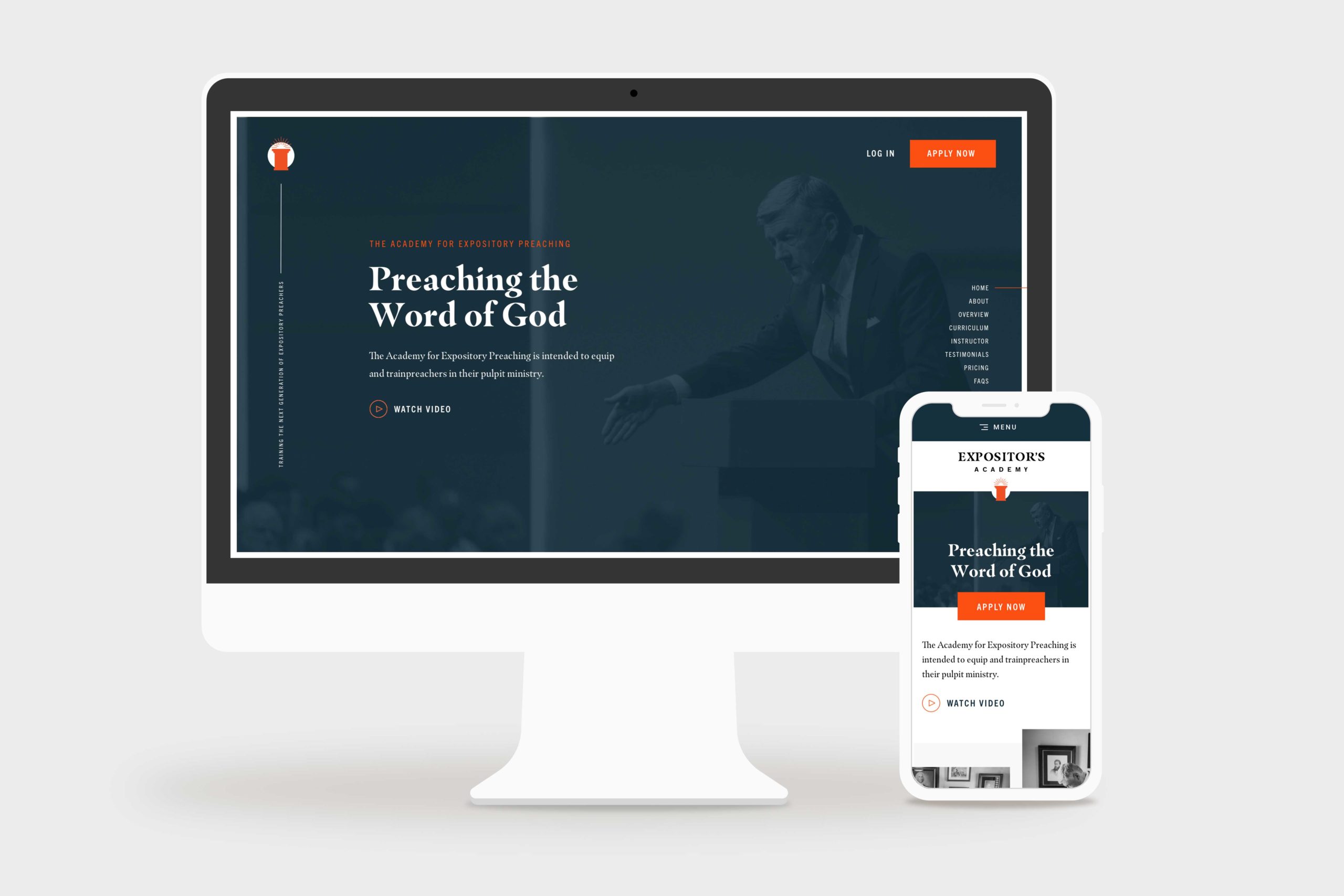
the expositors academy home page hero, desktop and mobile
Challenge
One Passion Ministries had never launched a digital product like The Expositors Academy, so they were looking to us for ideas and action. Particularly in coordinating marketing, e-commerce, learning management, and business systems to launch their new course successfully.
Solution
Starting with strategy, we took The Expositors Academy through an end-to-end website design and development process. We used a thoughtful platform combination of WordPress, WooCommerce, and LearnDash, to create a first-rate online course experience.
Results
Within six months after launch, The Expositors Academy had 125+ students interacting with their platform. Better yet, The Expositors Academy manages the website and the product with little effort—and without constant bugs, issues, and maintenance headaches.
I have had the opportunity to work closely with Simon and the Structure Team, and I couldn’t recommend them higher. They truly care about the service they provide and ensure that any project they are a part of is delivered with excellence. From creative ideas to execution, they are a professional team that will serve your business well.
Jackson, Marketing Director
Website Strategy
When The Expositors Academy came to us, they were unsure which platforms, systems, or processes they needed to create an online course.
As is usually the case, while a website may look simple on the surface, a lot is happening in the background. That’s why we started with a website strategy package to help them plan and define precisely what they needed the website to accomplish.
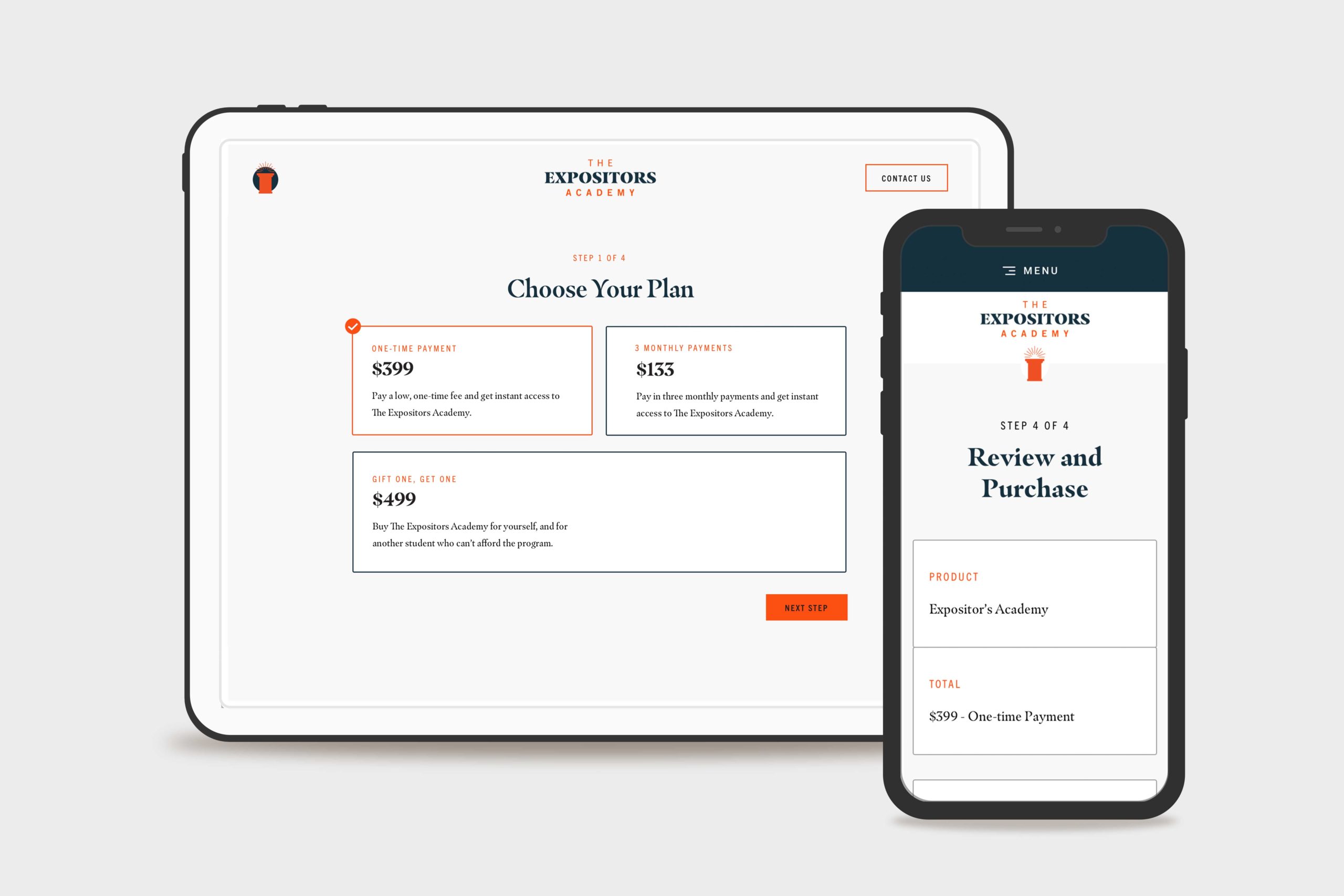
They wanted three different payment options, including a subscription option and an option to purchase a course license for another student who couldn’t afford it.
They also had a remote team of assignment graders who needed to keep track of submitted assignments, provide document markup, and communicate feedback directly to the student.
Last but not least, they needed to automate email communication to students that weren’t keeping up with the schedule, missing assignment deadlines, or hadn’t logged on for a while.
That’s when we landed on LearnDash because it fit their requirements and perfectly supported their sitemap and customer journey.
The Expositors Academy Website Custom WooCommerce Checkout
Website Design
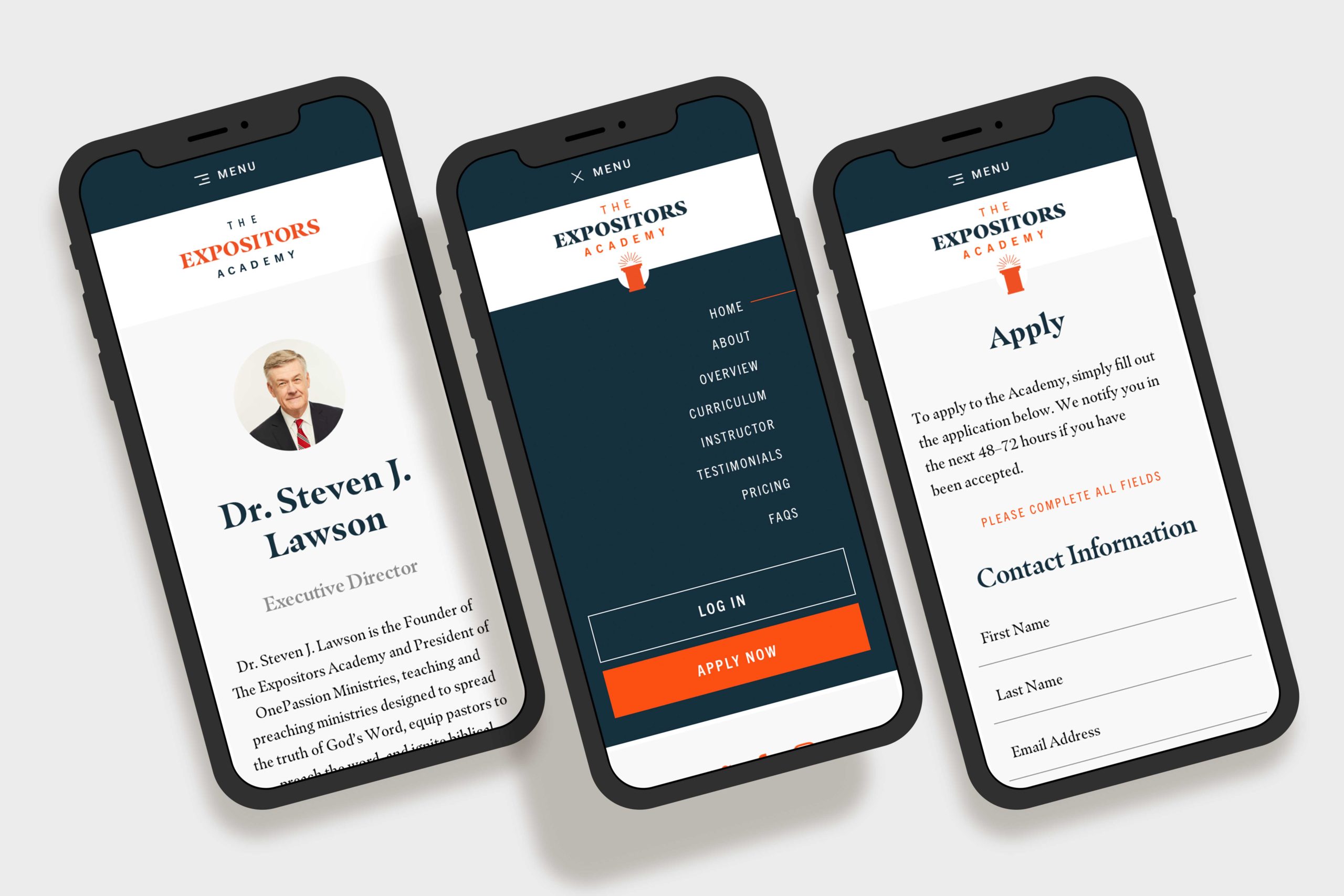
Next, we began website design. The website design process resulted in 15 screens of ready-to-build, fully-responsive marketing, ecommerce, and online course designs.
Prospective students could learn about the course and curriculum on the home page.
They could apply for the program on the application page and ensure they were the right fit.
On the contact page, users could ask questions or inquire about details they needed clarification on.
E-commerce Design
Furthermore, we designed a custom e-commerce experience that seamlessly guided students through Payment Options, Checkout, and Account Creation for the course. When they finished the checkout process, they were logged into the course and ready to start.
Learning Management System Design
Lastly, we customized the LearnDash course dashboard by combining The Expositors Academy brand styles with the default layouts provided by the plugin (including a few interface improvements, of course!).
The Expositors Academy Mobile Mockups
Website Development
The Expositors Academy was already familiar with WordPress CMS since we used it to build OnePassion.org, one of the other websites.
Front-end Website Development
We developed a custom theme for The Expositors Academy built according to the design spec. We included custom Javascript animations from the Animate On Scroll Library to enhance user experience.
Additionally, the website design called for a few other features like a nested accordion to house the curriculum information, an on-page navigation to help the user navigate the landing page sections, and a dynamic testimonial carousel.
Using Genesis Custom Blocks with embedded Custom Fields, we set up the backend so they could edit the website content independently without breaking any formatting.
Then, we integrated WooCommerce with WordPress and LearnDash, which made product creation, payment processing, order tracking, and more a breeze. Not to mention keeping the entire customer journey under one roof, from awareness to advocacy.
QA, Training, and Support
After populating the content we’d written and doing a thorough quality assurance process, we trained The Expositors Academy on a recorded video call. They walked away from the call with a thorough understanding of how the site worked and a recording and documentation for future reference.
Final Thoughts
The Expositors Academy online course WordPress website design and website development project is one we’re proud to share. It took months of united planning and preparation, with an incredible result.
Ultimately, the website platform we built allowed the OnePassion Ministries team to enter the market in a new way and further their vision of training new expositors—and helping them reform the church.
For additional reading, we designed and developed the nonprofit website for OnePassion Ministries at OnePassion.org .